enable assignment of "Download plot as a png" value to variable
Chưa có ai nhận issue này.
- Ngôn ngữ chính
- Python
- Star
- 18.8k
- Fork
- 2.8k
- Merge trung bình
- 16 giờ 26 phút
- Pull request đã merge (30 ngày)
- 21
Mô tả
Bug (or Feature Request?):
I want to get the annotated image after I used drawrect. The only possible way, for now, is using the Download plot as a png button, save it on pc, read it. Is there a straightforward way to do that?
I mark it as a bug (or maybe it's the intended behavior by the developer) because fig.to_image(format="png", engine="kaleido") return the original image, not the annotated one.
Note: I'm using a jupyter notebook
import plotly.graph_objects as go
fig = go.Figure(data=go.Bar(y=[2, 3, 1]))
config = dict({
    'modeBarButtonsToAdd':[
        'drawrect',
        'eraseshape',
    ],
    'modeBarButtonsToRemove':[
        'toggleSpikelines','hoverCompareCartesian'
    ]
})
fig.show(config=config)

do some annotations...
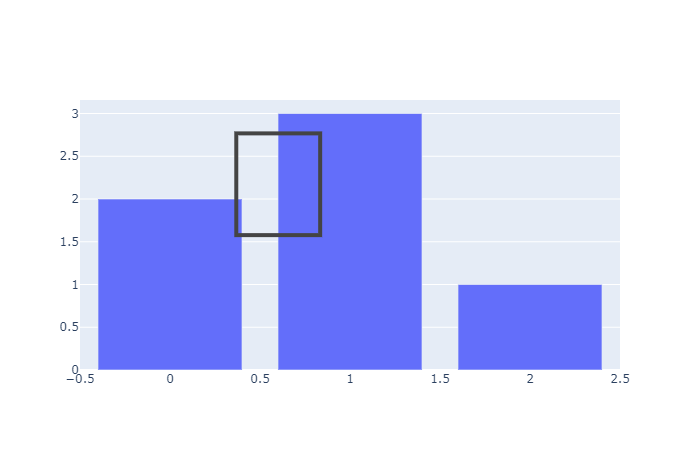
then run:
import numpy as np
import cv2
import matplotlib.pyplot as plt
annotate_image = fig.to_image(format="png", engine="kaleido")
nparr = np.frombuffer(annotate_image, np.uint8)
img_numpy = cv2.imdecode(nparr, cv2.IMREAD_COLOR)
plt.imshow(img_numpy[...,::-1])

The plt.imshow(img_numpy[...,::-1]) will show the original image, not the annotated image. How to use fig.to_image(format="png", engine="kaleido") to include the annotation of drawrect? Or any workaourd?
Hướng dẫn đóng góp
Bắt đầu từ đâu
- Đọc hết issue, rồi đọc hướng dẫn đóng góp của dự án.
- Bình luận trên issue rằng bạn sẽ nhận — tránh hai người làm cùng một việc.
- Fork repository và làm thay đổi trên một nhánh.
- Mở pull request có tham chiếu số hiệu của issue.
Hướng nghiên cứu
Bắt đầu với entry point fig.show(config=config) và interaction drawrect, sau đó so sánh với fig.to_image(format="png", engine="kaleido"). Xác định xem trạng thái đã chú thích có thể được truyền qua đường dẫn export hiện có hay không; được xem là hoàn thành khi image được gán tạo ra có chứa hình chữ nhật đã vẽ. Issue không nêu tên file repository hoặc test nào.
Do mô hình lập chỉ mục viết ra từ nội dung của issue.
Đánh giá
- Công nghệ
- jupyter-notebook, python
- Lĩnh vực
- data-visualization
- Loại issue
- Tính năng
- Độ khó
- 4/5
- Thời gian dự kiến
- 3-5 ngày
- Mức độ hoạt động
- Đình trệ
- Độ rõ ràng
- Khá rõ ràng
- Mức phù hợp với người mới
- 35/100