enable assignment of "Download plot as a png" value to variable
Nadie ha tomado este issue todavía.
- Lenguaje dominante
- Python
- Estrellas
- 18.8k
- Forks
- 2.8k
- Merge medio
- 16 h 26 min
- PR fusionados (30 d)
- 21
Descripción
Bug (or Feature Request?):
I want to get the annotated image after I used drawrect. The only possible way, for now, is using the Download plot as a png button, save it on pc, read it. Is there a straightforward way to do that?
I mark it as a bug (or maybe it's the intended behavior by the developer) because fig.to_image(format="png", engine="kaleido") return the original image, not the annotated one.
Note: I'm using a jupyter notebook
import plotly.graph_objects as go
fig = go.Figure(data=go.Bar(y=[2, 3, 1]))
config = dict({
    'modeBarButtonsToAdd':[
        'drawrect',
        'eraseshape',
    ],
    'modeBarButtonsToRemove':[
        'toggleSpikelines','hoverCompareCartesian'
    ]
})
fig.show(config=config)

do some annotations...
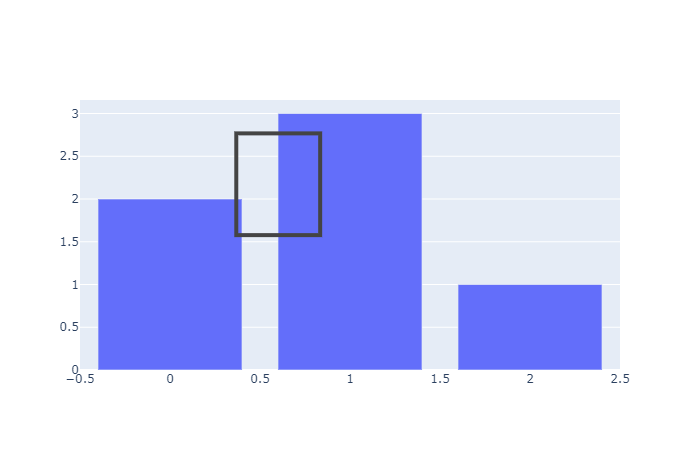
then run:
import numpy as np
import cv2
import matplotlib.pyplot as plt
annotate_image = fig.to_image(format="png", engine="kaleido")
nparr = np.frombuffer(annotate_image, np.uint8)
img_numpy = cv2.imdecode(nparr, cv2.IMREAD_COLOR)
plt.imshow(img_numpy[...,::-1])

The plt.imshow(img_numpy[...,::-1]) will show the original image, not the annotated image. How to use fig.to_image(format="png", engine="kaleido") to include the annotation of drawrect? Or any workaourd?
Guía de contribución
Primeros pasos
- Lee el issue completo y luego la guía de contribución del proyecto.
- Comenta en el issue que vas a ocuparte — evita que dos personas hagan lo mismo.
- Haz un fork del repositorio y trabaja en una rama.
- Abre un pull request que haga referencia al número del issue.
Línea de trabajo
Comienza con el punto de entrada fig.show(config=config) y la interacción drawrect, y compáralos después con fig.to_image(format="png", engine="kaleido"). Determina si el estado anotado puede pasar por la ruta de exportación existente; se considera terminado cuando la imagen asignada resultante incluye el rectángulo dibujado. En el issue no se mencionan archivos del repositorio ni pruebas.
Escrito por el modelo de indexación a partir del texto del issue.
Evaluación
- Stack tecnológico
- jupyter-notebook, python
- Área
- data-visualization
- Tipo de issue
- Nueva funcionalidad
- Dificultad
- 4/5
- Tiempo estimado
- 3-5 días
- Estado de actividad
- Estancado
- Claridad
- Bastante claro
- Aptitud para principiantes
- 35/100