enable assignment of "Download plot as a png" value to variable
Personne n'a encore pris cette issue.
- Langage dominant
- Python
- Étoiles
- 18.8k
- Forks
- 2.8k
- Merge moyen
- 16 h 26 min
- PR mergées (30 j)
- 21
Description
Bug (or Feature Request?):
I want to get the annotated image after I used drawrect. The only possible way, for now, is using the Download plot as a png button, save it on pc, read it. Is there a straightforward way to do that?
I mark it as a bug (or maybe it's the intended behavior by the developer) because fig.to_image(format="png", engine="kaleido") return the original image, not the annotated one.
Note: I'm using a jupyter notebook
import plotly.graph_objects as go
fig = go.Figure(data=go.Bar(y=[2, 3, 1]))
config = dict({
    'modeBarButtonsToAdd':[
        'drawrect',
        'eraseshape',
    ],
    'modeBarButtonsToRemove':[
        'toggleSpikelines','hoverCompareCartesian'
    ]
})
fig.show(config=config)

do some annotations...
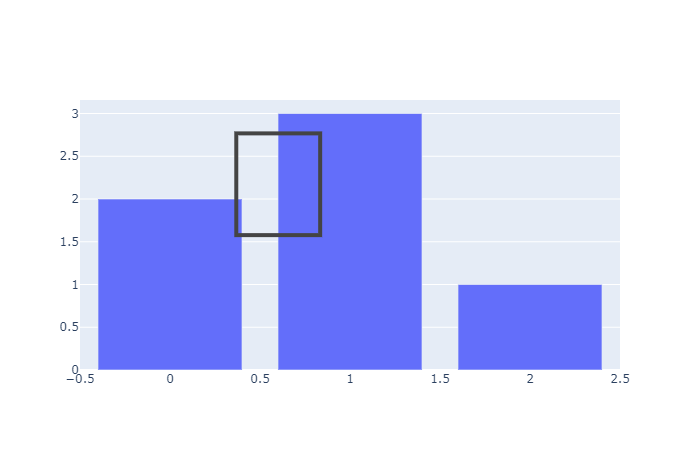
then run:
import numpy as np
import cv2
import matplotlib.pyplot as plt
annotate_image = fig.to_image(format="png", engine="kaleido")
nparr = np.frombuffer(annotate_image, np.uint8)
img_numpy = cv2.imdecode(nparr, cv2.IMREAD_COLOR)
plt.imshow(img_numpy[...,::-1])

The plt.imshow(img_numpy[...,::-1]) will show the original image, not the annotated image. How to use fig.to_image(format="png", engine="kaleido") to include the annotation of drawrect? Or any workaourd?
Guide de contribution
Ouvrir le guide de contribution
Par où commencer
- Lisez l'issue en entier, puis le guide de contribution du projet.
- Signalez en commentaire que vous la prenez — cela évite que deux personnes fassent le même travail.
- Forkez le dépôt et travaillez sur une branche.
- Ouvrez une pull request qui référence le numéro de l'issue.
Piste de recherche
Commencez par le point d’entrée fig.show(config=config) et l’interaction drawrect, puis comparez-les avec fig.to_image(format="png", engine="kaleido"). Déterminez si l’état annoté peut être transmis via le chemin d’exportation existant ; le travail est considéré comme terminé lorsque l’image assignée résultante inclut le rectangle dessiné. Aucun fichier du dépôt ni test n’est mentionné dans l’issue.
Rédigé par le modèle d'indexation à partir du texte de l'issue.
Évaluation
- Stack technique
- jupyter-notebook, python
- Domaine
- data-visualization
- Type d'issue
- Fonctionnalité
- Difficulté
- 4/5
- Temps estimé
- 3-5 jours
- Activité
- À l'abandon
- Clarté
- Plutôt claire
- Accessibilité débutants
- 35/100