enable assignment of "Download plot as a png" value to variable
Nessuno ha ancora preso questa issue.
- Lingua principale
- Python
- Stelle
- 18.8k
- Fork
- 2.8k
- Merge medio
- 16h 26m
- PR unite (30g)
- 21
Descrizione
Bug (or Feature Request?):
I want to get the annotated image after I used drawrect. The only possible way, for now, is using the Download plot as a png button, save it on pc, read it. Is there a straightforward way to do that?
I mark it as a bug (or maybe it's the intended behavior by the developer) because fig.to_image(format="png", engine="kaleido") return the original image, not the annotated one.
Note: I'm using a jupyter notebook
import plotly.graph_objects as go
fig = go.Figure(data=go.Bar(y=[2, 3, 1]))
config = dict({
    'modeBarButtonsToAdd':[
        'drawrect',
        'eraseshape',
    ],
    'modeBarButtonsToRemove':[
        'toggleSpikelines','hoverCompareCartesian'
    ]
})
fig.show(config=config)

do some annotations...
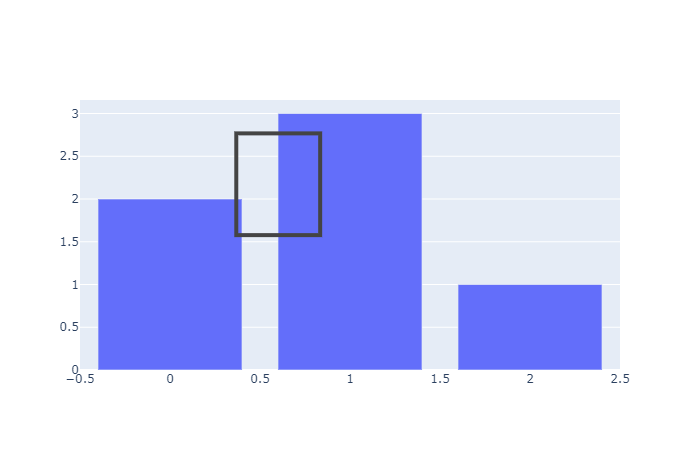
then run:
import numpy as np
import cv2
import matplotlib.pyplot as plt
annotate_image = fig.to_image(format="png", engine="kaleido")
nparr = np.frombuffer(annotate_image, np.uint8)
img_numpy = cv2.imdecode(nparr, cv2.IMREAD_COLOR)
plt.imshow(img_numpy[...,::-1])

The plt.imshow(img_numpy[...,::-1]) will show the original image, not the annotated image. How to use fig.to_image(format="png", engine="kaleido") to include the annotation of drawrect? Or any workaourd?
Guida per i contributori
Apri la guida per i contributori
Come iniziare
- Leggi tutta la issue e poi la guida ai contributi del progetto.
- Commenta sulla issue per dire che te ne occupi tu — evita che due persone facciano lo stesso lavoro.
- Fai un fork del repository e lavora su un branch.
- Apri una pull request che faccia riferimento al numero della issue.
Direzione di ricerca
Inizia dal punto di ingresso fig.show(config=config) e dall’interazione drawrect, quindi confrontali con fig.to_image(format="png", engine="kaleido"). Determina se lo stato annotato può essere trasmesso attraverso il percorso di esportazione esistente; il lavoro è considerato completato quando l’immagine assegnata risultante include il rettangolo disegnato. Nell’issue non sono indicati file del repository o test.
Scritto dal modello di indicizzazione a partire dal testo della issue.
Valutazione
- Stack tecnologico
- jupyter-notebook, python
- Ambito
- data-visualization
- Tipo di issue
- Funzionalità
- Difficoltà
- 4/5
- Tempo stimato
- 3-5 giorni
- Stato di attività
- Ferma
- Chiarezza
- Abbastanza chiara
- Idoneità per principianti
- 35/100