enable assignment of "Download plot as a png" value to variable
まだ誰も着手していません。
- 主要言語
- Python
- スター
- 18.8k
- フォーク
- 2.8k
- 平均マージ
- 16時間 26分
- マージ済み PR(30日)
- 21
説明
Bug (or Feature Request?):
I want to get the annotated image after I used drawrect. The only possible way, for now, is using the Download plot as a png button, save it on pc, read it. Is there a straightforward way to do that?
I mark it as a bug (or maybe it's the intended behavior by the developer) because fig.to_image(format="png", engine="kaleido") return the original image, not the annotated one.
Note: I'm using a jupyter notebook
import plotly.graph_objects as go
fig = go.Figure(data=go.Bar(y=[2, 3, 1]))
config = dict({
    'modeBarButtonsToAdd':[
        'drawrect',
        'eraseshape',
    ],
    'modeBarButtonsToRemove':[
        'toggleSpikelines','hoverCompareCartesian'
    ]
})
fig.show(config=config)

do some annotations...
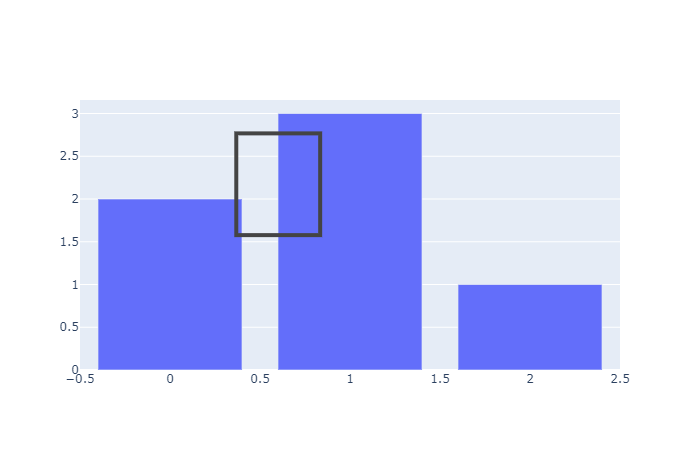
then run:
import numpy as np
import cv2
import matplotlib.pyplot as plt
annotate_image = fig.to_image(format="png", engine="kaleido")
nparr = np.frombuffer(annotate_image, np.uint8)
img_numpy = cv2.imdecode(nparr, cv2.IMREAD_COLOR)
plt.imshow(img_numpy[...,::-1])

The plt.imshow(img_numpy[...,::-1]) will show the original image, not the annotated image. How to use fig.to_image(format="png", engine="kaleido") to include the annotation of drawrect? Or any workaourd?
コントリビューションガイド
はじめの一歩
- issue を最後まで読み、次にプロジェクトのコントリビューションガイドを読みます。
- 着手することを issue にコメントします — 二人が同じ作業をするのを防げます。
- リポジトリをフォークし、ブランチを切って変更します。
- issue 番号を参照したプルリクエストを送ります。
調査の方向性
エントリーポイント fig.show(config=config) と drawrect インタラクションから始め、その後 fig.to_image(format="png", engine="kaleido") と比較します。注釈付きの状態を既存のエクスポートパス経由で渡せるかどうかを確認します。描画した長方形が結果として割り当てられた画像に含まれていれば完了です。Issue ではリポジトリのファイルやテストは指定されていません。
索引モデルが issue の本文から書いたものです。
評価
- 技術スタック
- jupyter-notebook, python
- 領域
- data-visualization
- issue の種類
- 機能追加
- 難易度
- 4/5
- 見積もり時間
- 3〜5日
- 活発さ
- 停滞
- 明瞭さ
- おおむね明確
- 初心者へのやさしさ
- 35/100