Events such as on_click in charts/figures with multiple traces only receive point ids for one trace
Chưa có ai nhận issue này.
- Ngôn ngữ chính
- Python
- Star
- 18.8k
- Fork
- 2.8k
- Merge trung bình
- 16 giờ 26 phút
- Pull request đã merge (30 ngày)
- 21
Mô tả
For figures that have multiple traces it is not possible to get the id of the clicked trace points for all traces, only one. This is a problem when trying to display details for clicked points of multiple traces.
The example below shows how to reproduce the behaviour with plotly 4.9.0 in a Jupyter notebook. When clicking on the green points, the text below the chart shows the id of the clicked point but when clicking on one of the purple points, the id is empty.
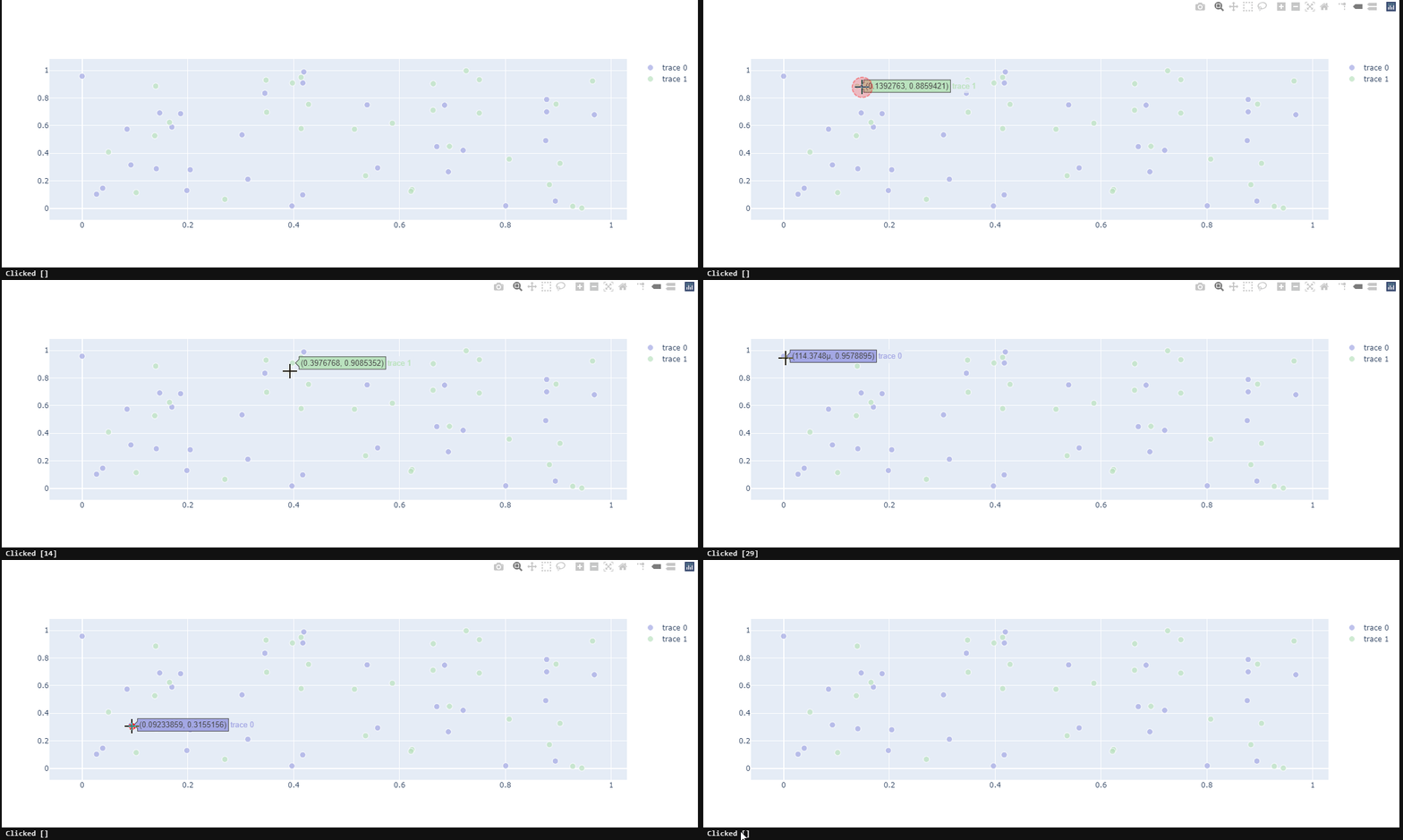
Could you kindly take a look?
import plotly.graph_objects as go
from ipywidgets import Output, VBox

import numpy as np
np.random.seed(1)
out = Output()

# create our callback function
@out.capture(clear_output=True)
def update_point(trace, points, selector):
    print(f'Clicked {points.point_inds}')

def create_scatter(colour):
    scatter = go.Scatter(x=np.random.rand(30), y=np.random.rand(30), mode='markers')
    colors =  [colour] * 30
    scatter.marker.color = colors
    scatter.marker.size = [10] * 30
    return scatter

scatter1 = create_scatter(colour='#a3a7e4')
scatter2 = create_scatter(colour='#bae2be')
fig = go.FigureWidget([scatter1, scatter2])
fig.data[0].on_click(update_point)
fig.data[1].on_click(update_point)
fig.layout.hovermode = 'closest'

VBox([fig, out])
Hướng dẫn đóng góp
Bắt đầu từ đâu
- Đọc hết issue, rồi đọc hướng dẫn đóng góp của dự án.
- Bình luận trên issue rằng bạn sẽ nhận — tránh hai người làm cùng một việc.
- Fork repository và làm thay đổi trên một nhánh.
- Mở pull request có tham chiếu số hiệu của issue.
Hướng nghiên cứu
Tái hiện vấn đề trong Jupyter notebook được cung cấp bằng cách sử dụng FigureWidget, hai trace Scatter và các callback on_click riêng biệt. Bắt đầu từ đường dẫn callback của trace trong FigureWidget và kiểm tra cách points.point_inds được điền cho từng trace. Hoàn thành khi việc nhấp vào các điểm trong một trong hai trace báo cáo ID của điểm được nhấp thay vì một giá trị rỗng.
Do mô hình lập chỉ mục viết ra từ nội dung của issue.
Đánh giá
- Công nghệ
- jupyter-notebook, python
- Lĩnh vực
- data-visualization
- Loại issue
- Lỗi
- Độ khó
- 4/5
- Thời gian dự kiến
- 3-5 ngày
- Mức độ hoạt động
- Đình trệ
- Độ rõ ràng
- Khá rõ ràng
- Mức phù hợp với người mới
- 35/100