feat(DataTable): Dynamic Recalculation of Sticky Header Column Position on Resize
- Ngôn ngữ chính
- TypeScript
- Star
- 25k
- Fork
- 6.8k
- Merge trung bình
- 1 ngày 8 giờ
- Pull request đã merge (30 ngày)
- 91
Mô tả
#### Feature Description
If the columns of a table that uses sticky headers fit within the container, then the sticky header scrolling is not applied, as it should be.
If the containing element is smaller than the data table, the sticky columns are rendered correctly.
However if we start with a container that fits the data table, and then resize the browser such that the containing container is now smaller, the sticky columns don't rerender properly. Scrolling is there, but usually when there's more than one column, it will be rendered too far to the right, and when the other columns are scrolled they will "Bleed" through the area where the sticky header column has left space.
I'm attaching a screenshot of this.
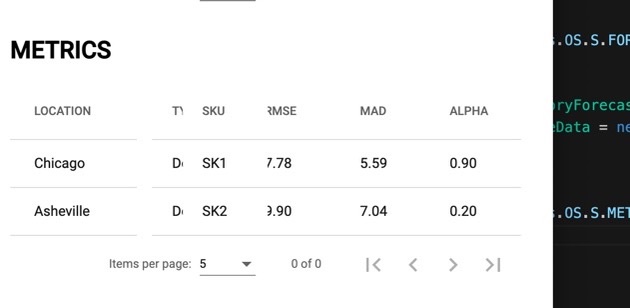
Notice that the "Type" column, which is scrolled behind SKU bleeds through where the table is "Missing" because the SKU column is rendered too far to the right.
#### Use Case
Correct rendering of the Sticky Columns when the table is resized.
Hướng dẫn đóng góp
Hướng nghiên cứu
Tái hiện vấn đề với một Angular DataTable sử dụng sticky headers, trước tiên thay đổi kích thước trình duyệt từ một container vừa với bảng sang một container không vừa với bảng. Hoàn tất khi các sticky columns được định vị lại chính xác sau khi thay đổi kích thước, không có khoảng trống hoặc các cột khác lọt vào khu vực dành riêng cho chúng.
Do mô hình lập chỉ mục viết ra từ nội dung của issue.
Đánh giá
- Công nghệ
- angular, typescript
- Lĩnh vực
- frontend
- Loại issue
- Tính năng
- Độ khó
- 4/5
- Thời gian dự kiến
- 3-5 ngày
- Mức độ hoạt động
- Đình trệ
- Độ rõ ràng
- Cần làm rõ
- Mức phù hợp với người mới
- 35/100