feat(DataTable): Dynamic Recalculation of Sticky Header Column Position on Resize
- Langage dominant
- TypeScript
- Étoiles
- 25k
- Forks
- 6.8k
- Merge moyen
- 1 j 8 h
- PR mergées (30 j)
- 91
Description
#### Feature Description
If the columns of a table that uses sticky headers fit within the container, then the sticky header scrolling is not applied, as it should be.
If the containing element is smaller than the data table, the sticky columns are rendered correctly.
However if we start with a container that fits the data table, and then resize the browser such that the containing container is now smaller, the sticky columns don't rerender properly. Scrolling is there, but usually when there's more than one column, it will be rendered too far to the right, and when the other columns are scrolled they will "Bleed" through the area where the sticky header column has left space.
I'm attaching a screenshot of this.
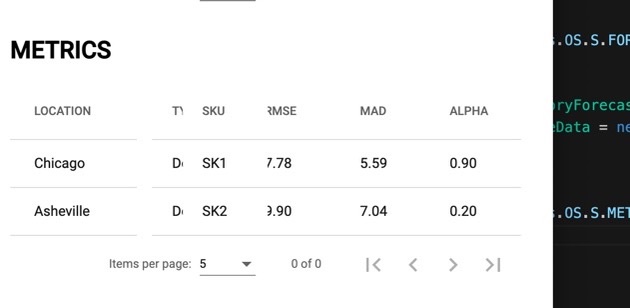
Notice that the "Type" column, which is scrolled behind SKU bleeds through where the table is "Missing" because the SKU column is rendered too far to the right.
#### Use Case
Correct rendering of the Sticky Columns when the table is resized.
Guide de contribution
Ouvrir le guide de contribution
Piste de recherche
Reproduire le problème avec une Angular DataTable utilisant des sticky headers, en redimensionnant d’abord le navigateur depuis un conteneur dans lequel le tableau tient vers un conteneur dans lequel il ne tient pas. C’est terminé lorsque les sticky columns se repositionnent correctement après le redimensionnement, sans espaces vides ni autres colonnes qui débordent sur leur zone réservée.
Rédigé par le modèle d'indexation à partir du texte de l'issue.
Évaluation
- Stack technique
- angular, typescript
- Domaine
- frontend
- Type d'issue
- Fonctionnalité
- Difficulté
- 4/5
- Temps estimé
- 3-5 jours
- Activité
- À l'abandon
- Clarté
- À clarifier
- Accessibilité débutants
- 35/100