feat(DataTable): Dynamic Recalculation of Sticky Header Column Position on Resize
- Vorherrschende Sprache
- TypeScript
- Sterne
- 25k
- Forks
- 6.8k
- Ø Merge
- 1 T. 8 Std.
- Gemergte PRs (30 T.)
- 91
Beschreibung
#### Feature Description
If the columns of a table that uses sticky headers fit within the container, then the sticky header scrolling is not applied, as it should be.
If the containing element is smaller than the data table, the sticky columns are rendered correctly.
However if we start with a container that fits the data table, and then resize the browser such that the containing container is now smaller, the sticky columns don't rerender properly. Scrolling is there, but usually when there's more than one column, it will be rendered too far to the right, and when the other columns are scrolled they will "Bleed" through the area where the sticky header column has left space.
I'm attaching a screenshot of this.
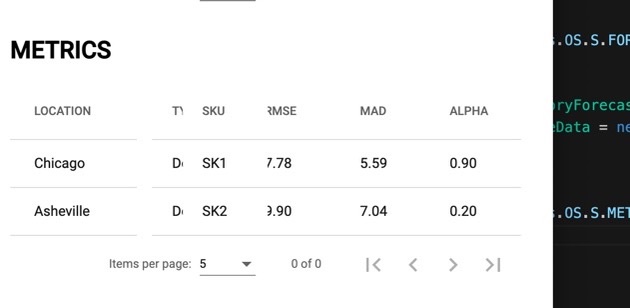
Notice that the "Type" column, which is scrolled behind SKU bleeds through where the table is "Missing" because the SKU column is rendered too far to the right.
#### Use Case
Correct rendering of the Sticky Columns when the table is resized.
Beitragsleitfaden
Rechercherichtung
Reproduziere das Problem mit einer Angular DataTable mit sticky headers, indem du zuerst den Browser von einem Container, in den die Tabelle passt, auf einen Container vergrößerst, in den sie nicht passt. Erledigt ist es, wenn sticky columns nach der Größenänderung korrekt neu positioniert werden und keine Lücken oder andere Spalten entstehen, die durch ihren reservierten Bereich hindurchscheinen.
Vom Indexierungsmodell aus dem Issue-Text verfasst.
Bewertung
- Tech-Stack
- angular, typescript
- Bereich
- frontend
- Issue-Typ
- Feature
- Schwierigkeit
- 4/5
- Geschätzter Aufwand
- 3-5 Tage
- Aktivitätsstatus
- Veraltet
- Klarheit
- Muss geklärt werden
- Anfängerfreundlichkeit
- 35/100