feat(DataTable): Dynamic Recalculation of Sticky Header Column Position on Resize
- 主要言語
- TypeScript
- スター
- 25k
- フォーク
- 6.8k
- 平均マージ
- 1日 8時間
- マージ済み PR(30日)
- 91
説明
#### Feature Description
If the columns of a table that uses sticky headers fit within the container, then the sticky header scrolling is not applied, as it should be.
If the containing element is smaller than the data table, the sticky columns are rendered correctly.
However if we start with a container that fits the data table, and then resize the browser such that the containing container is now smaller, the sticky columns don't rerender properly. Scrolling is there, but usually when there's more than one column, it will be rendered too far to the right, and when the other columns are scrolled they will "Bleed" through the area where the sticky header column has left space.
I'm attaching a screenshot of this.
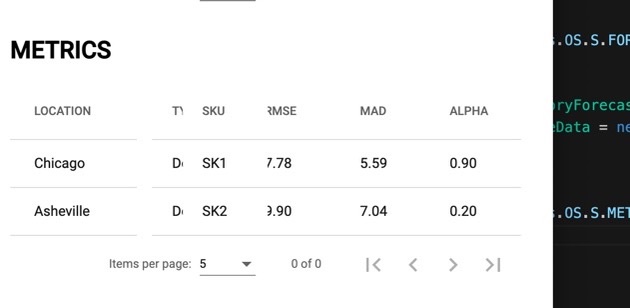
Notice that the "Type" column, which is scrolled behind SKU bleeds through where the table is "Missing" because the SKU column is rendered too far to the right.
#### Use Case
Correct rendering of the Sticky Columns when the table is resized.
コントリビューションガイド
調査の方向性
sticky headers を使用する Angular DataTable で問題を再現します。まず、テーブルが収まるコンテナから、テーブルが収まらないコンテナへブラウザのサイズを変更します。リサイズ後に sticky columns が正しく再配置され、隙間や、予約された領域に他の列が入り込むことがなければ完了です。
索引モデルが issue の本文から書いたものです。
評価
- 技術スタック
- angular, typescript
- 領域
- frontend
- issue の種類
- 機能追加
- 難易度
- 4/5
- 見積もり時間
- 3〜5日
- 活発さ
- 停滞
- 明瞭さ
- 説明が足りない
- 初心者へのやさしさ
- 35/100