Scattergl and px.line fill and continuous error bands don't appear
还没有人认领这个 Issue。
- 主要语言
- Python
- 星标
- 18.8k
- 派生
- 2.8k
- 平均合并
- 16 小时 26 分钟
- 30 天内合并 PR
- 21
描述
Summary
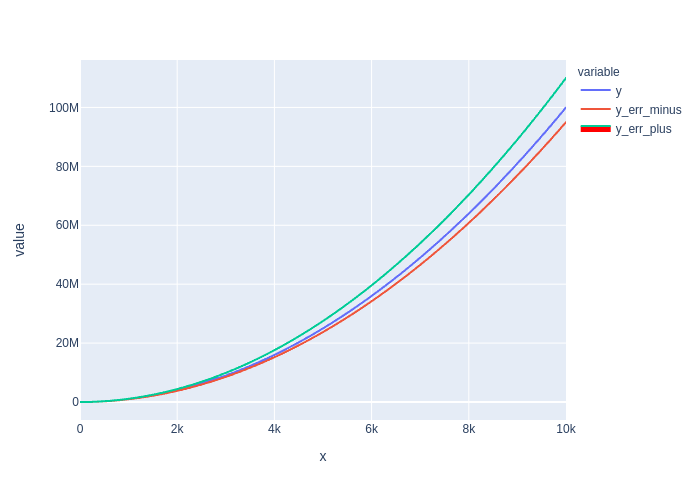
Using the fill and fillcolor parameters on scattergl traces (to produce continuous error bands, for example) does not work.
Issue
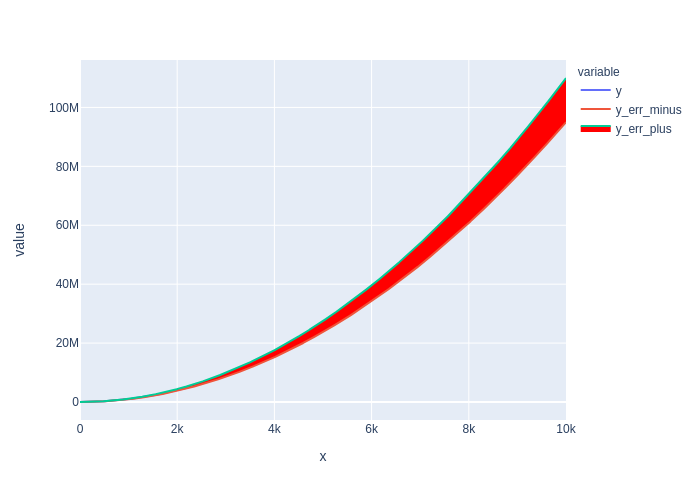
The issue is specific to scattergl traces: the same parameters work fine with scatter traces. To avoid the problem with plotly.express px.line() calls requires using render_mode="svg" to avoid the use of scattergl traces.
Using graph_objects has the some problem: one must use go.Scatter() and not go.Scattergl() to get error bands.
The reference for scattergl traces (https://plotly.com/python/reference/scattergl/#scattergl-fill) indicates that the behaviour should be the same as for scatter.
Specs
Python Version: 3.8.6
Plotly Version: 4.14.3
Kaleido Version: 0.2.1
- For image exports to be pasted here (they all looked the same as rendered in the browser)
Browsers: Firefox 88.0, Safari 12.1.1
Example
import numpy as np
import pandas as pd
import plotly.express as px

# dummy data
x = np.linspace(0, 10000, num=10_000)

df = pd.DataFrame({'x': x, 'y': x**2})
df['y_err_plus'] = df['y'] * 1.1
df['y_err_minus'] = df['y'] * 0.95
# use webgl and no fill

fig = (
px
 .line(
    df, x='x', y=['y', 'y_err_minus','y_err_plus'],
    render_mode='webgl')
 .update_traces(
     fill='tonexty', fillcolor='red',
     selector={'name':'y_err_plus'}
 )
)
fig
# use svg to get fill

fig = (
px
 .line(
    df, x='x', y=['y', 'y_err_minus','y_err_plus'],
    render_mode='svg')
 .update_traces(
     fill='tonexty', fillcolor='red',
     selector={'name':'y_err_plus'}
 )
)
fig
Sanity Check: fill to zero works?
Yes.
fig = (
px
.line(
    df, x='x', y='y',
    render_mode='webgl')
.update_traces(fill='tozeroy')
)

fig

贡献指南
从这里开始
- 先读完整个 Issue,再读项目的贡献指南。
- 在 Issue 下留言说明你要接手 —— 这能避免两个人做同样的事。
- Fork 仓库,在一个分支上完成修改。
- 提交 Pull Request,并在描述里引用这个 Issue 编号。
调研方向
使用 fill="tonexty" 和 fillcolor 通过 px.line(render_mode="webgl") 或 go.Scattergl() 重现该问题,然后将其与正常工作的 scatter 和 render_mode="svg" 情况进行比较。跟踪 scattergl 的渲染路径和现有的 fill 处理;完成标准是连续误差带能够在 webgl 中渲染,同时现有的 tozeroy 行为保持正确。
由索引模型根据 Issue 内容生成。
评估
- 技术栈
- python
- 领域
- data-visualization
- Issue 类型
- 缺陷
- 难度
- 4/5
- 预计耗时
- 3-5 天
- 活跃度
- 活跃
- 描述清晰度
- 基本清楚
- 新手友好度
- 55/100