Table cell misalignment and table getting wider when moving the mouse over it with flex layout
Chưa có ai nhận issue này.
- Ngôn ngữ chính
- Python
- Star
- 24.4k
- Fork
- 2.3k
- Merge trung bình
- 2 ngày 7 giờ
- Pull request đã merge (30 ngày)
- 13
Mô tả
Describe your context
Here's my setup:
python --version
Python 3.7.5

conda list dash
# Name                    Version
dash                      1.4.1
dash-core-components      1.3.1
dash-html-components      1.0.1
dash-renderer             1.1.2
dash-table                4.4.1
- OS: Windows 7
- Browsers:
- Chrome 77.0.3865.75
- IE 11.0.9600.19504
Describe the bug
Consider there following piece of code:
import os

import dash
import dash_html_components as html
import dash_table
import pandas as pd

df = pd.read_csv('https://raw.githubusercontent.com/plotly/datasets/master/solar.csv')

app = dash.Dash(__name__)

app.layout = html.Div(
    children=[
        dash_table.DataTable(
            id='table',
            columns=[{'name': c, 'id': c} for c in df.columns],
            fixed_rows=dict(headers=True, data=0),
            data=df.to_dict('records')
        )
    ],
    className='eight columns',
    style={'display': 'flex', 'justify-content': 'center'})

if __name__ == '__main__':
    app.run_server(debug=True)
Now we have two problems:
- The browser renders the table with a misalignment between header and the rest of the table, see screenshots below
- When I start moving my mouse over the table then every time the mouse pointer crosses any of the cell boundaries then the table gets a few pixels wider (in Chrome) or smaller (in IE), see screenshots below.
Expected behavior
- There should be no misalignment between header and the rest of the table
- The mouse moving over the table should have no effect whatsoever.
Screenshots
Initial state in Chrome:

After having moved the mouse over the table for a bit:
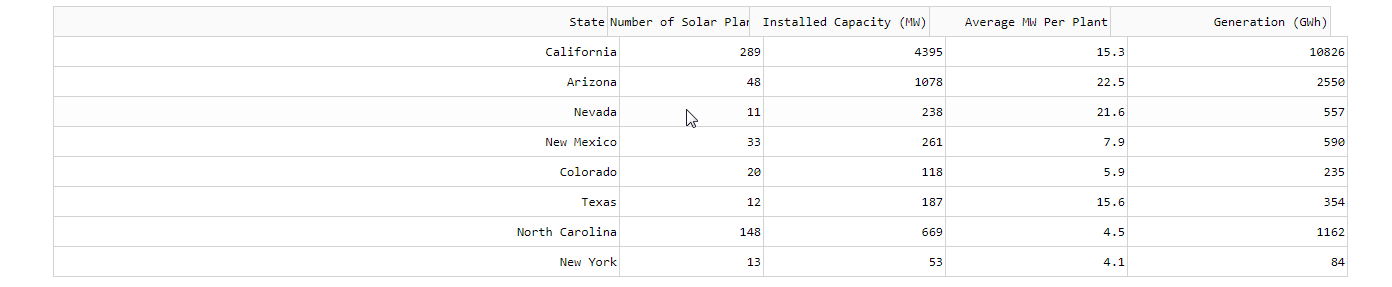
Initial state in IE:

After having moved the mouse over the table for a bit:

Hướng dẫn đóng góp
Bắt đầu từ đâu
- Đọc hết issue, rồi đọc hướng dẫn đóng góp của dự án.
- Bình luận trên issue rằng bạn sẽ nhận — tránh hai người làm cùng một việc.
- Fork repository và làm thay đổi trên một nhánh.
- Mở pull request có tham chiếu số hiệu của issue.
Hướng nghiên cứu
Tái hiện vấn đề bằng ví dụ Python Dash DataTable được cung cấp, sử dụng bố cục flex và các hàng header cố định. Kiểm tra độ căn chỉnh của header/body và chiều rộng của bảng trong khi di chuyển con trỏ qua các ranh giới ô trong Chrome và IE. Được xem là hoàn tất khi header vẫn căn chỉnh và việc di chuyển chuột không còn làm thay đổi chiều rộng của bảng.
Do mô hình lập chỉ mục viết ra từ nội dung của issue.
Đánh giá
- Công nghệ
- python
- Lĩnh vực
- frontend
- Loại issue
- Lỗi
- Độ khó
- 3/5
- Thời gian dự kiến
- 1-2 ngày
- Mức độ hoạt động
- Đình trệ
- Độ rõ ràng
- Khá rõ ràng
- Mức phù hợp với người mới
- 35/100