Table cell misalignment and table getting wider when moving the mouse over it with flex layout
Nadie ha tomado este issue todavía.
- Lenguaje dominante
- Python
- Estrellas
- 24.4k
- Forks
- 2.3k
- Merge medio
- 2 d 7 h
- PR fusionados (30 d)
- 13
Descripción
Describe your context
Here's my setup:
python --version
Python 3.7.5

conda list dash
# Name                    Version
dash                      1.4.1
dash-core-components      1.3.1
dash-html-components      1.0.1
dash-renderer             1.1.2
dash-table                4.4.1
- OS: Windows 7
- Browsers:
- Chrome 77.0.3865.75
- IE 11.0.9600.19504
Describe the bug
Consider there following piece of code:
import os

import dash
import dash_html_components as html
import dash_table
import pandas as pd

df = pd.read_csv('https://raw.githubusercontent.com/plotly/datasets/master/solar.csv')

app = dash.Dash(__name__)

app.layout = html.Div(
    children=[
        dash_table.DataTable(
            id='table',
            columns=[{'name': c, 'id': c} for c in df.columns],
            fixed_rows=dict(headers=True, data=0),
            data=df.to_dict('records')
        )
    ],
    className='eight columns',
    style={'display': 'flex', 'justify-content': 'center'})

if __name__ == '__main__':
    app.run_server(debug=True)
Now we have two problems:
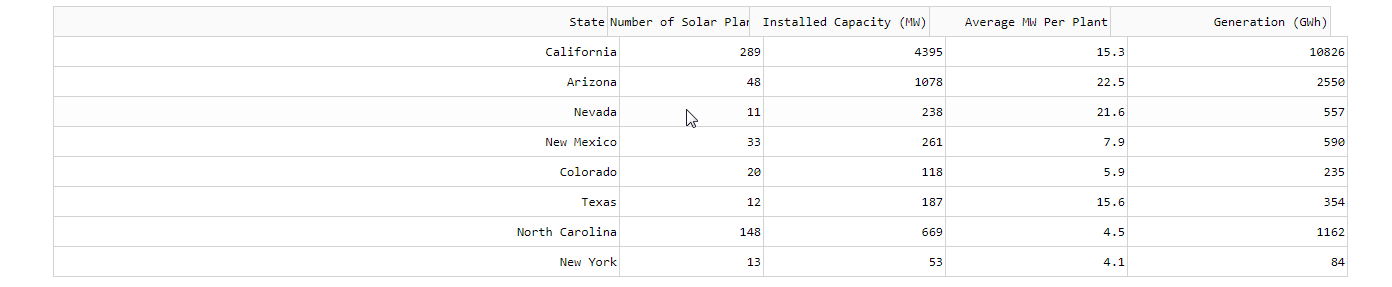
- The browser renders the table with a misalignment between header and the rest of the table, see screenshots below
- When I start moving my mouse over the table then every time the mouse pointer crosses any of the cell boundaries then the table gets a few pixels wider (in Chrome) or smaller (in IE), see screenshots below.
Expected behavior
- There should be no misalignment between header and the rest of the table
- The mouse moving over the table should have no effect whatsoever.
Screenshots
Initial state in Chrome:

After having moved the mouse over the table for a bit:
Initial state in IE:

After having moved the mouse over the table for a bit:

Guía de contribución
Primeros pasos
- Lee el issue completo y luego la guía de contribución del proyecto.
- Comenta en el issue que vas a ocuparte — evita que dos personas hagan lo mismo.
- Haz un fork del repositorio y trabaja en una rama.
- Abre un pull request que haga referencia al número del issue.
Línea de trabajo
Reproduzca el problema con el ejemplo proporcionado de Python Dash DataTable, utilizando el diseño flex y filas de encabezado fijas. Compruebe la alineación del encabezado y el cuerpo, así como el ancho de la tabla, mientras mueve el puntero por los límites de las celdas en Chrome e IE. Se considera terminado cuando el encabezado permanece alineado y el movimiento del ratón ya no cambia el ancho de la tabla.
Escrito por el modelo de indexación a partir del texto del issue.
Evaluación
- Stack tecnológico
- python
- Área
- frontend
- Tipo de issue
- Error
- Dificultad
- 3/5
- Tiempo estimado
- 1-2 días
- Estado de actividad
- Estancado
- Claridad
- Bastante claro
- Aptitud para principiantes
- 35/100