Table cell misalignment and table getting wider when moving the mouse over it with flex layout
Dieses Issue hat noch niemand übernommen.
- Vorherrschende Sprache
- Python
- Sterne
- 24.4k
- Forks
- 2.3k
- Ø Merge
- 2 T. 7 Std.
- Gemergte PRs (30 T.)
- 13
Beschreibung
Describe your context
Here's my setup:
python --version
Python 3.7.5

conda list dash
# Name                    Version
dash                      1.4.1
dash-core-components      1.3.1
dash-html-components      1.0.1
dash-renderer             1.1.2
dash-table                4.4.1
- OS: Windows 7
- Browsers:
- Chrome 77.0.3865.75
- IE 11.0.9600.19504
Describe the bug
Consider there following piece of code:
import os

import dash
import dash_html_components as html
import dash_table
import pandas as pd

df = pd.read_csv('https://raw.githubusercontent.com/plotly/datasets/master/solar.csv')

app = dash.Dash(__name__)

app.layout = html.Div(
    children=[
        dash_table.DataTable(
            id='table',
            columns=[{'name': c, 'id': c} for c in df.columns],
            fixed_rows=dict(headers=True, data=0),
            data=df.to_dict('records')
        )
    ],
    className='eight columns',
    style={'display': 'flex', 'justify-content': 'center'})

if __name__ == '__main__':
    app.run_server(debug=True)
Now we have two problems:
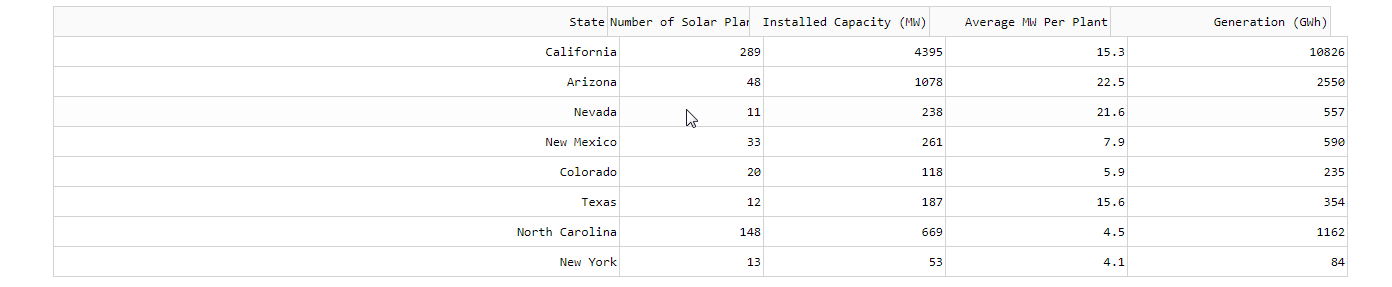
- The browser renders the table with a misalignment between header and the rest of the table, see screenshots below
- When I start moving my mouse over the table then every time the mouse pointer crosses any of the cell boundaries then the table gets a few pixels wider (in Chrome) or smaller (in IE), see screenshots below.
Expected behavior
- There should be no misalignment between header and the rest of the table
- The mouse moving over the table should have no effect whatsoever.
Screenshots
Initial state in Chrome:

After having moved the mouse over the table for a bit:
Initial state in IE:

After having moved the mouse over the table for a bit:

Beitragsleitfaden
Erste Schritte
- Lies das ganze Issue und danach den Beitragsleitfaden des Projekts.
- Schreib ins Issue, dass du es übernimmst — das erspart doppelte Arbeit.
- Forke das Repository und arbeite in einem Branch.
- Öffne einen Pull Request, der die Issue-Nummer nennt.
Rechercherichtung
Reproduzieren Sie das Problem mit dem bereitgestellten Python-Dash-DataTable-Beispiel unter Verwendung des flex-Layouts und fixierter Header-Zeilen. Überprüfen Sie die Ausrichtung von Header und Body sowie die Tabellenbreite, während Sie den Mauszeiger in Chrome und IE über Zellgrenzen bewegen. Als erledigt gilt die Aufgabe, wenn der Header ausgerichtet bleibt und die Mausbewegung die Tabellenbreite nicht mehr verändert.
Vom Indexierungsmodell aus dem Issue-Text verfasst.
Bewertung
- Tech-Stack
- python
- Bereich
- frontend
- Issue-Typ
- Bug
- Schwierigkeit
- 3/5
- Geschätzter Aufwand
- 1-2 Tage
- Aktivitätsstatus
- Veraltet
- Klarheit
- Größtenteils klar
- Anfängerfreundlichkeit
- 35/100