microsoft / microsoft/vscode-java-debug
show call stacks more friendly
オープン
まだ誰も着手していません。
ai-triaged
enhancement
external
ux
- 主要言語
- TypeScript
- スター
- 591
- フォーク
- 429
- 平均マージ
- 1日 9時間
- マージ済み PR(30日)
- 19
説明
While debugging, the call stack panel list all of the threads:

But most of the threads are not related to the application; they are just builtin threads(Finalizer, most of http-nio-808-exec-*).
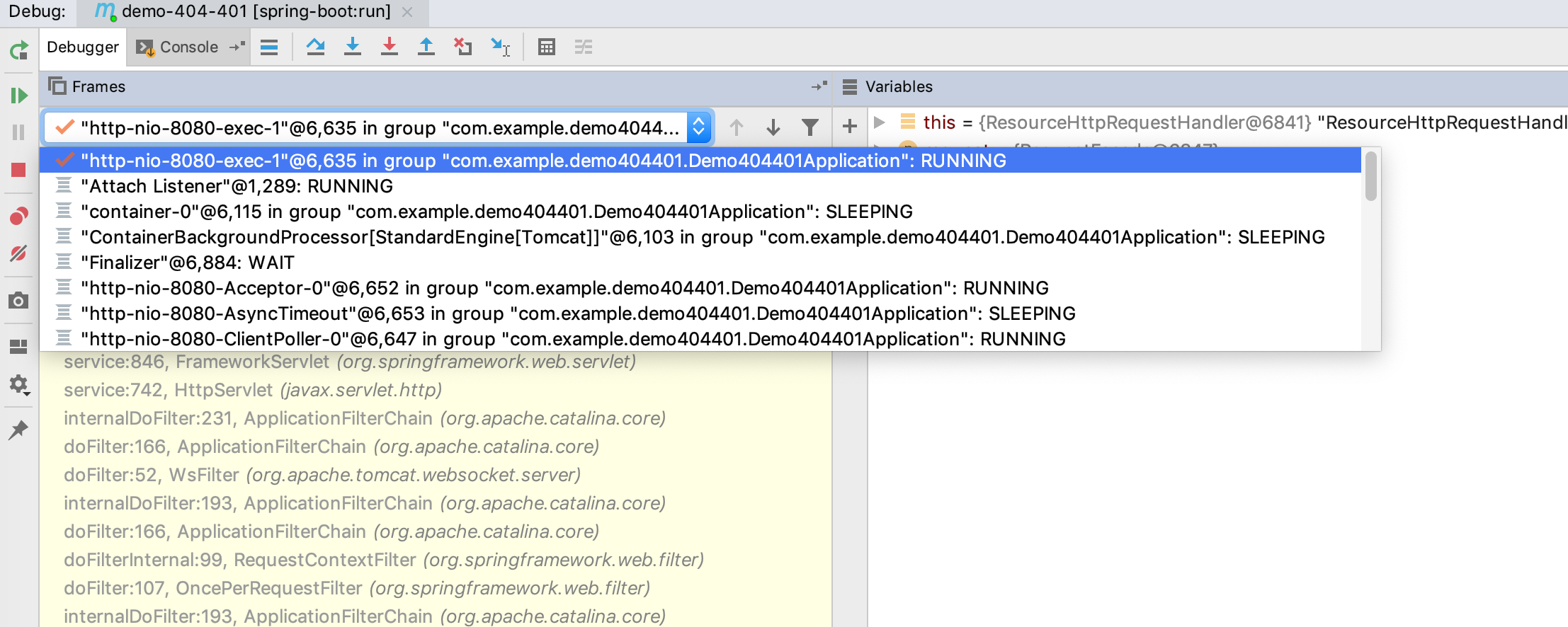
So, why not just put threads into a drop-down box?
When I select the current thread, show call stack of the current thread, and the UI will be more efficient:
コントリビューションガイド
はじめの一歩
- issue を最後まで読み、次にプロジェクトのコントリビューションガイドを読みます。
- 着手することを issue にコメントします — 二人が同じ作業をするのを防げます。
- リポジトリをフォークし、ブランチを切って変更します。
- issue 番号を参照したプルリクエストを送ります。
調査の方向性
この issue ではファイルもテストも指定されていないため、まずデバッガーのコールスタックパネルと、スレッドリストをレンダリングするコードを見つけます。現在のスレッドがどのように選択されるかを確認し、そのうえで、スレッドのドロップダウンにそのコールスタックが表示され、メインパネルに関係のないスレッドが一覧表示されないことを検証します。
索引モデルが issue の本文から書いたものです。
評価
- 技術スタック
- java, typescript
- 領域
- devtools, frontend
- issue の種類
- 機能追加
- 難易度
- 3/5
- 見積もり時間
- 1〜2日
- 活発さ
- 停滞
- 明瞭さ
- おおむね明確
- 初心者へのやさしさ
- 38/100