microsoft / microsoft/vscode-java-debug
show call stacks more friendly
Nobody has claimed this yet.
- Dominant language
- TypeScript
- Stars
- 591
- Forks
- 429
- Avg merge
- 1d 9h
- Merged PRs (30d)
- 19
Description
While debugging, the call stack panel list all of the threads:

But most of the threads are not related to the application; they are just builtin threads(Finalizer, most of http-nio-808-exec-*).
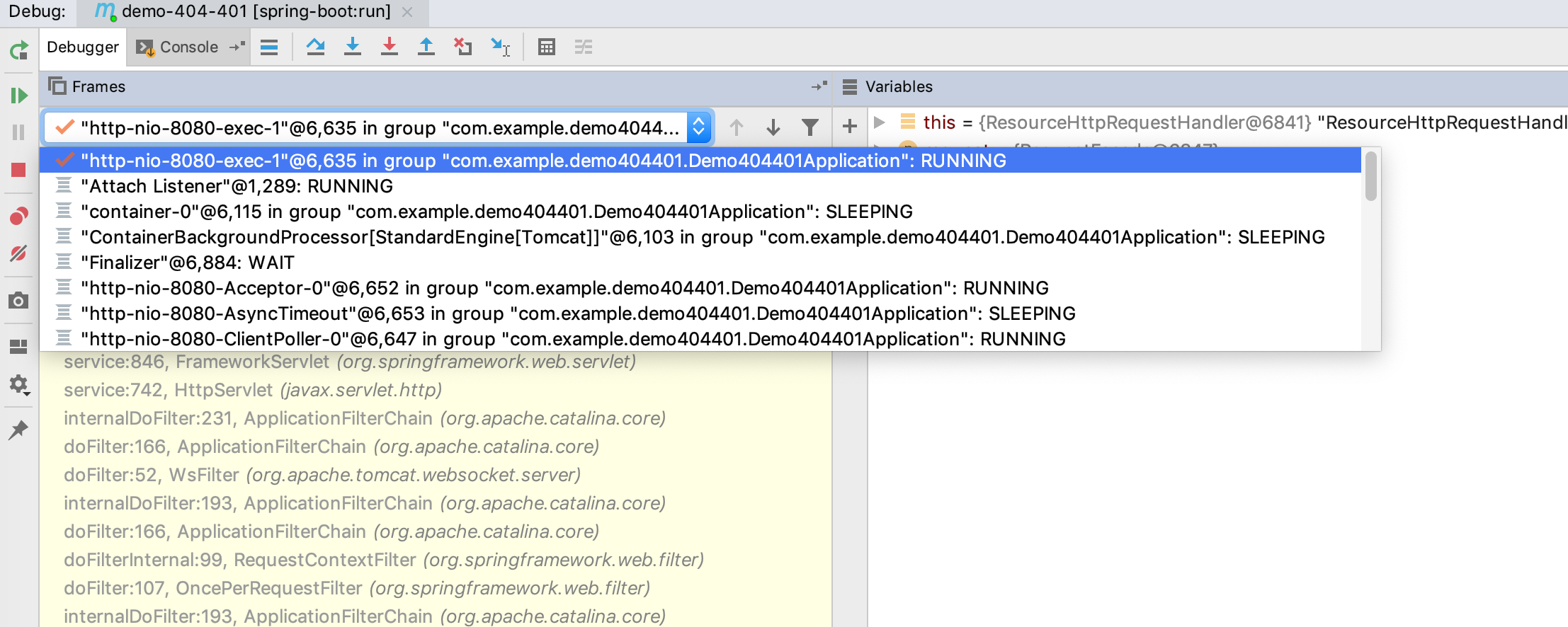
So, why not just put threads into a drop-down box?
When I select the current thread, show call stack of the current thread, and the UI will be more efficient:
Contributor guide
First steps
- Read the whole issue, then the project's contributing guide.
- Comment on the issue to say you are picking it up — it saves two people doing the same work.
- Fork the repository and make your change on a branch.
- Open a pull request that references the issue number.
Research direction
The issue names no files or tests; start by locating the debugger call stack panel and the code that renders the thread list. Confirm how the current thread is selected, then verify that a thread dropdown displays its call stack without listing unrelated threads in the main panel.
Written by the indexing model from the issue text.
Assessment
- Tech stack
- java, typescript
- Domain
- devtools, frontend
- Issue type
- Feature
- Difficulty
- 3/5
- Estimated time
- 1-2 days
- Activity status
- Stale
- Clarity
- Mostly clear
- Newbie friendliness
- 38/100