microsoft / microsoft/vscode-java-debug
show call stacks more friendly
未關閉
還沒有人認領這個 Issue。
ai-triaged
enhancement
external
ux
- 主要語言
- TypeScript
- 星號
- 591
- 分支
- 429
- 平均合併
- 1 天 9 小時
- 30 天內合併 PR
- 19
描述
While debugging, the call stack panel list all of the threads:

But most of the threads are not related to the application; they are just builtin threads(Finalizer, most of http-nio-808-exec-*).
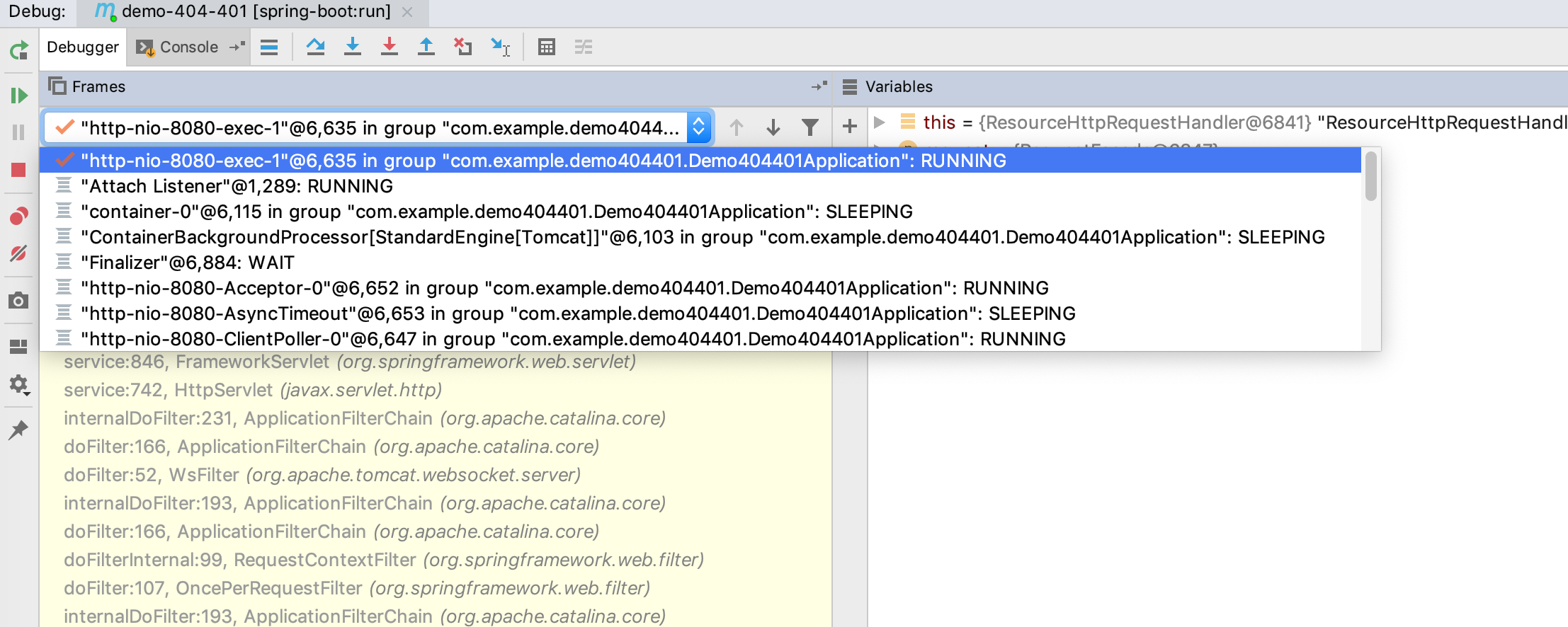
So, why not just put threads into a drop-down box?
When I select the current thread, show call stack of the current thread, and the UI will be more efficient:
貢獻指南
從這裡開始
- 先讀完整個 Issue,再讀專案的貢獻指南。
- 在 Issue 下留言說明你要接手 —— 這能避免兩個人做同樣的事。
- Fork 儲存庫,在一個分支上完成修改。
- 送出 Pull Request,並在描述裡引用這個 Issue 編號。
研究方向
Issue 沒有指明任何檔案或測試;請先定位 debugger 的呼叫堆疊面板以及負責呈現執行緒清單的程式碼。確認目前執行緒是如何選取的,然後驗證執行緒下拉式選單會顯示其呼叫堆疊,且不會在主面板中列出無關的執行緒。
由索引模型根據 Issue 內容生成。
評估
- 技術堆疊
- java, typescript
- 領域
- devtools, frontend
- Issue 類型
- 功能
- 難度
- 3/5
- 預估耗時
- 1-2 天
- 活躍度
- 停滯
- 描述清晰度
- 基本清楚
- 新手友好度
- 38/100