microsoft / microsoft/vscode-java-debug
show call stacks more friendly
未关闭
还没有人认领这个 Issue。
ai-triaged
enhancement
external
ux
- 主要语言
- TypeScript
- 星标
- 591
- 派生
- 429
- 平均合并
- 1 天 9 小时
- 30 天内合并 PR
- 19
描述
While debugging, the call stack panel list all of the threads:

But most of the threads are not related to the application; they are just builtin threads(Finalizer, most of http-nio-808-exec-*).
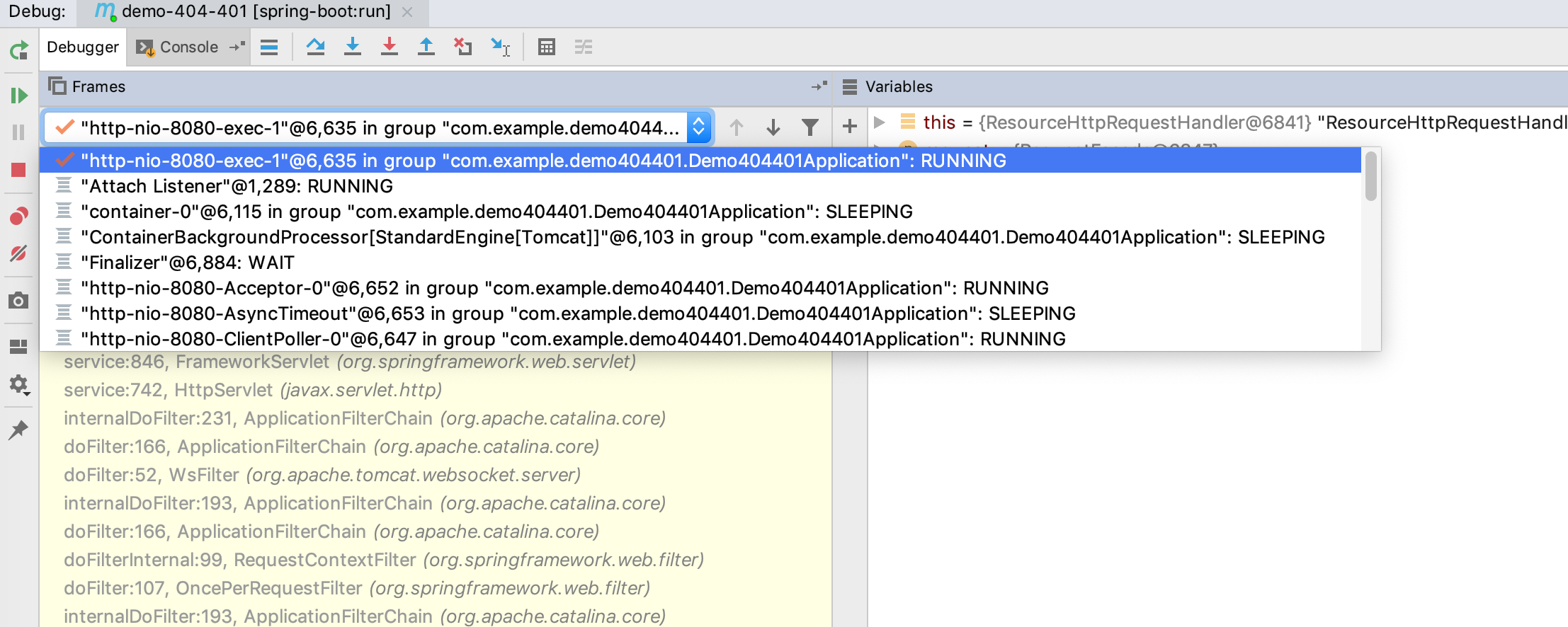
So, why not just put threads into a drop-down box?
When I select the current thread, show call stack of the current thread, and the UI will be more efficient:
贡献指南
从这里开始
- 先读完整个 Issue,再读项目的贡献指南。
- 在 Issue 下留言说明你要接手 —— 这能避免两个人做同样的事。
- Fork 仓库,在一个分支上完成修改。
- 提交 Pull Request,并在描述里引用这个 Issue 编号。
调研方向
Issue 没有指明任何文件或测试;请先定位 debugger 的调用栈面板以及渲染线程列表的代码。确认当前线程是如何选择的,然后验证线程下拉菜单会显示其调用栈,且不会在主面板中列出无关线程。
由索引模型根据 Issue 内容生成。
评估
- 技术栈
- java, typescript
- 领域
- devtools, frontend
- Issue 类型
- 功能
- 难度
- 3/5
- 预计耗时
- 1-2 天
- 活跃度
- 停滞
- 描述清晰度
- 基本清楚
- 新手友好度
- 38/100