microsoft / microsoft/TypeScript
Improve code formatting for inferred type signatures on hover in VSC
まだ誰も着手していません。
- 主要言語
- Go
- スター
- 111k
- フォーク
- 14.3k
- 平均マージ
- 2日 4時間
- マージ済み PR(30日)
- 132
説明
Suggestion
🔍 Search Terms
VSC, code formatting, prettier, type signature, hover, inferred types
✅ Viability Checklist
My suggestion meets these guidelines:
- This wouldn't be a breaking change in existing TypeScript/JavaScript code
- This wouldn't change the runtime behavior of existing JavaScript code
- This could be implemented without emitting different JS based on the types of the expressions
- This isn't a runtime feature (e.g. library functionality, non-ECMAScript syntax with JavaScript output, new syntax sugar for JS, etc.)
- This feature would agree with the rest of TypeScript's Design Goals.
⭐ Suggestion
In VSC when hovering over a code element (e.g. a function call) it displays the definition of the code element (e.g. the function signature) combined with the inferred types.
Problem
For simple code elements (e.g. variables) the displayed result is usually easy to read but for more complex code elements (e.g. complex function definitions) the displayed definition gets hard to read.
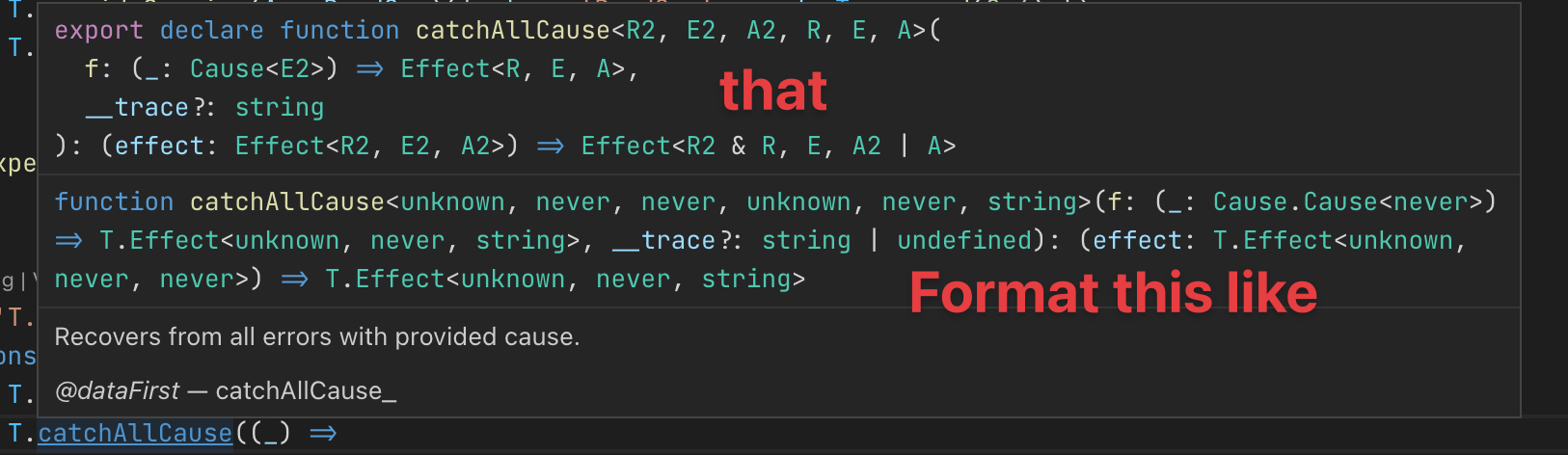
e.g. here's what I see when hovering over T.catchAllCause (see source)

For reference this is the corresponding source code (when I jump to definition) which is properly formatted:
/**
 * Recovers from all errors with provided cause.
 *
 * @dataFirst catchAllCause_
 */
export declare function catchAllCause<R2, E2, A2, R, E, A>(
  f: (_: Cause<E2>) => Effect<R, E, A>,
  __trace?: string
): (effect: Effect<R2, E2, A2>) => Effect<R2 & R, E, A2 | A>
Solution suggestion
It would be great if the rendered code definition were formatted/pretty printed to make it easier to read (or apply the original code formatting of the definition).
Here's an annotated version of my suggestion based on what I'm seeing when holding down the CMD key.
コントリビューションガイド
はじめの一歩
- issue を最後まで読み、次にプロジェクトのコントリビューションガイドを読みます。
- 着手することを issue にコメントします — 二人が同じ作業をするのを防げます。
- リポジトリをフォークし、ブランチを切って変更します。
- issue 番号を参照したプルリクエストを送ります。
調査の方向性
issue に記載されている VSC のホバー出力から始め、Effect-TS の適切にフォーマットされた TypeScript ソース例と比較します。ホバー結果で推論された型シグネチャがどのようにレンダリングされるかを追跡します。複雑な定義が一貫してフォーマットされ、VSC で読みやすい状態を保てれば完了です。
索引モデルが issue の本文から書いたものです。
評価
- 技術スタック
- typescript, vscode
- 領域
- developer-experience, tooling
- issue の種類
- 機能追加
- 難易度
- 4/5
- 見積もり時間
- 3〜5日
- 活発さ
- 停滞
- 明瞭さ
- おおむね明確
- 初心者へのやさしさ
- 42/100