microsoft / microsoft/TypeScript
Improve code formatting for inferred type signatures on hover in VSC
Nadie ha tomado este issue todavía.
- Lenguaje dominante
- Go
- Estrellas
- 111k
- Forks
- 14.3k
- Merge medio
- 2 d 4 h
- PR fusionados (30 d)
- 132
Descripción
Suggestion
🔍 Search Terms
VSC, code formatting, prettier, type signature, hover, inferred types
✅ Viability Checklist
My suggestion meets these guidelines:
- This wouldn't be a breaking change in existing TypeScript/JavaScript code
- This wouldn't change the runtime behavior of existing JavaScript code
- This could be implemented without emitting different JS based on the types of the expressions
- This isn't a runtime feature (e.g. library functionality, non-ECMAScript syntax with JavaScript output, new syntax sugar for JS, etc.)
- This feature would agree with the rest of TypeScript's Design Goals.
⭐ Suggestion
In VSC when hovering over a code element (e.g. a function call) it displays the definition of the code element (e.g. the function signature) combined with the inferred types.
Problem
For simple code elements (e.g. variables) the displayed result is usually easy to read but for more complex code elements (e.g. complex function definitions) the displayed definition gets hard to read.
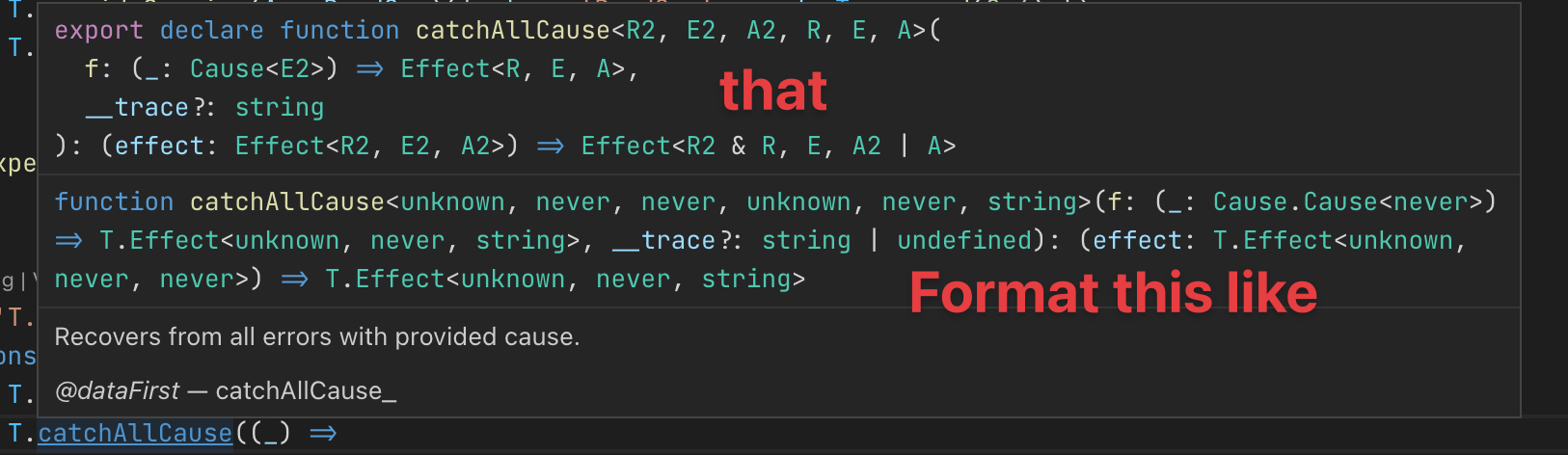
e.g. here's what I see when hovering over T.catchAllCause (see source)

For reference this is the corresponding source code (when I jump to definition) which is properly formatted:
/**
 * Recovers from all errors with provided cause.
 *
 * @dataFirst catchAllCause_
 */
export declare function catchAllCause<R2, E2, A2, R, E, A>(
  f: (_: Cause<E2>) => Effect<R, E, A>,
  __trace?: string
): (effect: Effect<R2, E2, A2>) => Effect<R2 & R, E, A2 | A>
Solution suggestion
It would be great if the rendered code definition were formatted/pretty printed to make it easier to read (or apply the original code formatting of the definition).
Here's an annotated version of my suggestion based on what I'm seeing when holding down the CMD key.
Guía de contribución
Primeros pasos
- Lee el issue completo y luego la guía de contribución del proyecto.
- Comenta en el issue que vas a ocuparte — evita que dos personas hagan lo mismo.
- Haz un fork del repositorio y trabaja en una rama.
- Abre un pull request que haga referencia al número del issue.
Línea de trabajo
Comienza con la salida de hover de VSC descrita en el issue y compárala con el ejemplo de código fuente TypeScript correctamente formateado de Effect-TS. Traza cómo se representan las firmas de tipo inferidas en los resultados de hover. Se considera terminado cuando las definiciones complejas tienen un formato coherente y siguen siendo legibles en VSC.
Escrito por el modelo de indexación a partir del texto del issue.
Evaluación
- Stack tecnológico
- typescript, vscode
- Área
- developer-experience, tooling
- Tipo de issue
- Nueva funcionalidad
- Dificultad
- 4/5
- Tiempo estimado
- 3-5 días
- Estado de actividad
- Estancado
- Claridad
- Bastante claro
- Aptitud para principiantes
- 42/100