microsoft / microsoft/TypeScript
Improve code formatting for inferred type signatures on hover in VSC
Nessuno ha ancora preso questa issue.
- Lingua principale
- Go
- Stelle
- 111k
- Fork
- 14.3k
- Merge medio
- 2g 4h
- PR unite (30g)
- 132
Descrizione
Suggestion
🔍 Search Terms
VSC, code formatting, prettier, type signature, hover, inferred types
✅ Viability Checklist
My suggestion meets these guidelines:
- This wouldn't be a breaking change in existing TypeScript/JavaScript code
- This wouldn't change the runtime behavior of existing JavaScript code
- This could be implemented without emitting different JS based on the types of the expressions
- This isn't a runtime feature (e.g. library functionality, non-ECMAScript syntax with JavaScript output, new syntax sugar for JS, etc.)
- This feature would agree with the rest of TypeScript's Design Goals.
⭐ Suggestion
In VSC when hovering over a code element (e.g. a function call) it displays the definition of the code element (e.g. the function signature) combined with the inferred types.
Problem
For simple code elements (e.g. variables) the displayed result is usually easy to read but for more complex code elements (e.g. complex function definitions) the displayed definition gets hard to read.
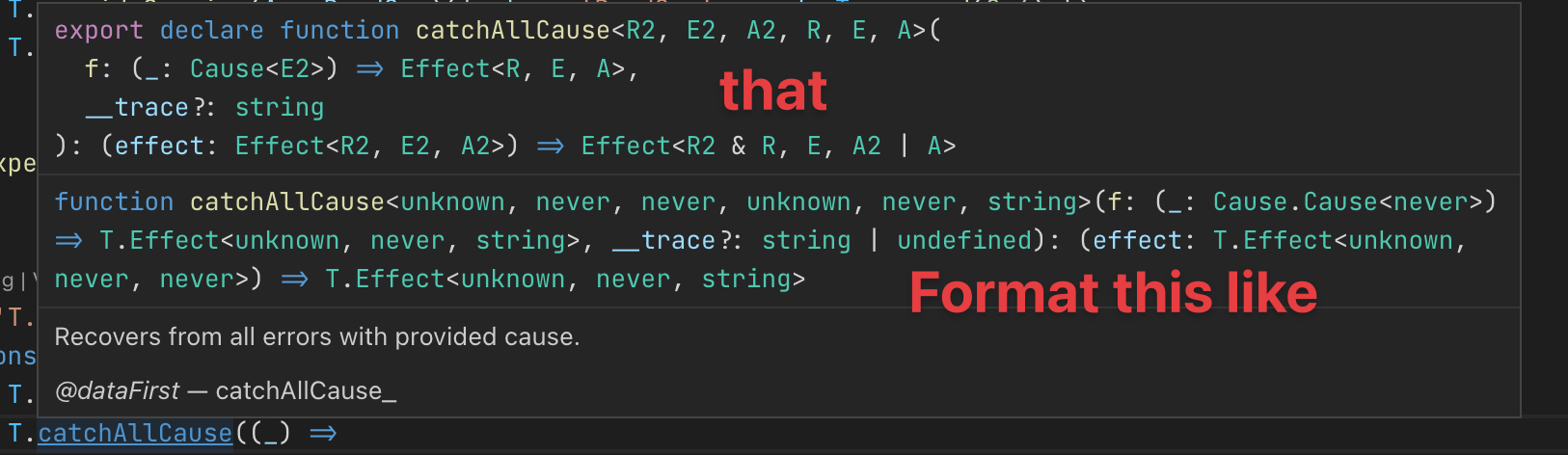
e.g. here's what I see when hovering over T.catchAllCause (see source)

For reference this is the corresponding source code (when I jump to definition) which is properly formatted:
/**
 * Recovers from all errors with provided cause.
 *
 * @dataFirst catchAllCause_
 */
export declare function catchAllCause<R2, E2, A2, R, E, A>(
  f: (_: Cause<E2>) => Effect<R, E, A>,
  __trace?: string
): (effect: Effect<R2, E2, A2>) => Effect<R2 & R, E, A2 | A>
Solution suggestion
It would be great if the rendered code definition were formatted/pretty printed to make it easier to read (or apply the original code formatting of the definition).
Here's an annotated version of my suggestion based on what I'm seeing when holding down the CMD key.
Guida per i contributori
Apri la guida per i contributori
Come iniziare
- Leggi tutta la issue e poi la guida ai contributi del progetto.
- Commenta sulla issue per dire che te ne occupi tu — evita che due persone facciano lo stesso lavoro.
- Fai un fork del repository e lavora su un branch.
- Apri una pull request che faccia riferimento al numero della issue.
Direzione di ricerca
Inizia dall’output dell’hover di VSC descritto nell’issue e confrontalo con l’esempio di codice sorgente TypeScript formattato correttamente di Effect-TS. Traccia il modo in cui le firme dei tipi inferite vengono visualizzate nei risultati dell’hover. Il lavoro è completato quando le definizioni complesse sono formattate in modo coerente e rimangono leggibili in VSC.
Scritto dal modello di indicizzazione a partire dal testo della issue.
Valutazione
- Stack tecnologico
- typescript, vscode
- Ambito
- developer-experience, tooling
- Tipo di issue
- Funzionalità
- Difficoltà
- 4/5
- Tempo stimato
- 3-5 giorni
- Stato di attività
- Ferma
- Chiarezza
- Abbastanza chiara
- Idoneità per principianti
- 42/100