microsoft / microsoft/TypeScript
Improve code formatting for inferred type signatures on hover in VSC
Dieses Issue hat noch niemand übernommen.
- Vorherrschende Sprache
- Go
- Sterne
- 111k
- Forks
- 14.3k
- Ø Merge
- 2 T. 4 Std.
- Gemergte PRs (30 T.)
- 132
Beschreibung
Suggestion
🔍 Search Terms
VSC, code formatting, prettier, type signature, hover, inferred types
✅ Viability Checklist
My suggestion meets these guidelines:
- This wouldn't be a breaking change in existing TypeScript/JavaScript code
- This wouldn't change the runtime behavior of existing JavaScript code
- This could be implemented without emitting different JS based on the types of the expressions
- This isn't a runtime feature (e.g. library functionality, non-ECMAScript syntax with JavaScript output, new syntax sugar for JS, etc.)
- This feature would agree with the rest of TypeScript's Design Goals.
⭐ Suggestion
In VSC when hovering over a code element (e.g. a function call) it displays the definition of the code element (e.g. the function signature) combined with the inferred types.
Problem
For simple code elements (e.g. variables) the displayed result is usually easy to read but for more complex code elements (e.g. complex function definitions) the displayed definition gets hard to read.
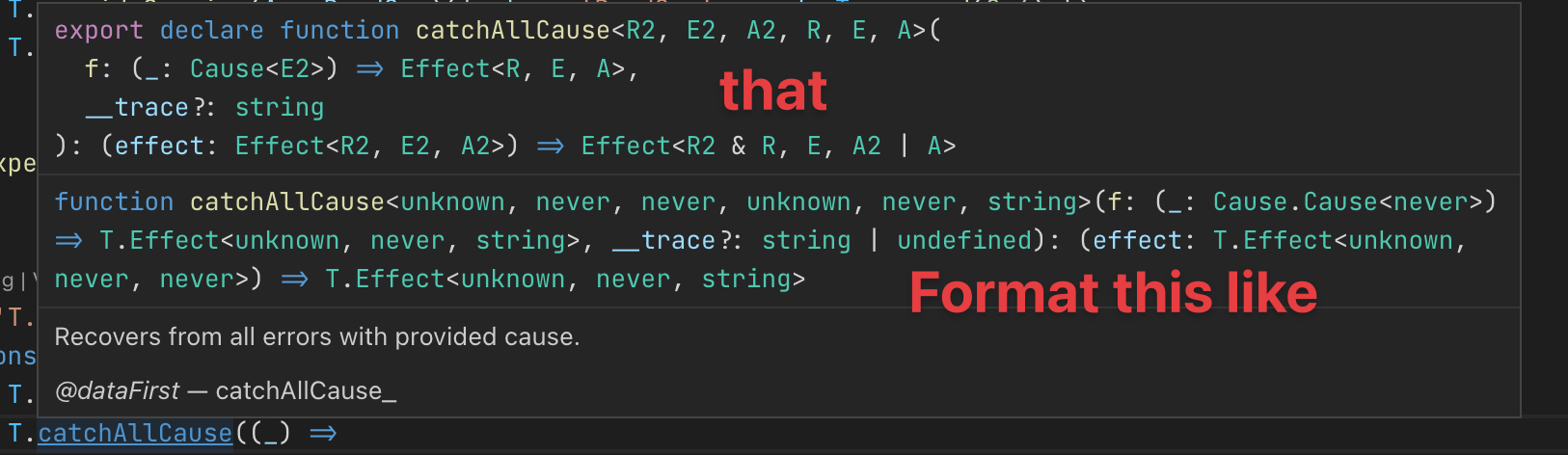
e.g. here's what I see when hovering over T.catchAllCause (see source)

For reference this is the corresponding source code (when I jump to definition) which is properly formatted:
/**
 * Recovers from all errors with provided cause.
 *
 * @dataFirst catchAllCause_
 */
export declare function catchAllCause<R2, E2, A2, R, E, A>(
  f: (_: Cause<E2>) => Effect<R, E, A>,
  __trace?: string
): (effect: Effect<R2, E2, A2>) => Effect<R2 & R, E, A2 | A>
Solution suggestion
It would be great if the rendered code definition were formatted/pretty printed to make it easier to read (or apply the original code formatting of the definition).
Here's an annotated version of my suggestion based on what I'm seeing when holding down the CMD key.
Beitragsleitfaden
Erste Schritte
- Lies das ganze Issue und danach den Beitragsleitfaden des Projekts.
- Schreib ins Issue, dass du es übernimmst — das erspart doppelte Arbeit.
- Forke das Repository und arbeite in einem Branch.
- Öffne einen Pull Request, der die Issue-Nummer nennt.
Rechercherichtung
Beginne mit der in der Issue beschriebenen VSC-Hover-Ausgabe und vergleiche sie mit dem korrekt formatierten TypeScript-Quellbeispiel von Effect-TS. Verfolge, wie inferierte Typsignaturen für Hover-Ergebnisse dargestellt werden. Als abgeschlossen gilt, wenn komplexe Definitionen konsistent formatiert und in VSC lesbar bleiben.
Vom Indexierungsmodell aus dem Issue-Text verfasst.
Bewertung
- Tech-Stack
- typescript, vscode
- Bereich
- developer-experience, tooling
- Issue-Typ
- Feature
- Schwierigkeit
- 4/5
- Geschätzter Aufwand
- 3-5 Tage
- Aktivitätsstatus
- Veraltet
- Klarheit
- Größtenteils klar
- Anfängerfreundlichkeit
- 42/100