feat(DataTable): Dynamic Recalculation of Sticky Header Column Position on Resize
- Dominant language
- TypeScript
- Stars
- 25k
- Forks
- 6.8k
- Avg merge
- 1d 8h
- Merged PRs (30d)
- 91
Description
#### Feature Description
If the columns of a table that uses sticky headers fit within the container, then the sticky header scrolling is not applied, as it should be.
If the containing element is smaller than the data table, the sticky columns are rendered correctly.
However if we start with a container that fits the data table, and then resize the browser such that the containing container is now smaller, the sticky columns don't rerender properly. Scrolling is there, but usually when there's more than one column, it will be rendered too far to the right, and when the other columns are scrolled they will "Bleed" through the area where the sticky header column has left space.
I'm attaching a screenshot of this.
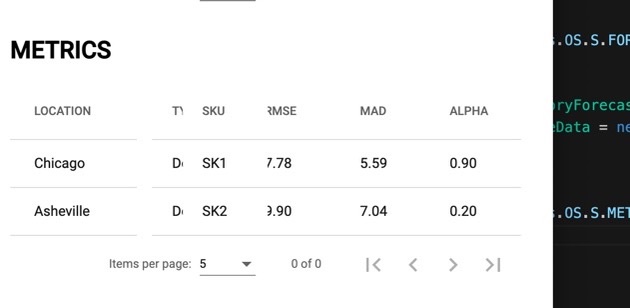
Notice that the "Type" column, which is scrolled behind SKU bleeds through where the table is "Missing" because the SKU column is rendered too far to the right.
#### Use Case
Correct rendering of the Sticky Columns when the table is resized.
Contributor guide
Research direction
Reproduce the issue with an Angular DataTable using sticky headers, first resizing the browser from a container that fits the table to one that does not. Done means sticky columns reposition correctly after resizing, with no gaps or other columns bleeding through their reserved area.
Written by the indexing model from the issue text.
Assessment
- Tech stack
- angular, typescript
- Domain
- frontend
- Issue type
- Feature
- Difficulty
- 4/5
- Estimated time
- 3-5 days
- Activity status
- Stale
- Clarity
- Needs clarification
- Newbie friendliness
- 35/100