Analytics: When using ScreenTrackingService the average engagement time is calculated the wrong way
- Linguagem predominante
- TypeScript
- Estrelas
- 7.8k
- Forks
- 2.2k
- Merge médio
- 22h 28min
- PRs com merge (30d)
- 6
Descrição
### Version info
**Angular:**
"@angular/animations": "13.1.3",
"@angular/common": "13.1.3",
"@angular/compiler": "13.1.3",
"@angular/core": "13.1.3",
"@angular/forms": "13.1.3",
"@angular/platform-browser": "13.1.3",
"@angular/platform-browser-dynamic": "13.1.3",
"@angular/router": "13.1.3",
"rxjs": "7.4.0",
"tslib": "2.3.1",
"zone.js": "0.11.4",
"typescript": "4.5.5"
**Firebase:**
"firebase": "9.6.7",
**AngularFire:**
"@angular/fire": "7.2.1",
**System:**
NodeJS: v12.20.2
npm: 6.14.11
OS: macOS Monterey (12.2.1)
### How to reproduce these conditions
[Demo example](https://github.com/timkos/test-analytics) (fix firebase config in AppModule)
**Steps to set up and reproduce**
1. provide FirebaseApp and Analytics and add ScreenTrackingService to AppModule:
```
imports: [
BrowserModule,
AppRoutingModule,
provideFirebaseApp(() =>
initializeApp(config)
),
provideAnalytics(() => getAnalytics())
],
providers: [ScreenTrackingService] ```
2. Create two routes `/test` and `/test2`. The route `/test` we will visit and stay on it for a longer time. On the other hand, we will always go to `/test2` just for a short time and then always go back to `/test` route.
**Sample data and security rules**
### Debug output
After some time we can see Average Engagement Times for visited paths (screens) on
Firebase -> Analytics -> Dashboard -> View pages and screens.
To see data for screen names (routes) switch from 'Page title and screen class' to 'Page title and screen name'.
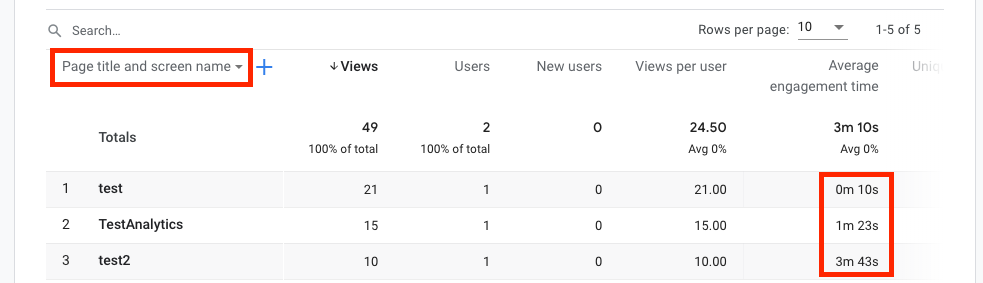
### Expected behavior
Average Engagement Time of the route `/test` should be much bigger then the one of the `/test2` route.
### Actual behavior
Average Engagement Time of the route `/test` is much smaller then the one of `/test2` route.
It looks like previous engagement time is added to the next visited route (screen). It should be added to the previous route (screen).
Guia de contribuição
Direção de pesquisa
Comece pelo registro de ScreenTrackingService em AppModule e reproduza a sequência de rotas da demonstração vinculada, visitando /test e /test2 conforme descrito. Compare os resultados de engajamento de tela do Firebase Analytics com a atribuição de rota esperada; considera-se concluído quando a rota /test, que permanece ativa por mais tempo, reporta um tempo médio de engajamento substancialmente maior que /test2.
Escrita pelo modelo de indexação a partir do texto da issue.
Avaliação
- Stack de tecnologia
- angular, firebase, typescript
- Domínio
- analytics, frontend
- Tipo de issue
- Bug
- Dificuldade
- 4/5
- Tempo estimado
- 3-5 dias
- Status de atividade
- Estagnada
- Clareza
- Razoavelmente clara
- Facilidade para iniciantes
- 35/100