Analytics: When using ScreenTrackingService the average engagement time is calculated the wrong way
- Lingua principale
- TypeScript
- Stelle
- 7.8k
- Fork
- 2.2k
- Merge medio
- 22h 28m
- PR unite (30g)
- 6
Descrizione
### Version info
**Angular:**
"@angular/animations": "13.1.3",
"@angular/common": "13.1.3",
"@angular/compiler": "13.1.3",
"@angular/core": "13.1.3",
"@angular/forms": "13.1.3",
"@angular/platform-browser": "13.1.3",
"@angular/platform-browser-dynamic": "13.1.3",
"@angular/router": "13.1.3",
"rxjs": "7.4.0",
"tslib": "2.3.1",
"zone.js": "0.11.4",
"typescript": "4.5.5"
**Firebase:**
"firebase": "9.6.7",
**AngularFire:**
"@angular/fire": "7.2.1",
**System:**
NodeJS: v12.20.2
npm: 6.14.11
OS: macOS Monterey (12.2.1)
### How to reproduce these conditions
[Demo example](https://github.com/timkos/test-analytics) (fix firebase config in AppModule)
**Steps to set up and reproduce**
1. provide FirebaseApp and Analytics and add ScreenTrackingService to AppModule:
```
imports: [
BrowserModule,
AppRoutingModule,
provideFirebaseApp(() =>
initializeApp(config)
),
provideAnalytics(() => getAnalytics())
],
providers: [ScreenTrackingService] ```
2. Create two routes `/test` and `/test2`. The route `/test` we will visit and stay on it for a longer time. On the other hand, we will always go to `/test2` just for a short time and then always go back to `/test` route.
**Sample data and security rules**
### Debug output
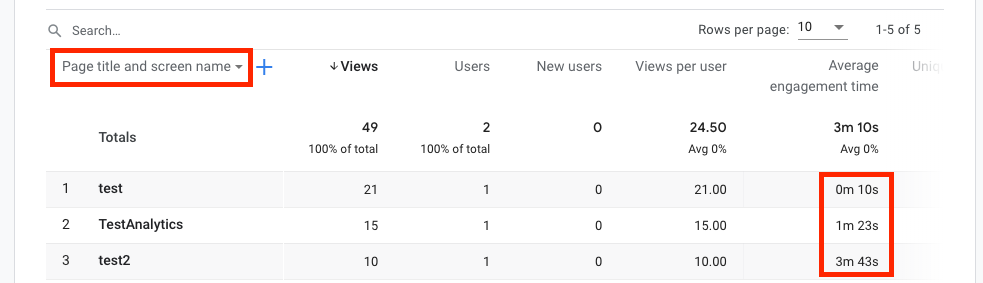
After some time we can see Average Engagement Times for visited paths (screens) on
Firebase -> Analytics -> Dashboard -> View pages and screens.
To see data for screen names (routes) switch from 'Page title and screen class' to 'Page title and screen name'.
### Expected behavior
Average Engagement Time of the route `/test` should be much bigger then the one of the `/test2` route.
### Actual behavior
Average Engagement Time of the route `/test` is much smaller then the one of `/test2` route.
It looks like previous engagement time is added to the next visited route (screen). It should be added to the previous route (screen).
Guida per i contributori
Apri la guida per i contributori
Direzione di ricerca
Inizia dalla registrazione di ScreenTrackingService in AppModule e riproduci la sequenza di route della demo collegata, visitando /test e /test2 come descritto. Confronta i risultati del coinvolgimento nelle schermate di Firebase Analytics con l’attribuzione delle route prevista; il lavoro è completato quando la route /test, attiva più a lungo, riporta un tempo medio di coinvolgimento sostanzialmente superiore a /test2.
Scritto dal modello di indicizzazione a partire dal testo della issue.
Valutazione
- Stack tecnologico
- angular, firebase, typescript
- Ambito
- analytics, frontend
- Tipo di issue
- Bug
- Difficoltà
- 4/5
- Tempo stimato
- 3-5 giorni
- Stato di attività
- Ferma
- Chiarezza
- Abbastanza chiara
- Idoneità per principianti
- 35/100