Analytics: When using ScreenTrackingService the average engagement time is calculated the wrong way
- Langage dominant
- TypeScript
- Étoiles
- 7.8k
- Forks
- 2.2k
- Merge moyen
- 22 h 28 min
- PR mergées (30 j)
- 6
Description
### Version info
**Angular:**
"@angular/animations": "13.1.3",
"@angular/common": "13.1.3",
"@angular/compiler": "13.1.3",
"@angular/core": "13.1.3",
"@angular/forms": "13.1.3",
"@angular/platform-browser": "13.1.3",
"@angular/platform-browser-dynamic": "13.1.3",
"@angular/router": "13.1.3",
"rxjs": "7.4.0",
"tslib": "2.3.1",
"zone.js": "0.11.4",
"typescript": "4.5.5"
**Firebase:**
"firebase": "9.6.7",
**AngularFire:**
"@angular/fire": "7.2.1",
**System:**
NodeJS: v12.20.2
npm: 6.14.11
OS: macOS Monterey (12.2.1)
### How to reproduce these conditions
[Demo example](https://github.com/timkos/test-analytics) (fix firebase config in AppModule)
**Steps to set up and reproduce**
1. provide FirebaseApp and Analytics and add ScreenTrackingService to AppModule:
```
imports: [
BrowserModule,
AppRoutingModule,
provideFirebaseApp(() =>
initializeApp(config)
),
provideAnalytics(() => getAnalytics())
],
providers: [ScreenTrackingService] ```
2. Create two routes `/test` and `/test2`. The route `/test` we will visit and stay on it for a longer time. On the other hand, we will always go to `/test2` just for a short time and then always go back to `/test` route.
**Sample data and security rules**
### Debug output
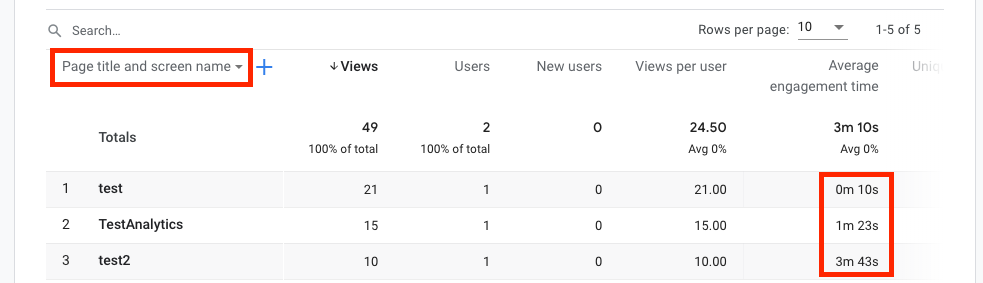
After some time we can see Average Engagement Times for visited paths (screens) on
Firebase -> Analytics -> Dashboard -> View pages and screens.
To see data for screen names (routes) switch from 'Page title and screen class' to 'Page title and screen name'.
### Expected behavior
Average Engagement Time of the route `/test` should be much bigger then the one of the `/test2` route.
### Actual behavior
Average Engagement Time of the route `/test` is much smaller then the one of `/test2` route.
It looks like previous engagement time is added to the next visited route (screen). It should be added to the previous route (screen).
Guide de contribution
Ouvrir le guide de contribution
Piste de recherche
Commencez par l’enregistrement de ScreenTrackingService dans AppModule et reproduisez la séquence de routes de la démo liée, en visitant /test et /test2 comme indiqué. Comparez les résultats d’engagement des écrans de Firebase Analytics avec l’attribution de routes attendue ; le travail est terminé lorsque la route /test, active plus longtemps, indique une durée moyenne d’engagement nettement supérieure à celle de /test2.
Rédigé par le modèle d'indexation à partir du texte de l'issue.
Évaluation
- Stack technique
- angular, firebase, typescript
- Domaine
- analytics, frontend
- Type d'issue
- Bug
- Difficulté
- 4/5
- Temps estimé
- 3-5 jours
- Activité
- À l'abandon
- Clarté
- Plutôt claire
- Accessibilité débutants
- 35/100