PathOfBuildingCommunity / PathOfBuildingCommunity/PathOfBuilding
Adding jewel to build, improve ui behaviour (scrollbar, tooltips)
Chưa có ai nhận issue này.
- Ngôn ngữ chính
- Lua
- Star
- 5.4k
- Fork
- 2.4k
- Merge trung bình
- 1 ngày 12 giờ
- Pull request đã merge (30 ngày)
- 26
Mô tả
Check for duplicates
- I've checked for duplicate issues by using the search function of the issue tracker
Is your feature request related to a problem?
Hi, first time posting on github so pardon me if I sound too peasant. I've checked for similar requests but found none, sorry if it's a duplicate
Issue 1: adding a jewel to a build (jewel specifically because you add a lot of them and they all modify different stats) creates a lot of visual clutter with tooltips. "Adding this to socket 10 will do this and this" the more the sockets, the bigger the issue.
Eventually, a scroll bar appears at the bottom but:
sort of issue 2:
choosing a jewel from the unique list
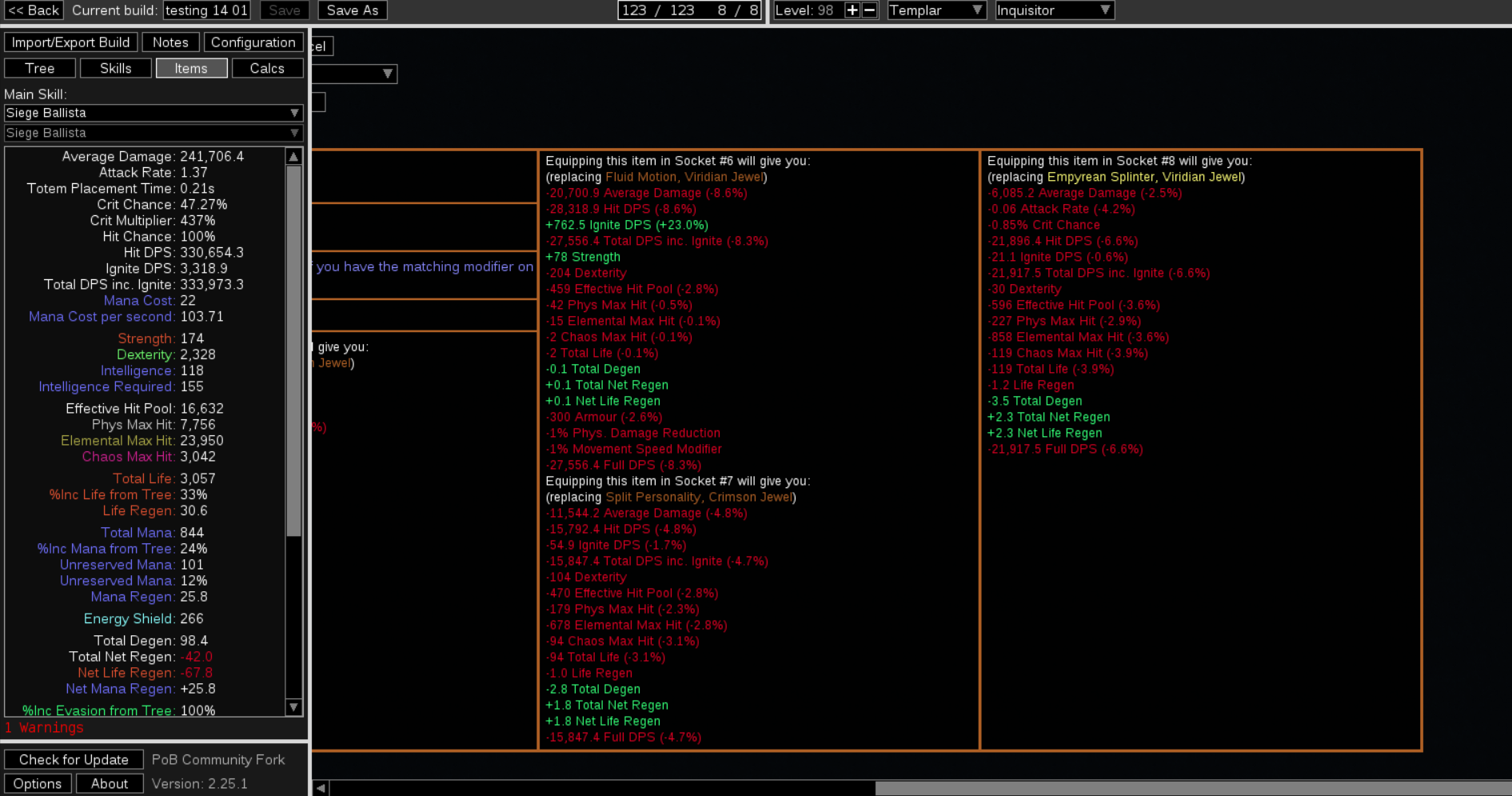
or importing a pre crafted jewel

moves your bar to the far end meaning you have to scroll back left to finishing importing the item to your build. I can see how some people might want to inspect stats before adding the item but me in particular I'd like to just add it without scrolling back
Describe the solution you'd like
I'd like a setting option or a check or a ctrl toggle to disable comparisons
Or that the default bar postion when importing wasn't to the far right.
Alternatively, keep always "pinned" the box with [add to build, edit, cancel, corrupt, ... ] to bypass the need to scroll
Describe alternatives you've considered
No response
Additional context
No response
Hướng dẫn đóng góp
Bắt đầu từ đâu
- Đọc hết issue, rồi đọc hướng dẫn đóng góp của dự án.
- Bình luận trên issue rằng bạn sẽ nhận — tránh hai người làm cùng một việc.
- Fork repository và làm thay đổi trên một nhánh.
- Mở pull request có tham chiếu số hiệu của issue.
Hướng nghiên cứu
Bắt đầu bằng cách xác định các điểm vào của việc chọn jewel và nhập jewel được tạo sẵn, sau đó theo dõi hành vi so sánh tooltip và thanh cuộn ngang được thể hiện trong issue. Công việc được xem là hoàn tất khi tương tác được chọn ngăn chặn hoặc tránh vị trí cuộn không mong muốn ở ngoài cùng bên phải, đồng thời vẫn duy trì quyền truy cập vào các control thêm, chỉnh sửa, hủy và các control liên quan.
Do mô hình lập chỉ mục viết ra từ nội dung của issue.
Đánh giá
- Công nghệ
- lua
- Lĩnh vực
- desktop
- Loại issue
- Tính năng
- Độ khó
- 4/5
- Thời gian dự kiến
- 3-5 ngày
- Mức độ hoạt động
- Đình trệ
- Độ rõ ràng
- Khá rõ ràng
- Mức phù hợp với người mới
- 25/100