PathOfBuildingCommunity / PathOfBuildingCommunity/PathOfBuilding
Adding jewel to build, improve ui behaviour (scrollbar, tooltips)
Nadie ha tomado este issue todavía.
- Lenguaje dominante
- Lua
- Estrellas
- 5.4k
- Forks
- 2.4k
- Merge medio
- 1 d 12 h
- PR fusionados (30 d)
- 26
Descripción
Check for duplicates
- I've checked for duplicate issues by using the search function of the issue tracker
Is your feature request related to a problem?
Hi, first time posting on github so pardon me if I sound too peasant. I've checked for similar requests but found none, sorry if it's a duplicate
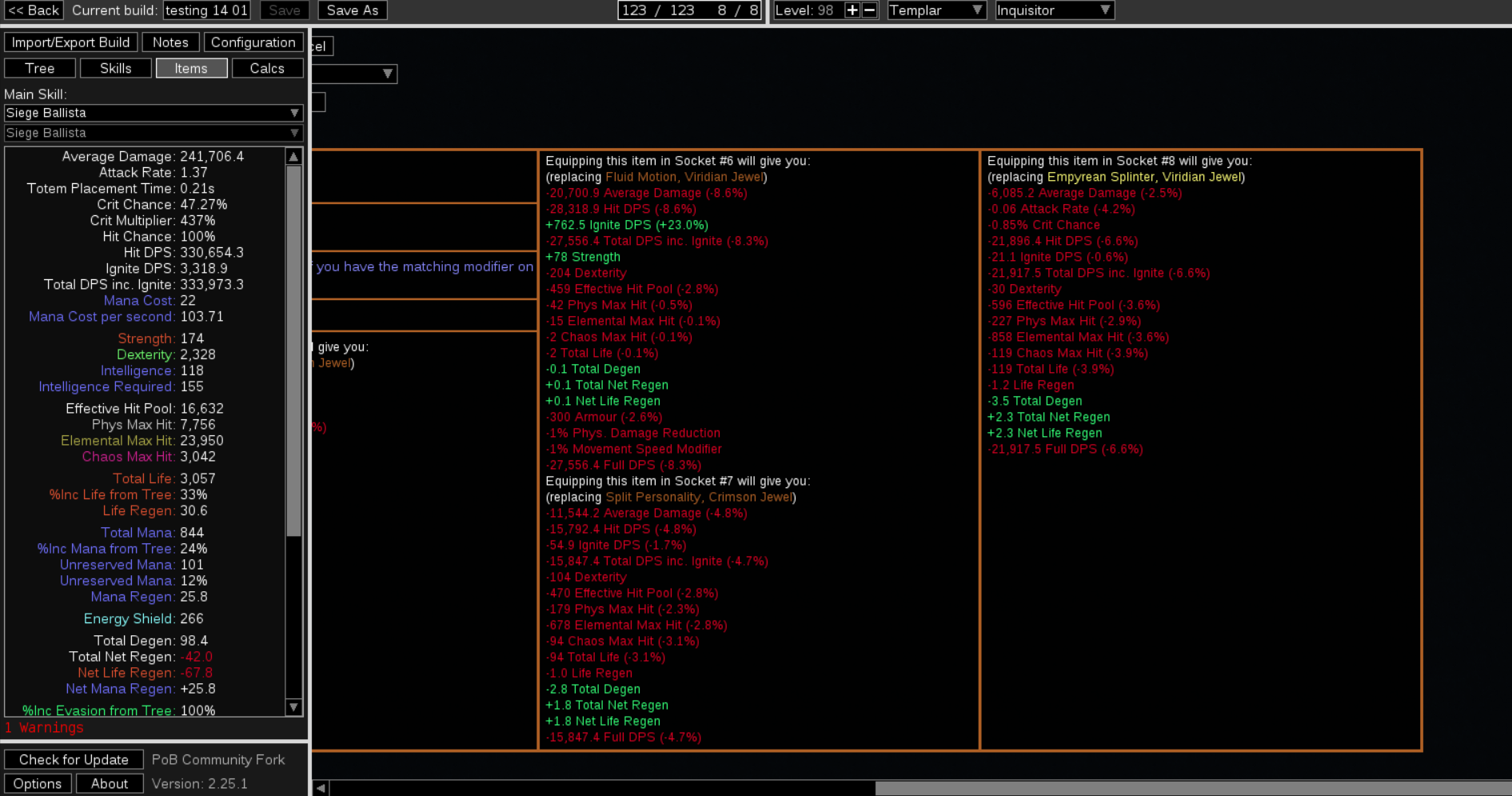
Issue 1: adding a jewel to a build (jewel specifically because you add a lot of them and they all modify different stats) creates a lot of visual clutter with tooltips. "Adding this to socket 10 will do this and this" the more the sockets, the bigger the issue.
Eventually, a scroll bar appears at the bottom but:
sort of issue 2:
choosing a jewel from the unique list
or importing a pre crafted jewel

moves your bar to the far end meaning you have to scroll back left to finishing importing the item to your build. I can see how some people might want to inspect stats before adding the item but me in particular I'd like to just add it without scrolling back
Describe the solution you'd like
I'd like a setting option or a check or a ctrl toggle to disable comparisons
Or that the default bar postion when importing wasn't to the far right.
Alternatively, keep always "pinned" the box with [add to build, edit, cancel, corrupt, ... ] to bypass the need to scroll
Describe alternatives you've considered
No response
Additional context
No response
Guía de contribución
Primeros pasos
- Lee el issue completo y luego la guía de contribución del proyecto.
- Comenta en el issue que vas a ocuparte — evita que dos personas hagan lo mismo.
- Haz un fork del repositorio y trabaja en una rama.
- Abre un pull request que haga referencia al número del issue.
Línea de trabajo
Comienza localizando los puntos de entrada para la selección de joyas y la importación de joyas prefabricadas; después, sigue el comportamiento de la comparación de tooltips y de la barra de desplazamiento horizontal que se muestra en el issue. Se considera terminado cuando la interacción elegida impide o evita la posición de desplazamiento no deseada en el extremo derecho, al tiempo que conserva el acceso a los controles de añadir, editar, cancelar y los relacionados.
Escrito por el modelo de indexación a partir del texto del issue.
Evaluación
- Stack tecnológico
- lua
- Área
- desktop
- Tipo de issue
- Nueva funcionalidad
- Dificultad
- 4/5
- Tiempo estimado
- 3-5 días
- Estado de actividad
- Estancado
- Claridad
- Bastante claro
- Aptitud para principiantes
- 25/100