PathOfBuildingCommunity / PathOfBuildingCommunity/PathOfBuilding
Adding jewel to build, improve ui behaviour (scrollbar, tooltips)
Dieses Issue hat noch niemand übernommen.
- Vorherrschende Sprache
- Lua
- Sterne
- 5.4k
- Forks
- 2.4k
- Ø Merge
- 1 T. 12 Std.
- Gemergte PRs (30 T.)
- 26
Beschreibung
Check for duplicates
- I've checked for duplicate issues by using the search function of the issue tracker
Is your feature request related to a problem?
Hi, first time posting on github so pardon me if I sound too peasant. I've checked for similar requests but found none, sorry if it's a duplicate
Issue 1: adding a jewel to a build (jewel specifically because you add a lot of them and they all modify different stats) creates a lot of visual clutter with tooltips. "Adding this to socket 10 will do this and this" the more the sockets, the bigger the issue.
Eventually, a scroll bar appears at the bottom but:
sort of issue 2:
choosing a jewel from the unique list
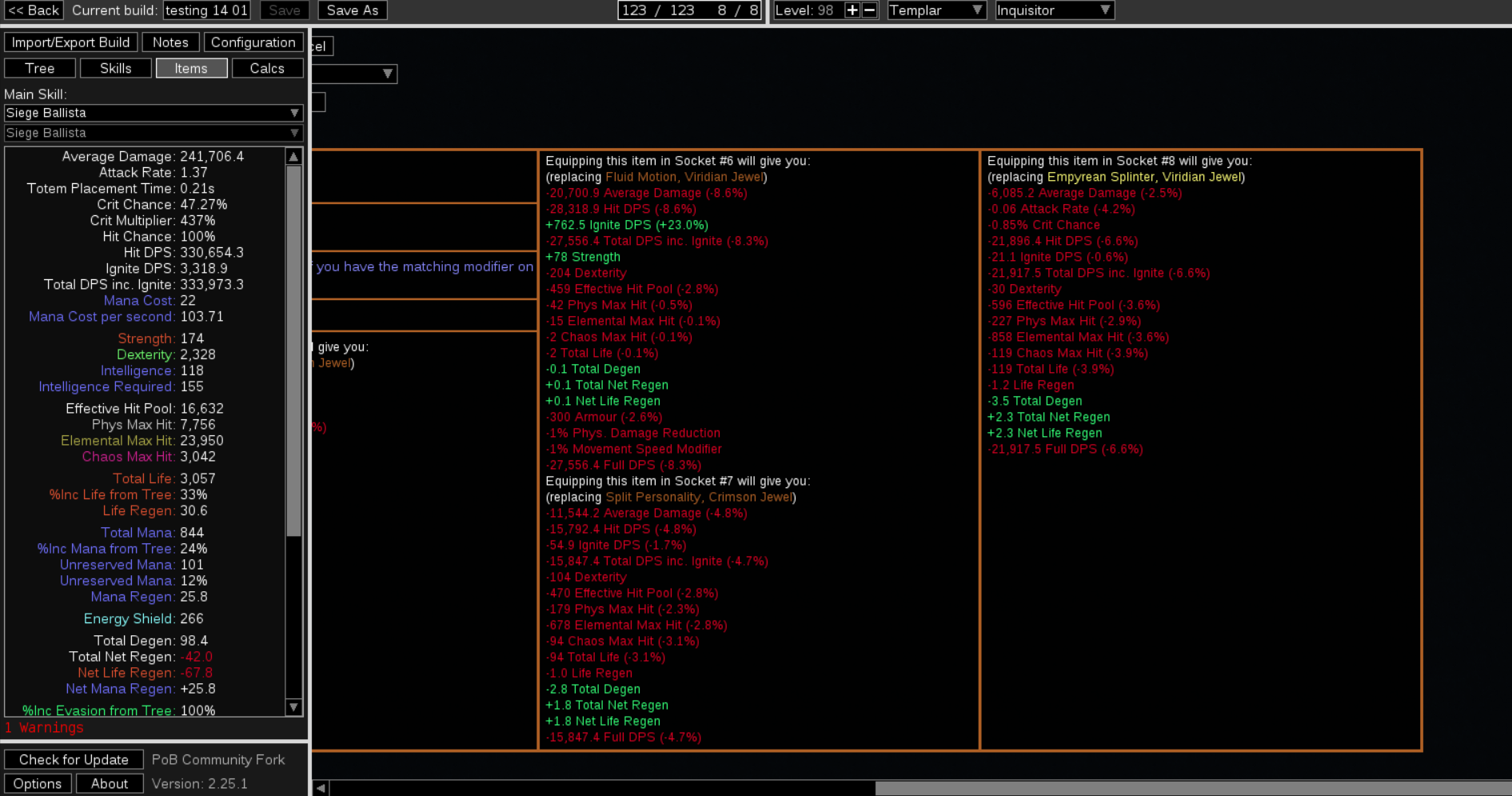
or importing a pre crafted jewel

moves your bar to the far end meaning you have to scroll back left to finishing importing the item to your build. I can see how some people might want to inspect stats before adding the item but me in particular I'd like to just add it without scrolling back
Describe the solution you'd like
I'd like a setting option or a check or a ctrl toggle to disable comparisons
Or that the default bar postion when importing wasn't to the far right.
Alternatively, keep always "pinned" the box with [add to build, edit, cancel, corrupt, ... ] to bypass the need to scroll
Describe alternatives you've considered
No response
Additional context
No response
Beitragsleitfaden
Erste Schritte
- Lies das ganze Issue und danach den Beitragsleitfaden des Projekts.
- Schreib ins Issue, dass du es übernimmst — das erspart doppelte Arbeit.
- Forke das Repository und arbeite in einem Branch.
- Öffne einen Pull Request, der die Issue-Nummer nennt.
Rechercherichtung
Beginne damit, die Einstiegspunkte für die Juwelenauswahl und den Import vorgefertigter Juwelen zu finden, und verfolge anschließend das im Issue gezeigte Verhalten des Tooltip-Vergleichs und der horizontalen Bildlaufleiste. Als erledigt gilt die Aufgabe, wenn die ausgewählte Interaktion die unerwünschte Scrollposition ganz rechts verhindert oder vermeidet und gleichzeitig den Zugriff auf die Steuerelemente zum Hinzufügen, Bearbeiten, Abbrechen und die zugehörigen Steuerelemente erhält.
Vom Indexierungsmodell aus dem Issue-Text verfasst.
Bewertung
- Tech-Stack
- lua
- Bereich
- desktop
- Issue-Typ
- Feature
- Schwierigkeit
- 4/5
- Geschätzter Aufwand
- 3-5 Tage
- Aktivitätsstatus
- Veraltet
- Klarheit
- Größtenteils klar
- Anfängerfreundlichkeit
- 25/100