PathOfBuildingCommunity / PathOfBuildingCommunity/PathOfBuilding
Adding jewel to build, improve ui behaviour (scrollbar, tooltips)
Nessuno ha ancora preso questa issue.
- Lingua principale
- Lua
- Stelle
- 5.4k
- Fork
- 2.4k
- Merge medio
- 1g 12h
- PR unite (30g)
- 26
Descrizione
Check for duplicates
- I've checked for duplicate issues by using the search function of the issue tracker
Is your feature request related to a problem?
Hi, first time posting on github so pardon me if I sound too peasant. I've checked for similar requests but found none, sorry if it's a duplicate
Issue 1: adding a jewel to a build (jewel specifically because you add a lot of them and they all modify different stats) creates a lot of visual clutter with tooltips. "Adding this to socket 10 will do this and this" the more the sockets, the bigger the issue.
Eventually, a scroll bar appears at the bottom but:
sort of issue 2:
choosing a jewel from the unique list
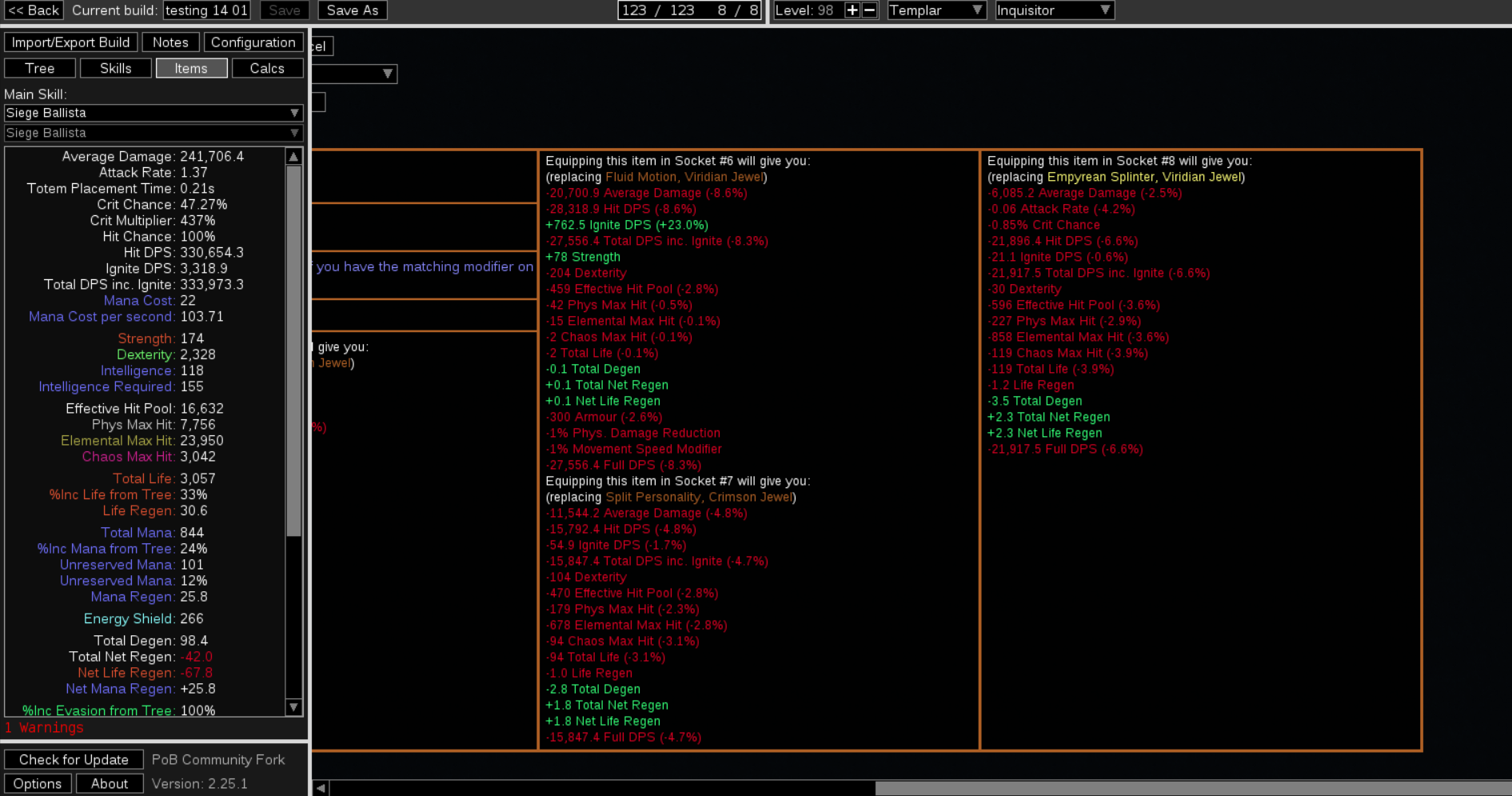
or importing a pre crafted jewel

moves your bar to the far end meaning you have to scroll back left to finishing importing the item to your build. I can see how some people might want to inspect stats before adding the item but me in particular I'd like to just add it without scrolling back
Describe the solution you'd like
I'd like a setting option or a check or a ctrl toggle to disable comparisons
Or that the default bar postion when importing wasn't to the far right.
Alternatively, keep always "pinned" the box with [add to build, edit, cancel, corrupt, ... ] to bypass the need to scroll
Describe alternatives you've considered
No response
Additional context
No response
Guida per i contributori
Apri la guida per i contributori
Come iniziare
- Leggi tutta la issue e poi la guida ai contributi del progetto.
- Commenta sulla issue per dire che te ne occupi tu — evita che due persone facciano lo stesso lavoro.
- Fai un fork del repository e lavora su un branch.
- Apri una pull request che faccia riferimento al numero della issue.
Direzione di ricerca
Inizia individuando i punti di ingresso per la selezione delle gemme e l’importazione delle gemme precostruite, quindi traccia il comportamento del confronto dei tooltip e della barra di scorrimento orizzontale mostrato nell’issue. Il lavoro è completato quando l’interazione scelta impedisce o evita la posizione di scorrimento indesiderata all’estrema destra, preservando al contempo l’accesso ai controlli per aggiungere, modificare, annullare e ai controlli correlati.
Scritto dal modello di indicizzazione a partire dal testo della issue.
Valutazione
- Stack tecnologico
- lua
- Ambito
- desktop
- Tipo di issue
- Funzionalità
- Difficoltà
- 4/5
- Tempo stimato
- 3-5 giorni
- Stato di attività
- Ferma
- Chiarezza
- Abbastanza chiara
- Idoneità per principianti
- 25/100