Tutorial font hard to read
まだ誰も着手していません。
- 主要言語
- JavaScript
- スター
- 11.8k
- フォーク
- 7.9k
- 平均マージ
- 1日 11時間
- マージ済み PR(30日)
- 11
説明
I worked through the tutorial today, it suggests:
We strongly recommend typing code by hand as you’re working through the tutorial and not using copy/paste. This will help you develop muscle memory and a stronger understanding.
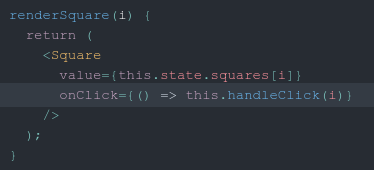
I agree with it, but I found impossible because I cannot tell the difference between Braces {} and Parentheses () due to the font.
I'm using Chrome on Ubuntu 20,04 with the Yarun-dark theme so perhaps that causes the issue.
For example the left braces in the copied image below look like parentheses
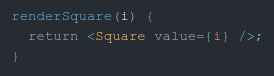
rather than
  renderSquare(i) {
    return <Square value={i} />;
  }
The right braces on below look different on the value= and onClick= lines as well
コントリビューションガイド
はじめの一歩
- issue を最後まで読み、次にプロジェクトのコントリビューションガイドを読みます。
- 着手することを issue にコメントします — 二人が同じ作業をするのを防げます。
- リポジトリをフォークし、ブランチを切って変更します。
- issue 番号を参照したプルリクエストを送ります。
調査の方向性
影響を受けるチュートリアルページから始め、スクリーンショットと JSX の例を参照しながら、Yarun-dark テーマを使用した Ubuntu 20.04 上の Chrome で中括弧と丸括弧の表示を再現してください。ページに表示されるコードのスタイルを追跡し、fix の完了時にチュートリアル内で中括弧と丸括弧が視覚的に区別できることを確認してください。
索引モデルが issue の本文から書いたものです。
評価
- 技術スタック
- javascript, react
- 領域
- documentation, frontend
- issue の種類
- バグ
- 難易度
- 3/5
- 見積もり時間
- 1〜2日
- 活発さ
- 停滞
- 明瞭さ
- おおむね明確
- 初心者へのやさしさ
- 42/100