Tutorial font hard to read
還沒有人認領這個 Issue。
- 主要語言
- JavaScript
- 星號
- 11.8k
- 分支
- 7.9k
- 平均合併
- 1 天 11 小時
- 30 天內合併 PR
- 11
描述
I worked through the tutorial today, it suggests:
We strongly recommend typing code by hand as you’re working through the tutorial and not using copy/paste. This will help you develop muscle memory and a stronger understanding.
I agree with it, but I found impossible because I cannot tell the difference between Braces {} and Parentheses () due to the font.
I'm using Chrome on Ubuntu 20,04 with the Yarun-dark theme so perhaps that causes the issue.
For example the left braces in the copied image below look like parentheses
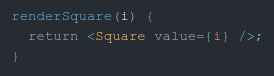
rather than
  renderSquare(i) {
    return <Square value={i} />;
  }
The right braces on below look different on the value= and onClick= lines as well
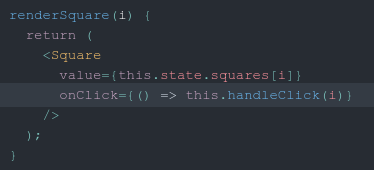
貢獻指南
從這裡開始
- 先讀完整個 Issue,再讀專案的貢獻指南。
- 在 Issue 下留言說明你要接手 —— 這能避免兩個人做同樣的事。
- Fork 儲存庫,在一個分支上完成修改。
- 送出 Pull Request,並在描述裡引用這個 Issue 編號。
研究方向
從受影響的教學頁面開始,使用螢幕截圖和 JSX 範例作為參考,在使用 Yarun-dark 主題的 Ubuntu 20.04 上透過 Chrome 重現大括號和小括號的呈現效果。追蹤頁面上顯示的程式碼樣式,並確認修復完成後,教學中的大括號和小括號在視覺上可以區分。
由索引模型根據 Issue 內容生成。
評估
- 技術堆疊
- javascript, react
- 領域
- documentation, frontend
- Issue 類型
- 缺陷
- 難度
- 3/5
- 預估耗時
- 1-2 天
- 活躍度
- 停滯
- 描述清晰度
- 基本清楚
- 新手友好度
- 42/100