Tutorial font hard to read
Nobody has claimed this yet.
- Dominant language
- JavaScript
- Stars
- 11.8k
- Forks
- 7.9k
- Avg merge
- 1d 11h
- Merged PRs (30d)
- 11
Description
I worked through the tutorial today, it suggests:
We strongly recommend typing code by hand as you’re working through the tutorial and not using copy/paste. This will help you develop muscle memory and a stronger understanding.
I agree with it, but I found impossible because I cannot tell the difference between Braces {} and Parentheses () due to the font.
I'm using Chrome on Ubuntu 20,04 with the Yarun-dark theme so perhaps that causes the issue.
For example the left braces in the copied image below look like parentheses
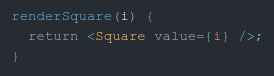
rather than
  renderSquare(i) {
    return <Square value={i} />;
  }
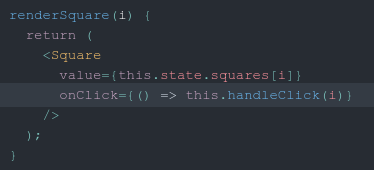
The right braces on below look different on the value= and onClick= lines as well
Contributor guide
First steps
- Read the whole issue, then the project's contributing guide.
- Comment on the issue to say you are picking it up — it saves two people doing the same work.
- Fork the repository and make your change on a branch.
- Open a pull request that references the issue number.
Research direction
Start with the affected tutorial page and reproduce the brace and parenthesis rendering in Chrome on Ubuntu 20.04 with the Yarun-dark theme, using the screenshots and JSX examples as references. Trace the page's displayed code styling and verify that braces and parentheses are visually distinguishable in the tutorial when the fix is done.
Written by the indexing model from the issue text.
Assessment
- Tech stack
- javascript, react
- Domain
- documentation, frontend
- Issue type
- Bug
- Difficulty
- 3/5
- Estimated time
- 1-2 days
- Activity status
- Stale
- Clarity
- Mostly clear
- Newbie friendliness
- 42/100