Python uninstalls wrong instance if it isn't installed in C:/...
まだ誰も着手していません。
- 主要言語
- Python
- スター
- 77.2k
- フォーク
- 36k
- PR マージ指標
- PR 指標を取得中
説明
Bug report
I had Python 3.9.08 installed for all users in C:\Program Files\Python39 (aka the one in C)
It was in path and I was mainly using it through vs code
I had to install py 3.9.13 for a spesific module
i installd it again for all users and pip in X:\Program Files\Python39 (aka the one in x)
In path the x version was higher then the c version an so replaced the system version witch i dont mint
now tho the problem.
Wenn i want to use pip is gives me this error

So i tried to reinstall the x version and i use the uninstaller via the controll panel (i verifi iit was the correct one via the date)
but i wonderd why i would dnt disapier after i ran it.
But i discoverd that i didn't uninstall no matter how many time i run it. So i
I checked with file explorer an every thing was still there
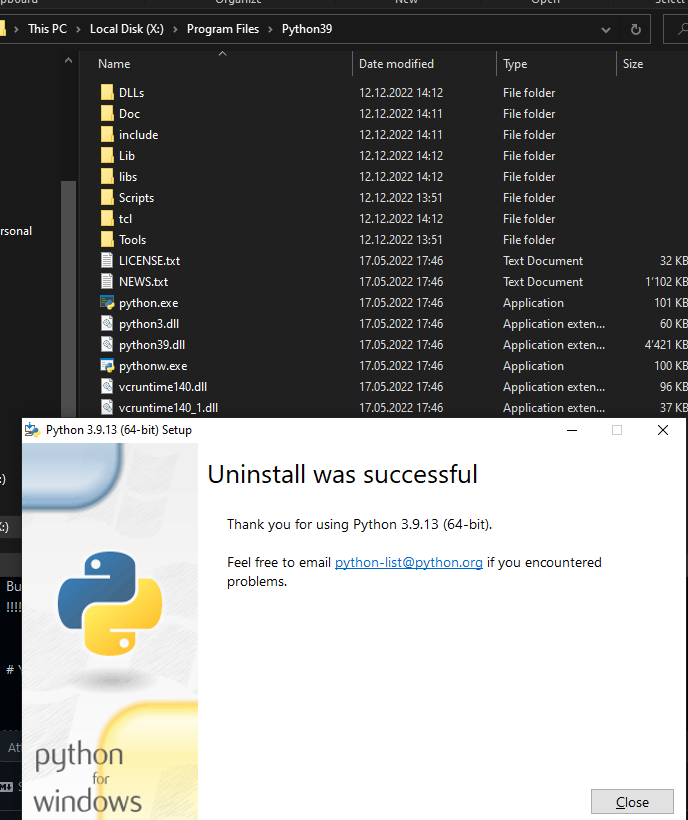
so i cheched if the c version was still there
!!!!!!! IT F*** UNINSTALLD THE C VERSION !!!!!!!
idk how but this is bad....
Your environment
Edition Windows 10 Home
Version 22H2
Installed on 06.09.2020
OS build 19045.2311
Experience Windows Feature Experience Pack 120.2212.4190.0
Im not how i installed the c version but i ~the same as the x version exept for the path
コントリビューションガイド
はじめの一歩
- issue を最後まで読み、次にプロジェクトのコントリビューションガイドを読みます。
- 着手することを issue にコメントします — 二人が同じ作業をするのを防げます。
- リポジトリをフォークし、ブランチを切って変更します。
- issue 番号を参照したプルリクエストを送ります。
調査の方向性
まず、C:\Program Files と X:\Program Files にある2つの全ユーザー向け Python インストールを使って Windows 10 で報告を再現し、その後 Control Panel を使って X: のインスタンスをアンインストールします。C: のインストールが削除される理由を特定するため、インストーラーとアンインストールの動作を調査します。選択したインスタンスが削除され、もう一方が残れば完了です。
索引モデルが issue の本文から書いたものです。
評価
- 技術スタック
- python
- 領域
- operating-systems
- issue の種類
- バグ
- 難易度
- 4/5
- 見積もり時間
- 3〜5日
- 活発さ
- 停滞
- 明瞭さ
- おおむね明確
- 初心者へのやさしさ
- 25/100