Table cell misalignment and table getting wider when moving the mouse over it with flex layout
Open
Nobody has claimed this yet.
bug
dash-data-table
P3
- Dominant language
- Python
- Stars
- 24.4k
- Forks
- 2.3k
- Avg merge
- 2d 7h
- Merged PRs (30d)
- 13
Description
Describe your context
Here's my setup:
python --version
Python 3.7.5

conda list dash
# Name                    Version
dash                      1.4.1
dash-core-components      1.3.1
dash-html-components      1.0.1
dash-renderer             1.1.2
dash-table                4.4.1
- OS: Windows 7
- Browsers:
- Chrome 77.0.3865.75
- IE 11.0.9600.19504
Describe the bug
Consider there following piece of code:
import os

import dash
import dash_html_components as html
import dash_table
import pandas as pd

df = pd.read_csv('https://raw.githubusercontent.com/plotly/datasets/master/solar.csv')

app = dash.Dash(__name__)

app.layout = html.Div(
    children=[
        dash_table.DataTable(
            id='table',
            columns=[{'name': c, 'id': c} for c in df.columns],
            fixed_rows=dict(headers=True, data=0),
            data=df.to_dict('records')
        )
    ],
    className='eight columns',
    style={'display': 'flex', 'justify-content': 'center'})

if __name__ == '__main__':
    app.run_server(debug=True)
Now we have two problems:
- The browser renders the table with a misalignment between header and the rest of the table, see screenshots below
- When I start moving my mouse over the table then every time the mouse pointer crosses any of the cell boundaries then the table gets a few pixels wider (in Chrome) or smaller (in IE), see screenshots below.
Expected behavior
- There should be no misalignment between header and the rest of the table
- The mouse moving over the table should have no effect whatsoever.
Screenshots
Initial state in Chrome:

After having moved the mouse over the table for a bit:
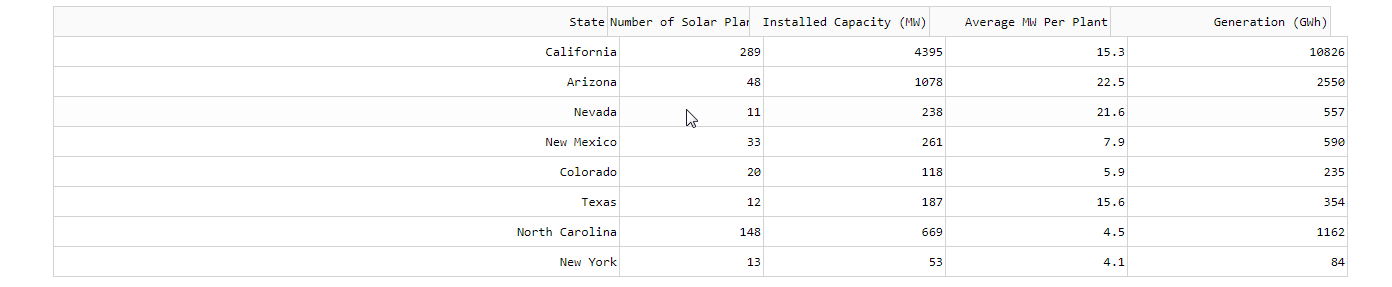
Initial state in IE:

After having moved the mouse over the table for a bit:

Contributor guide
First steps
- Read the whole issue, then the project's contributing guide.
- Comment on the issue to say you are picking it up — it saves two people doing the same work.
- Fork the repository and make your change on a branch.
- Open a pull request that references the issue number.
Research direction
Reproduce the issue with the provided Python Dash DataTable example, using the flex layout and fixed header rows. Check the header/body alignment and table width while moving the pointer across cell boundaries in Chrome and IE. Done means the header remains aligned and mouse movement no longer changes the table width.
Written by the indexing model from the issue text.
Assessment
- Tech stack
- python
- Domain
- frontend
- Issue type
- Bug
- Difficulty
- 3/5
- Estimated time
- 1-2 days
- Activity status
- Stale
- Clarity
- Mostly clear
- Newbie friendliness
- 35/100