microsoft / microsoft/vscode-cpptools
Gives confusing hints when different defining spellings.
まだ誰も着手していません。
- 主要言語
- TypeScript
- スター
- 6.2k
- フォーク
- 1.7k
- 平均マージ
- 14時間 46分
- マージ済み PR(30日)
- 61
説明
Environment
- OS and version: Windows 7 x64 SP1 and Neon Linux 5.24
- VS Code: 1.67.2
- C/C++ extension: 1.10.4 and 1.9.8
- OS and version of remote machine (if applicable):
- GDB / LLDB version: gdb 9.2 on Neon Linux and gdb 11.2 on Windows 7
Bug Summary and Steps to Reproduce
Bug Summary:
variable value hint bug when debug
code like this
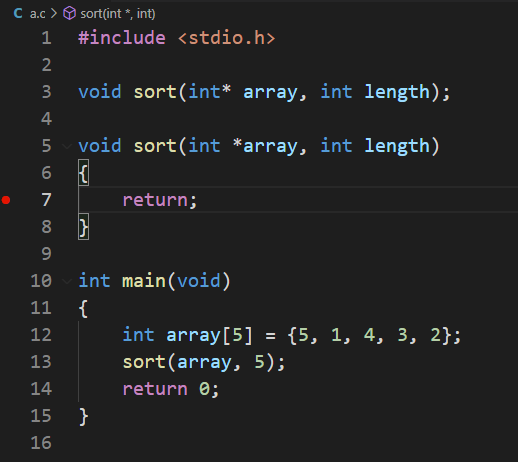
Steps to reproduce:
- start debug
int* array show array's addreess.
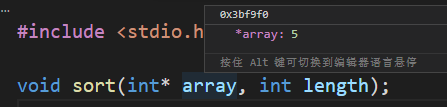
int *array show array's element (first element of array).
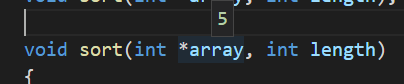
I got confused a bit when I saw this, when I was debugging.
I think this behavior is weird, and it should be displaying the array address, not an indirect operation on the array address. These two ways of writing should have the same display content, right?
Should a judgment be added to distinguish whether the identifier is in the definition or the value?
Debugger Configurations
# tasks.json

// tasks.json

{
    "tasks": [
        {
            "type": "cppbuild",
            "label": "C/C++: gcc.exe 生成活动文件",
            // "command": "D:\\SoftwareInstallation\\Windows7\\ProgramFiles\\MinGW-w64\\win32\\bin\\gcc.exe",
            "command": "D:\\SoftwareInstallation\\Windows7\\ProgramFiles\\MinGW-w64\\posix-new\\winlibs-x86_64-posix-seh-gcc-11.3.0-mingw-w64msvcrt-10.0.0-r2\\mingw64\\bin\\gcc.exe",
            "args": [
                "-fdiagnostics-color=always",
                "-g",
                "${file}",
                "-o",
                "${workspaceFolder}\\bin\\${fileBasenameNoExtension}.exe",
                "-fexec-charset=GBK"
            ],
            "options": {
                "cwd": "${workspaceFolder}"
            },
            "problemMatcher": [
                "$gcc"
            ],
            "group": {
                "kind": "build",
                "isDefault": true
            },
            "detail": "调试器生成的任务。",
            "presentation": {
                "echo": true,
                "reveal": "silent",
                "focus": false,
                "panel": "shared",
                "showReuseMessage": false,
                "clear": false
            }
        }
    ],
    "version": "2.0.0"
}


# launch.json
```json
{
	// 使用 IntelliSense 了解相关属性。
	// 悬停以查看现有属性的描述。
	// 欲了解更多信息,请访问: https://go.microsoft.com/fwlink/?linkid=830387
	"version": "0.2.0",
	"configurations": [
		{
			"name": "gcc.exe - 生成和调试活动文件",
			"type": "cppdbg",
			"request": "launch",
			"program": "${workspaceFolder}\\bin\\${fileBasenameNoExtension}.exe",
			"args": [],
			"stopAtEntry": false,
			"cwd": "${workspaceFolder}",
			"environment": [],
			"externalConsole": false,
			"MIMode": "gdb",
			// "miDebuggerPath": "D:\\SoftwareInstallation\\Windows7\\ProgramFiles\\MinGW-w64\\win32\\bin\\gdb.exe",
			"miDebuggerPath": "D:\\SoftwareInstallation\\Windows7\\ProgramFiles\\MinGW-w64\\posix-new\\winlibs-x86_64-posix-seh-gcc-11.3.0-mingw-w64msvcrt-10.0.0-r2\\mingw64\\bin\\gdb.exe",
			"setupCommands": [
				{
					"description": "为 gdb 启用整齐打印",
					"text": "-enable-pretty-printing",
					"ignoreFailures": true
				}
			],
			"preLaunchTask": "C/C++: gcc.exe 生成活动文件"
		}
	]
}
### Debugger Logs

```shell
none
Other Extensions
No response
Additional Information
No response
コントリビューションガイド
はじめの一歩
- issue を最後まで読み、次にプロジェクトのコントリビューションガイドを読みます。
- 着手することを issue にコメントします — 二人が同じ作業をするのを防げます。
- リポジトリをフォークし、ブランチを切って変更します。
- issue 番号を参照したプルリクエストを送ります。
調査の方向性
まず、提供された tasks.json と launch.json の設定を使い、報告されている GDB のバージョンと 2 通りのポインター宣言の書き方で動作を再現します。それぞれの場合にデバッガーが表示する値を比較し、C/C++ 拡張機能の変数ヒントまたは式評価のエントリーポイントを調べます。表示動作が明確に定義され、回帰テストでカバーされていれば完了です。
索引モデルが issue の本文から書いたものです。
評価
- 技術スタック
- cpp, typescript
- 領域
- devtools
- issue の種類
- バグ
- 難易度
- 4/5
- 見積もり時間
- 3〜5日
- 活発さ
- 停滞
- 明瞭さ
- 説明が足りない
- 初心者へのやさしさ
- 32/100