microsoft / microsoft/vscode-cpptools
Gives confusing hints when different defining spellings.
Nadie ha tomado este issue todavía.
- Lenguaje dominante
- TypeScript
- Estrellas
- 6.2k
- Forks
- 1.7k
- Merge medio
- 14 h 46 min
- PR fusionados (30 d)
- 61
Descripción
Environment
- OS and version: Windows 7 x64 SP1 and Neon Linux 5.24
- VS Code: 1.67.2
- C/C++ extension: 1.10.4 and 1.9.8
- OS and version of remote machine (if applicable):
- GDB / LLDB version: gdb 9.2 on Neon Linux and gdb 11.2 on Windows 7
Bug Summary and Steps to Reproduce
Bug Summary:
variable value hint bug when debug
code like this
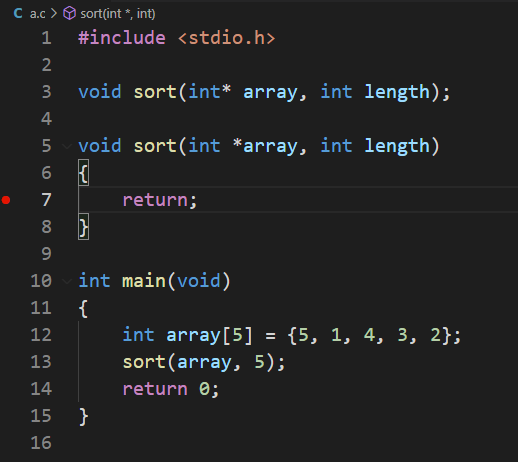
Steps to reproduce:
- start debug
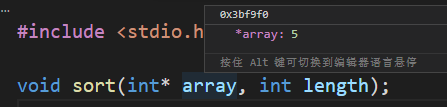
int* array show array's addreess.
int *array show array's element (first element of array).
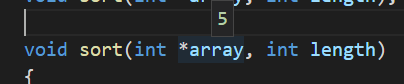
I got confused a bit when I saw this, when I was debugging.
I think this behavior is weird, and it should be displaying the array address, not an indirect operation on the array address. These two ways of writing should have the same display content, right?
Should a judgment be added to distinguish whether the identifier is in the definition or the value?
Debugger Configurations
# tasks.json

// tasks.json

{
    "tasks": [
        {
            "type": "cppbuild",
            "label": "C/C++: gcc.exe 生成活动文件",
            // "command": "D:\\SoftwareInstallation\\Windows7\\ProgramFiles\\MinGW-w64\\win32\\bin\\gcc.exe",
            "command": "D:\\SoftwareInstallation\\Windows7\\ProgramFiles\\MinGW-w64\\posix-new\\winlibs-x86_64-posix-seh-gcc-11.3.0-mingw-w64msvcrt-10.0.0-r2\\mingw64\\bin\\gcc.exe",
            "args": [
                "-fdiagnostics-color=always",
                "-g",
                "${file}",
                "-o",
                "${workspaceFolder}\\bin\\${fileBasenameNoExtension}.exe",
                "-fexec-charset=GBK"
            ],
            "options": {
                "cwd": "${workspaceFolder}"
            },
            "problemMatcher": [
                "$gcc"
            ],
            "group": {
                "kind": "build",
                "isDefault": true
            },
            "detail": "调试器生成的任务。",
            "presentation": {
                "echo": true,
                "reveal": "silent",
                "focus": false,
                "panel": "shared",
                "showReuseMessage": false,
                "clear": false
            }
        }
    ],
    "version": "2.0.0"
}


# launch.json
```json
{
	// 使用 IntelliSense 了解相关属性。
	// 悬停以查看现有属性的描述。
	// 欲了解更多信息,请访问: https://go.microsoft.com/fwlink/?linkid=830387
	"version": "0.2.0",
	"configurations": [
		{
			"name": "gcc.exe - 生成和调试活动文件",
			"type": "cppdbg",
			"request": "launch",
			"program": "${workspaceFolder}\\bin\\${fileBasenameNoExtension}.exe",
			"args": [],
			"stopAtEntry": false,
			"cwd": "${workspaceFolder}",
			"environment": [],
			"externalConsole": false,
			"MIMode": "gdb",
			// "miDebuggerPath": "D:\\SoftwareInstallation\\Windows7\\ProgramFiles\\MinGW-w64\\win32\\bin\\gdb.exe",
			"miDebuggerPath": "D:\\SoftwareInstallation\\Windows7\\ProgramFiles\\MinGW-w64\\posix-new\\winlibs-x86_64-posix-seh-gcc-11.3.0-mingw-w64msvcrt-10.0.0-r2\\mingw64\\bin\\gdb.exe",
			"setupCommands": [
				{
					"description": "为 gdb 启用整齐打印",
					"text": "-enable-pretty-printing",
					"ignoreFailures": true
				}
			],
			"preLaunchTask": "C/C++: gcc.exe 生成活动文件"
		}
	]
}
### Debugger Logs

```shell
none
Other Extensions
No response
Additional Information
No response
Guía de contribución
Primeros pasos
- Lee el issue completo y luego la guía de contribución del proyecto.
- Comenta en el issue que vas a ocuparte — evita que dos personas hagan lo mismo.
- Haz un fork del repositorio y trabaja en una rama.
- Abre un pull request que haga referencia al número del issue.
Línea de trabajo
Empieza reproduciendo el comportamiento con las configuraciones tasks.json y launch.json proporcionadas, usando las versiones de GDB indicadas y las dos formas de declarar punteros. Compara el valor mostrado por el depurador en cada caso e inspecciona el punto de entrada de la extensión C/C++ para las sugerencias de variables o la evaluación de expresiones; se considera terminado cuando el comportamiento de visualización está claramente definido y cubierto por una prueba de regresión.
Escrito por el modelo de indexación a partir del texto del issue.
Evaluación
- Stack tecnológico
- cpp, typescript
- Área
- devtools
- Tipo de issue
- Error
- Dificultad
- 4/5
- Tiempo estimado
- 3-5 días
- Estado de actividad
- Estancado
- Claridad
- Necesita aclaración
- Aptitud para principiantes
- 32/100