microsoft / microsoft/TypeScript
Improve code formatting for inferred type signatures on hover in VSC
Nobody has claimed this yet.
- Dominant language
- Go
- Stars
- 111k
- Forks
- 14.3k
- Avg merge
- 2d 4h
- Merged PRs (30d)
- 132
Description
Suggestion
🔍 Search Terms
VSC, code formatting, prettier, type signature, hover, inferred types
✅ Viability Checklist
My suggestion meets these guidelines:
- This wouldn't be a breaking change in existing TypeScript/JavaScript code
- This wouldn't change the runtime behavior of existing JavaScript code
- This could be implemented without emitting different JS based on the types of the expressions
- This isn't a runtime feature (e.g. library functionality, non-ECMAScript syntax with JavaScript output, new syntax sugar for JS, etc.)
- This feature would agree with the rest of TypeScript's Design Goals.
⭐ Suggestion
In VSC when hovering over a code element (e.g. a function call) it displays the definition of the code element (e.g. the function signature) combined with the inferred types.
Problem
For simple code elements (e.g. variables) the displayed result is usually easy to read but for more complex code elements (e.g. complex function definitions) the displayed definition gets hard to read.
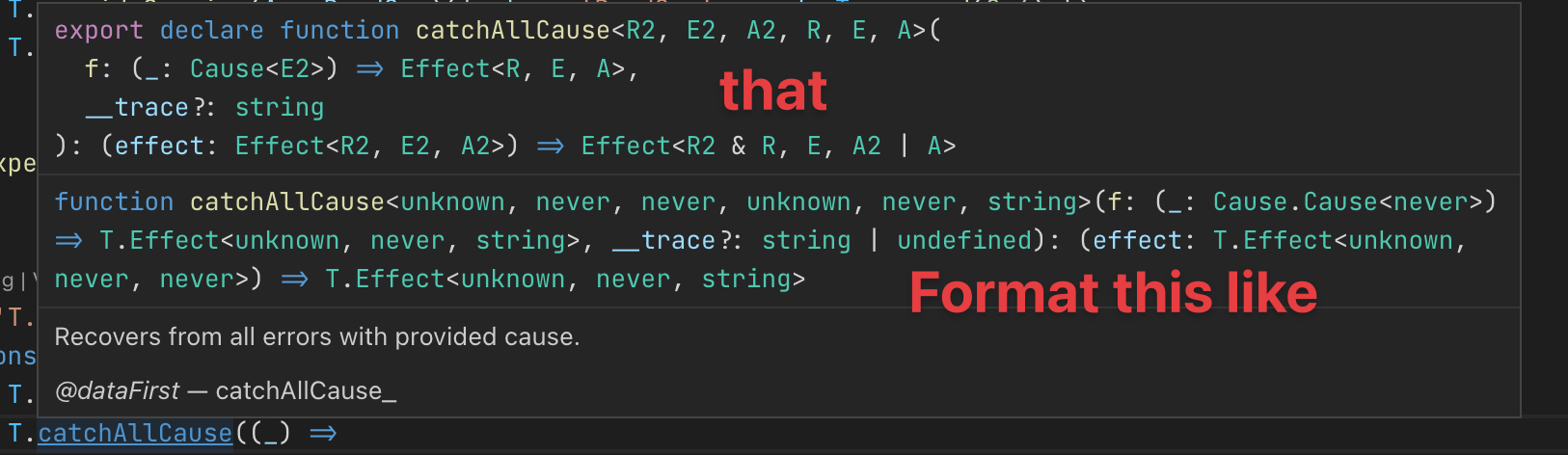
e.g. here's what I see when hovering over T.catchAllCause (see source)

For reference this is the corresponding source code (when I jump to definition) which is properly formatted:
/**
 * Recovers from all errors with provided cause.
 *
 * @dataFirst catchAllCause_
 */
export declare function catchAllCause<R2, E2, A2, R, E, A>(
  f: (_: Cause<E2>) => Effect<R, E, A>,
  __trace?: string
): (effect: Effect<R2, E2, A2>) => Effect<R2 & R, E, A2 | A>
Solution suggestion
It would be great if the rendered code definition were formatted/pretty printed to make it easier to read (or apply the original code formatting of the definition).
Here's an annotated version of my suggestion based on what I'm seeing when holding down the CMD key.
Contributor guide
First steps
- Read the whole issue, then the project's contributing guide.
- Comment on the issue to say you are picking it up — it saves two people doing the same work.
- Fork the repository and make your change on a branch.
- Open a pull request that references the issue number.
Research direction
Start with the VSC hover output described in the issue and compare it with the properly formatted TypeScript source example from Effect-TS. Trace how inferred type signatures are rendered for hover results. Done means complex definitions are consistently formatted and remain readable in VSC.
Written by the indexing model from the issue text.
Assessment
- Tech stack
- typescript, vscode
- Domain
- developer-experience, tooling
- Issue type
- Feature
- Difficulty
- 4/5
- Estimated time
- 3-5 days
- Activity status
- Stale
- Clarity
- Mostly clear
- Newbie friendliness
- 42/100