matplotlib / matplotlib/ipympl
figures that start in background tabs are cut off at bottom
Nadie ha tomado este issue todavía.
- Lenguaje dominante
- Jupyter Notebook
- Estrellas
- 1.7k
- Forks
- 234
- Métricas de merge de PR
- Sin PR fusionados en 30 d
Descripción
I'm having some trouble with figures getting cut off at the bottom when they're included in tabs other than the first tab. Here's a minimal example. Note that I put the figures in boxes because I have the same problem as #126 if I don't.
%matplotlib widget
import matplotlib.pyplot as plt
plt.ioff()
import ipywidgets as widgets
import numpy as np
fig1,ax1 = plt.subplots()
ax1.scatter(np.arange(10),np.random.random(10))
ax1.set_xlabel('x axis')
ax1.set_ylabel('y axis')
fig2,ax2 = plt.subplots()
ax2.plot(np.arange(10),np.random.random(10))
ax2.set_xlabel('x axis')
ax2.set_ylabel('y axis')
tabs = widgets.Tab(children=[widgets.Box([fig1.canvas]),widgets.Box([fig2.canvas])])
tabs.set_title(0, 'fig1')
tabs.set_title(1, 'fig2')
tabs
The first tab looks like (I clicked on the figure to show the boundaries)

and the second tab looks like:
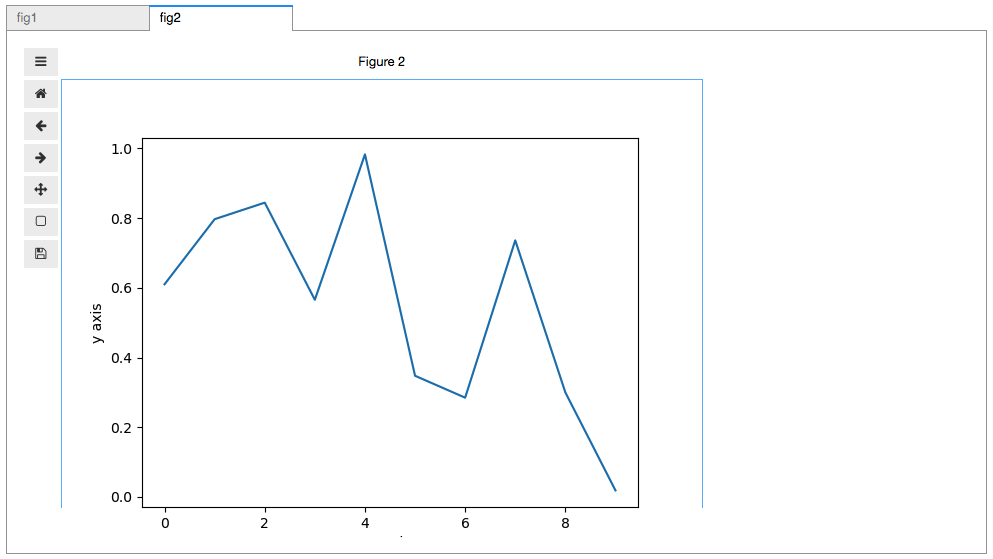
I just cannot figure out why the bottom of that second figure is getting cut off.
Guía de contribución
Primeros pasos
- Lee el issue completo y luego la guía de contribución del proyecto.
- Comenta en el issue que vas a ocuparte — evita que dos personas hagan lo mismo.
- Haz un fork del repositorio y trabaja en una rama.
- Abre un pull request que haga referencia al número del issue.
Línea de trabajo
Empieza ejecutando el ejemplo mínimo de notebook con dos pestañas de ipywidgets y figuras de matplotlib, y compara después el tamaño de la segunda figura, inicialmente oculta, con el de la primera. Rastrea cómo se establecen las dimensiones de la figura cuando la segunda pestaña se hace visible. Se considera terminado cuando las figuras de todas las pestañas muestran su área de trazado completa sin quedar cortadas.
Escrito por el modelo de indexación a partir del texto del issue.
Evaluación
- Stack tecnológico
- jupyter, jupyter-notebook, python
- Área
- data-visualization, frontend
- Tipo de issue
- Error
- Dificultad
- 3/5
- Tiempo estimado
- 1-2 días
- Estado de actividad
- Estancado
- Claridad
- Bastante claro
- Aptitud para principiantes
- 45/100