dotnet / dotnet/machinelearning-modelbuilder
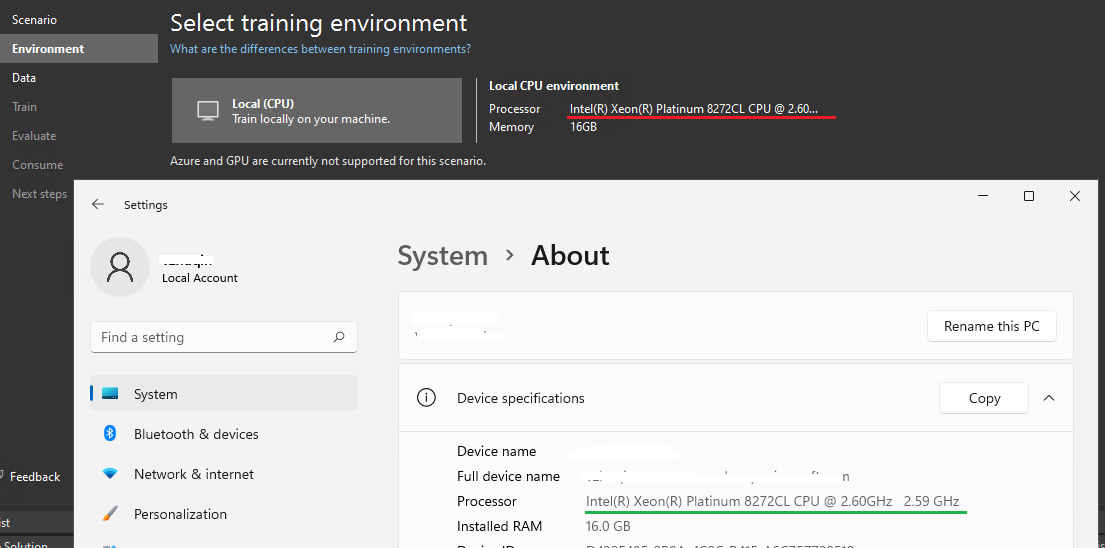
Tooltips doesn't work when the local (CPU) processor information is not fully displayed.
- Ngôn ngữ chính
- Dockerfile
- Star
- 285
- Fork
- 66
- Chỉ số merge pull request
- Không có pull request nào được merge trong 30 ngày
Mô tả
**System Information (please complete the following information):**
- Model Builder Version (available in Manage Extensions dialog): 16.11.0.2162702
- Microsoft Visual Studio Enterprise 2022 (64-bit) Version 17.0.3
**Describe the bug**
- On which step of the process did you run into an issue: local (CPU) processor information
**To Reproduce**
Steps to reproduce the behavior:
1. Select Create a new project from the Visual Studio 2022 start window;
2. Choose the C# Console App (.NET Core) project template with .Net 6.0;
3. Add model builder by right click on the project;
4. Select Data classification to navigate Environment page;
5. See issue: Local (CPU) processor information is not fully displayed, and tooltips is not shown when hovering the mouse over it.
**Expected behavior**
Local (CPU) processor information can be fully displayed.
**Screenshots**
If applicable, add screenshots to help explain your problem.
**Additional context**
Also occurs on latest main build: 16.9.1.2162101
Hướng dẫn đóng góp
Chưa lập chỉ mục được hướng dẫn đóng góp cho kho mã nguồn này
Hướng nghiên cứu
Tái hiện sự cố theo các bước Visual Studio 2022 được liệt kê, sau đó kiểm tra trang Environment nơi thông tin CPU cục bộ được hiển thị. Hoàn thành khi thông tin bộ xử lý hiển thị đầy đủ và di chuột lên đó sẽ hiển thị tooltip; ban đầu, payload không nêu tệp hoặc test nào.
Do mô hình lập chỉ mục viết ra từ nội dung của issue.
Đánh giá
- Công nghệ
- csharp
- Lĩnh vực
- desktop
- Loại issue
- Lỗi
- Độ khó
- 3/5
- Thời gian dự kiến
- 1-2 ngày
- Mức độ hoạt động
- Đình trệ
- Độ rõ ràng
- Khá rõ ràng
- Mức phù hợp với người mới
- 35/100