dotnet / dotnet/machinelearning-modelbuilder
Tooltips doesn't work when the local (CPU) processor information is not fully displayed.
- Langage dominant
- Dockerfile
- Étoiles
- 285
- Forks
- 66
- Métriques de merge des PR
- Aucune PR mergée en 30 j
Description
**System Information (please complete the following information):**
- Model Builder Version (available in Manage Extensions dialog): 16.11.0.2162702
- Microsoft Visual Studio Enterprise 2022 (64-bit) Version 17.0.3
**Describe the bug**
- On which step of the process did you run into an issue: local (CPU) processor information
**To Reproduce**
Steps to reproduce the behavior:
1. Select Create a new project from the Visual Studio 2022 start window;
2. Choose the C# Console App (.NET Core) project template with .Net 6.0;
3. Add model builder by right click on the project;
4. Select Data classification to navigate Environment page;
5. See issue: Local (CPU) processor information is not fully displayed, and tooltips is not shown when hovering the mouse over it.
**Expected behavior**
Local (CPU) processor information can be fully displayed.
**Screenshots**
If applicable, add screenshots to help explain your problem.
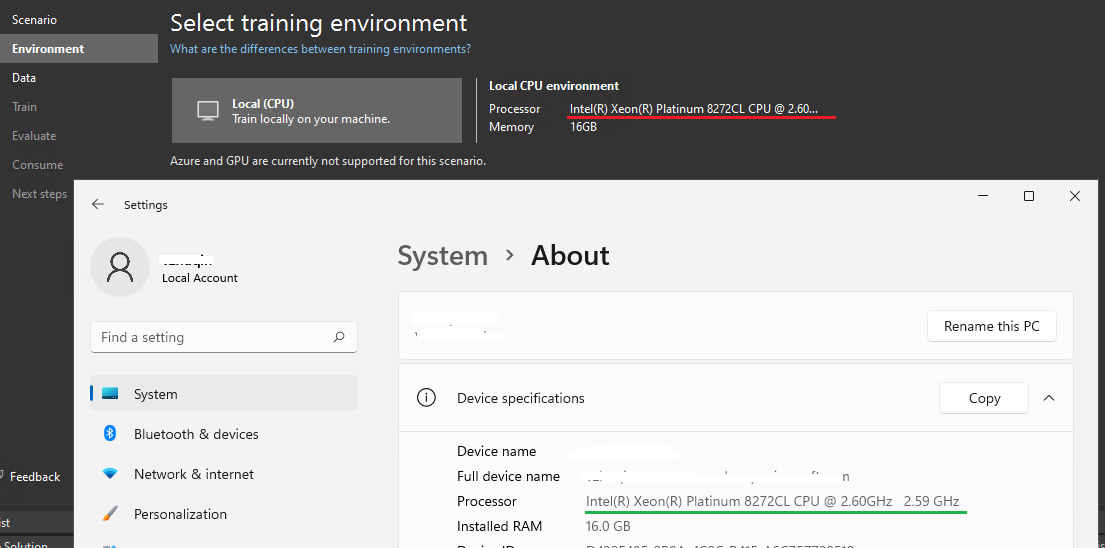
**Additional context**
Also occurs on latest main build: 16.9.1.2162101
Guide de contribution
Aucun guide de contribution indexé pour ce dépôt
Piste de recherche
Reproduisez le problème en suivant les étapes Visual Studio 2022 indiquées, puis inspectez la page Environment où les informations du CPU local sont affichées. C’est terminé lorsque les informations du processeur sont entièrement visibles et que le tooltip s’affiche au survol ; au départ, le payload ne mentionne aucun fichier ni test.
Rédigé par le modèle d'indexation à partir du texte de l'issue.
Évaluation
- Stack technique
- csharp
- Domaine
- desktop
- Type d'issue
- Bug
- Difficulté
- 3/5
- Temps estimé
- 1-2 jours
- Activité
- À l'abandon
- Clarté
- Plutôt claire
- Accessibilité débutants
- 35/100