dotnet / dotnet/machinelearning-modelbuilder
Tooltips doesn't work when the local (CPU) processor information is not fully displayed.
Nobody has claimed this yet.
- Dominant language
- Dockerfile
- Stars
- 285
- Forks
- 66
- PR merge metrics
- No merged PRs in 30d
Description
**System Information (please complete the following information):**
- Model Builder Version (available in Manage Extensions dialog): 16.11.0.2162702
- Microsoft Visual Studio Enterprise 2022 (64-bit) Version 17.0.3
**Describe the bug**
- On which step of the process did you run into an issue: local (CPU) processor information
**To Reproduce**
Steps to reproduce the behavior:
1. Select Create a new project from the Visual Studio 2022 start window;
2. Choose the C# Console App (.NET Core) project template with .Net 6.0;
3. Add model builder by right click on the project;
4. Select Data classification to navigate Environment page;
5. See issue: Local (CPU) processor information is not fully displayed, and tooltips is not shown when hovering the mouse over it.
**Expected behavior**
Local (CPU) processor information can be fully displayed.
**Screenshots**
If applicable, add screenshots to help explain your problem.
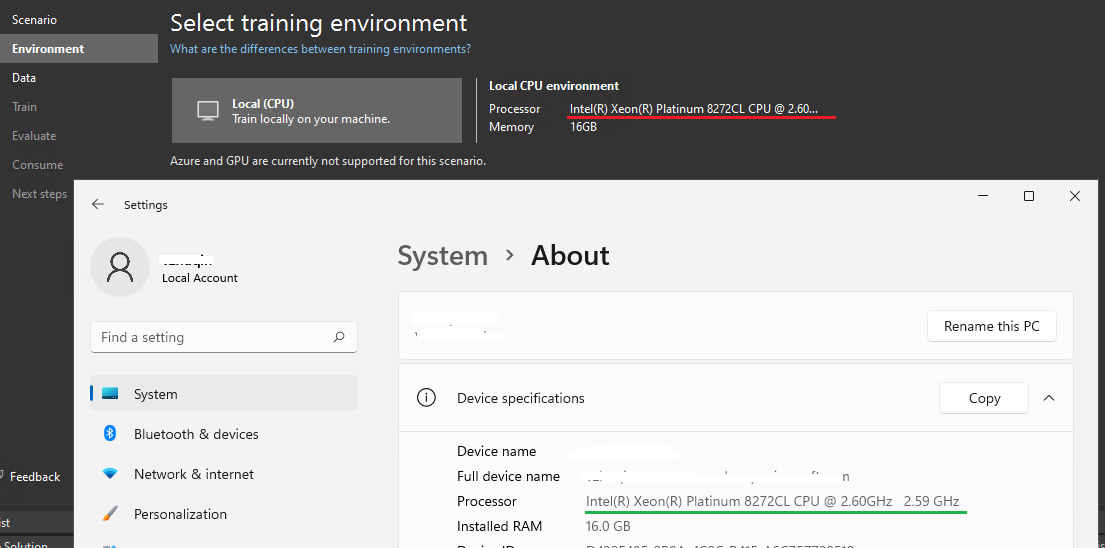
**Additional context**
Also occurs on latest main build: 16.9.1.2162101
Contributor guide
No contributing guide indexed for this repository
First steps
- Read the whole issue, then the project's contributing guide.
- Comment on the issue to say you are picking it up — it saves two people doing the same work.
- Fork the repository and make your change on a branch.
- Open a pull request that references the issue number.
Research direction
Reproduce the issue through the listed Visual Studio 2022 steps, then inspect the Environment page where local CPU information is rendered. Done means the processor information is fully visible and hovering over it displays the tooltip; the payload names no files or tests to begin with.
Written by the indexing model from the issue text.
Assessment
- Tech stack
- csharp
- Domain
- desktop
- Issue type
- Bug
- Difficulty
- 3/5
- Estimated time
- 1-2 days
- Activity status
- Stale
- Clarity
- Mostly clear
- Newbie friendliness
- 35/100