NativeScript / NativeScript/nativescript-cli
iOS cloud build failure: "No project found at or above '/private/tmp/builds/_/[...]'"
まだ誰も着手していません。
- 主要言語
- JavaScript
- スター
- 1.1k
- フォーク
- 204
- 平均マージ
- 1日 9時間
- マージ済み PR(30日)
- 8
説明
Environment
- CLI:
5.0.0-2018-10-05-12399(Ubuntu 16.04 LTS) - Cross-platform modules:
4.2.1 - Android Runtime:
4.2.0 - iOS Runtime:
4.2.0 - Plugin(s):
package.json
Describe the bug
Local android builds succeed and install on an emulator with no issues. However, cloud build ios fails with the following error:
{after-prepare hooks and other normal stuff beforehand}

  ios Build Tooling revision 2018.08.08.1r
  Build Tooling Hostname administrators-mac-4.local
 App package not specified. Skipping unzip step.
  NativeScript CLI version 4.1.2
 Add platform ios with runtime version 4.2.0

Support for macOS 10.12 is deprecated and will be removed in one of the next releases of NativeScript. Please, upgrade to the latest macOS version.
 No project found at or above `/private/tmp/builds/_/ec0244e90d63acff1f57a805419368be2c1ae7f3/4.1.2/4.2.0/Antem2' and neither was a --path specified.
 # tns platform add
==========
┌──────────────────────────┬─────────────────────────────────────────────────────────────────────────────────────────────────────────────────────────────────────────────────┐
│ Usage                    │ Synopsis                                                                                                                                        │
│ Android latest runtime   │ $ tns platform add android [--framework-path <File Path>] [--symlink] [--sdk <API Level>] [--platform-template <Platform Template>]             │
│ Android selected runtime │ $ tns platform add android[@<Version>] [--framework-path <File Path>] [--symlink] [--sdk <API Level>] [--platform-template <Platform Template>] │
│ iOS latest runtime       │ $ tns platform add ios [--framework-path <File Path>] [--symlink]                                                                               │
│ iOS selected runtime     │ $ tns platform add ios[@<Version>] [--framework-path <File Path>] [--symlink] [--platform-template <Platform Template>]                         │
└──────────────────────────┴─────────────────────────────────────────────────────────────────────────────────────────────────────────────────────────────────────────────────┘
Configures the current project to target the selected platform.
### Options
    * --framework-path - Sets the path to a NativeScript runtime for the specified platform that you want to use instead of the default runtime. If --symlink is specified, <File Path> must point to directory in which the runtime is already extracted. If --symlink is not specified, <File Path> must point to a valid npm package.
    * --symlink - Creates a symlink to a NativeScript runtime for the specified platform that you want to use instead of the default runtime. If --frameworkPath is specified, creates a symlink to the specified directory. If --frameworkPath is not specified, creates a symlink to platform runtime installed with your current version of NativeScript.
    * --sdk - Sets the target Android SDK for the project.
    * --platform-template - Sets the platform template that will be used for the native application.
### Attributes
    * <API Level> is a valid Android API level. For example: 17, 19, MNC.
    * <File Path> is the complete path to a valid npm package or a directory that contains a NativeScript runtime for the selected platform.
    * <Platform Template> is a valid npm package, path to directory, .tgz or GitHub URL that contains a native Android or iOS template.
    * <Version> is any available version of the respective platform runtime published in npm.
No project found at or above '/private/tmp/builds/_/ec0244e90d63acff1f57a805419368be2c1ae7f3/4.1.2/4.2.0/Antem2' and neither was a --path specified.

Build failed.
Local android builds succeed with no issue.
To reproduce
Define following alias (split between multiple lines for legibility):
alias cloudbuild='echo -n "Enter password for Certificates.p12: " &&
read -s && echo &&
tns cloud build ios
    --accountId=1 --bundle --env.uglify --env.production --env.snapshot --release
    --certificate="/home/potassiumion/Downloads/Certificates.p12"
    --provision="/home/potassiumion/Downloads/Antem_Distribution.mobileprovision"
    --certificatePassword=$REPLY'
--provisionand--certificateoptions link to valid files and--certificatePasswordis correct
Run cloudbuild in root folder
I have tried using different
nativescriptversions as well, to no avail.
Expected behavior
Build should succeed and spit back an .ipa. Local android builds do work as expected.
Project structure
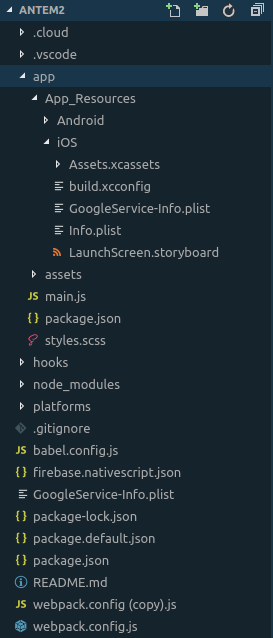
Additional context
Gist with log and package.json
コントリビューションガイド
はじめの一歩
- issue を最後まで読み、次にプロジェクトのコントリビューションガイドを読みます。
- 着手することを issue にコメントします — 二人が同じ作業をするのを防げます。
- リポジトリをフォークし、ブランチを切って変更します。
- issue 番号を参照したプルリクエストを送ります。
調査の方向性
レポートでは、ソースファイルもテストも特定されていません。まず、ドキュメントに記載された CLI と証明書のオプションを使い、プロジェクトルートから tns cloud build ios を再現して実行します。次に、報告されたプロジェクト欠落のパスを追跡します。Cloud build がプロジェクトを見つけ、期待される .ipa を生成できれば完了です。
索引モデルが issue の本文から書いたものです。
評価
- 技術スタック
- ios, javascript
- 領域
- cli, cloud, mobile
- issue の種類
- バグ
- 難易度
- 4/5
- 見積もり時間
- 3〜5日
- 活発さ
- 停滞
- 明瞭さ
- 説明が足りない
- 初心者へのやさしさ
- 30/100