NativeScript / NativeScript/nativescript-cli
iOS cloud build failure: "No project found at or above '/private/tmp/builds/_/[...]'"
還沒有人認領這個 Issue。
- 主要語言
- JavaScript
- 星號
- 1.1k
- 分支
- 204
- 平均合併
- 1 天 9 小時
- 30 天內合併 PR
- 8
描述
Environment
- CLI:
5.0.0-2018-10-05-12399(Ubuntu 16.04 LTS) - Cross-platform modules:
4.2.1 - Android Runtime:
4.2.0 - iOS Runtime:
4.2.0 - Plugin(s):
package.json
Describe the bug
Local android builds succeed and install on an emulator with no issues. However, cloud build ios fails with the following error:
{after-prepare hooks and other normal stuff beforehand}

  ios Build Tooling revision 2018.08.08.1r
  Build Tooling Hostname administrators-mac-4.local
 App package not specified. Skipping unzip step.
  NativeScript CLI version 4.1.2
 Add platform ios with runtime version 4.2.0

Support for macOS 10.12 is deprecated and will be removed in one of the next releases of NativeScript. Please, upgrade to the latest macOS version.
 No project found at or above `/private/tmp/builds/_/ec0244e90d63acff1f57a805419368be2c1ae7f3/4.1.2/4.2.0/Antem2' and neither was a --path specified.
 # tns platform add
==========
┌──────────────────────────┬─────────────────────────────────────────────────────────────────────────────────────────────────────────────────────────────────────────────────┐
│ Usage                    │ Synopsis                                                                                                                                        │
│ Android latest runtime   │ $ tns platform add android [--framework-path <File Path>] [--symlink] [--sdk <API Level>] [--platform-template <Platform Template>]             │
│ Android selected runtime │ $ tns platform add android[@<Version>] [--framework-path <File Path>] [--symlink] [--sdk <API Level>] [--platform-template <Platform Template>] │
│ iOS latest runtime       │ $ tns platform add ios [--framework-path <File Path>] [--symlink]                                                                               │
│ iOS selected runtime     │ $ tns platform add ios[@<Version>] [--framework-path <File Path>] [--symlink] [--platform-template <Platform Template>]                         │
└──────────────────────────┴─────────────────────────────────────────────────────────────────────────────────────────────────────────────────────────────────────────────────┘
Configures the current project to target the selected platform.
### Options
    * --framework-path - Sets the path to a NativeScript runtime for the specified platform that you want to use instead of the default runtime. If --symlink is specified, <File Path> must point to directory in which the runtime is already extracted. If --symlink is not specified, <File Path> must point to a valid npm package.
    * --symlink - Creates a symlink to a NativeScript runtime for the specified platform that you want to use instead of the default runtime. If --frameworkPath is specified, creates a symlink to the specified directory. If --frameworkPath is not specified, creates a symlink to platform runtime installed with your current version of NativeScript.
    * --sdk - Sets the target Android SDK for the project.
    * --platform-template - Sets the platform template that will be used for the native application.
### Attributes
    * <API Level> is a valid Android API level. For example: 17, 19, MNC.
    * <File Path> is the complete path to a valid npm package or a directory that contains a NativeScript runtime for the selected platform.
    * <Platform Template> is a valid npm package, path to directory, .tgz or GitHub URL that contains a native Android or iOS template.
    * <Version> is any available version of the respective platform runtime published in npm.
No project found at or above '/private/tmp/builds/_/ec0244e90d63acff1f57a805419368be2c1ae7f3/4.1.2/4.2.0/Antem2' and neither was a --path specified.

Build failed.
Local android builds succeed with no issue.
To reproduce
Define following alias (split between multiple lines for legibility):
alias cloudbuild='echo -n "Enter password for Certificates.p12: " &&
read -s && echo &&
tns cloud build ios
    --accountId=1 --bundle --env.uglify --env.production --env.snapshot --release
    --certificate="/home/potassiumion/Downloads/Certificates.p12"
    --provision="/home/potassiumion/Downloads/Antem_Distribution.mobileprovision"
    --certificatePassword=$REPLY'
--provisionand--certificateoptions link to valid files and--certificatePasswordis correct
Run cloudbuild in root folder
I have tried using different
nativescriptversions as well, to no avail.
Expected behavior
Build should succeed and spit back an .ipa. Local android builds do work as expected.
Project structure
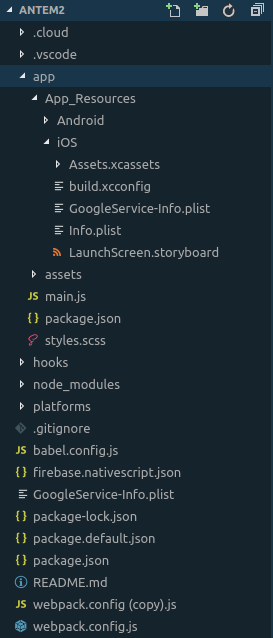
Additional context
Gist with log and package.json
貢獻指南
從這裡開始
- 先讀完整個 Issue,再讀專案的貢獻指南。
- 在 Issue 下留言說明你要接手 —— 這能避免兩個人做同樣的事。
- Fork 儲存庫,在一個分支上完成修改。
- 送出 Pull Request,並在描述裡引用這個 Issue 編號。
研究方向
報告中沒有指定來源檔案或測試。首先,從專案根目錄使用文件中說明的 CLI 和憑證選項重現 tns cloud build ios,然後追蹤報告中所述的專案遺失路徑。當雲端建置找到專案並產生預期的 .ipa 時,即表示完成。
由索引模型根據 Issue 內容生成。
評估
- 技術堆疊
- ios, javascript
- 領域
- cli, cloud, mobile
- Issue 類型
- 缺陷
- 難度
- 4/5
- 預估耗時
- 3-5 天
- 活躍度
- 停滯
- 描述清晰度
- 需要釐清
- 新手友好度
- 30/100