iOS cloud build failure: "No project found at or above '/private/tmp/builds/_/[...]'"
Dieses Issue hat noch niemand übernommen.
Bewertung
- Schwierigkeit
- 4/5
- Geschätzter Aufwand
- 3-5 Tage
- Anfängerfreundlichkeit
- 30/100
- Issue-Typ
- Bug
- Klarheit
- Muss geklärt werden
- Aktivitätsstatus
- Veraltet
- Tech-Stack
- ios, javascript
Rechercherichtung
Im Bericht ist keine Quelldatei und kein Test angegeben. Beginne damit, tns cloud build ios aus dem Projektstammverzeichnis mit den dokumentierten CLI- und Zertifikatsoptionen zu reproduzieren, und verfolge dann den gemeldeten Pfad für das fehlende Projekt. Erfolgreich ist die Aufgabe, wenn der Cloud-Build das Projekt findet und die erwartete .ipa erzeugt.
Vom Indexierungsmodell aus dem Issue-Text verfasst.
Beschreibung
Environment
- CLI:
5.0.0-2018-10-05-12399(Ubuntu 16.04 LTS) - Cross-platform modules:
4.2.1 - Android Runtime:
4.2.0 - iOS Runtime:
4.2.0 - Plugin(s):
package.json
Describe the bug
Local android builds succeed and install on an emulator with no issues. However, cloud build ios fails with the following error:
{after-prepare hooks and other normal stuff beforehand}

  ios Build Tooling revision 2018.08.08.1r
  Build Tooling Hostname administrators-mac-4.local
 App package not specified. Skipping unzip step.
  NativeScript CLI version 4.1.2
 Add platform ios with runtime version 4.2.0

Support for macOS 10.12 is deprecated and will be removed in one of the next releases of NativeScript. Please, upgrade to the latest macOS version.
 No project found at or above `/private/tmp/builds/_/ec0244e90d63acff1f57a805419368be2c1ae7f3/4.1.2/4.2.0/Antem2' and neither was a --path specified.
 # tns platform add
==========
┌──────────────────────────┬─────────────────────────────────────────────────────────────────────────────────────────────────────────────────────────────────────────────────┐
│ Usage                    │ Synopsis                                                                                                                                        │
│ Android latest runtime   │ $ tns platform add android [--framework-path <File Path>] [--symlink] [--sdk <API Level>] [--platform-template <Platform Template>]             │
│ Android selected runtime │ $ tns platform add android[@<Version>] [--framework-path <File Path>] [--symlink] [--sdk <API Level>] [--platform-template <Platform Template>] │
│ iOS latest runtime       │ $ tns platform add ios [--framework-path <File Path>] [--symlink]                                                                               │
│ iOS selected runtime     │ $ tns platform add ios[@<Version>] [--framework-path <File Path>] [--symlink] [--platform-template <Platform Template>]                         │
└──────────────────────────┴─────────────────────────────────────────────────────────────────────────────────────────────────────────────────────────────────────────────────┘
Configures the current project to target the selected platform.
### Options
    * --framework-path - Sets the path to a NativeScript runtime for the specified platform that you want to use instead of the default runtime. If --symlink is specified, <File Path> must point to directory in which the runtime is already extracted. If --symlink is not specified, <File Path> must point to a valid npm package.
    * --symlink - Creates a symlink to a NativeScript runtime for the specified platform that you want to use instead of the default runtime. If --frameworkPath is specified, creates a symlink to the specified directory. If --frameworkPath is not specified, creates a symlink to platform runtime installed with your current version of NativeScript.
    * --sdk - Sets the target Android SDK for the project.
    * --platform-template - Sets the platform template that will be used for the native application.
### Attributes
    * <API Level> is a valid Android API level. For example: 17, 19, MNC.
    * <File Path> is the complete path to a valid npm package or a directory that contains a NativeScript runtime for the selected platform.
    * <Platform Template> is a valid npm package, path to directory, .tgz or GitHub URL that contains a native Android or iOS template.
    * <Version> is any available version of the respective platform runtime published in npm.
No project found at or above '/private/tmp/builds/_/ec0244e90d63acff1f57a805419368be2c1ae7f3/4.1.2/4.2.0/Antem2' and neither was a --path specified.

Build failed.
Local android builds succeed with no issue.
To reproduce
Define following alias (split between multiple lines for legibility):
alias cloudbuild='echo -n "Enter password for Certificates.p12: " &&
read -s && echo &&
tns cloud build ios
    --accountId=1 --bundle --env.uglify --env.production --env.snapshot --release
    --certificate="/home/potassiumion/Downloads/Certificates.p12"
    --provision="/home/potassiumion/Downloads/Antem_Distribution.mobileprovision"
    --certificatePassword=$REPLY'
--provisionand--certificateoptions link to valid files and--certificatePasswordis correct
Run cloudbuild in root folder
I have tried using different
nativescriptversions as well, to no avail.
Expected behavior
Build should succeed and spit back an .ipa. Local android builds do work as expected.
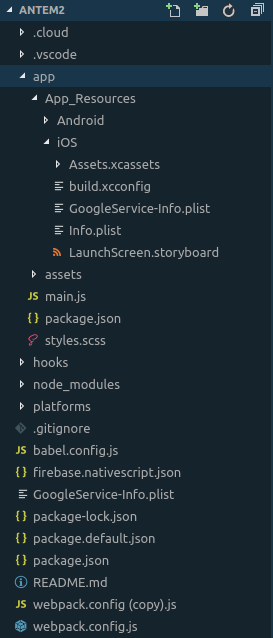
Project structure
Additional context
Gist with log and package.json
- Vorherrschende Sprache
- JavaScript
- Sterne
- 1.1k
- Forks
- 204
- Ø Merge
- 1 T. 9 Std.
- Gemergte PRs (30 T.)
- 8
Beitragsleitfaden
Erste Schritte
- Lesen Sie das ganze Issue und danach den Beitragsleitfaden des Projekts.
- Schreiben Sie ins Issue, dass Sie es übernehmen — das erspart doppelte Arbeit.
- Forken Sie das Repository und arbeiten Sie in einem Branch.
- Öffnen Sie einen Pull Request, der die Issue-Nummer nennt.
Mehr aus NativeScript/nativescript-cli
-
in-progress
NativeScript/nativescript-cli#6140 · 2 Kommentare · 1 zugewiesene Person ·
-
NativeScript/nativescript-cli#6090 · 1 zugewiesene Person ·
-
in progress
NativeScript/nativescript-cli#6015 · 1 Reaktion · 1 zugewiesene Person ·
-
question
Schwierigkeit 4/5 3-5 Tage Anfängerfreundlichkeit 48/100
NativeScript/nativescript-cli#5992 · 5 Kommentare ·
-
feature-pending-triage
Schwierigkeit 4/5 3-5 Tage Anfängerfreundlichkeit 35/100
NativeScript/nativescript-cli#5975 ·
Alle Issues in NativeScript/nativescript-cli
Ähnliche Issues
-
bug
Schwierigkeit 2/5 1-3 Stunden Anfängerfreundlichkeit 76/100
avniproject/avni-client#2135 ·
-
automated broken-link
Schwierigkeit 1/5 Unter einer Stunde Anfängerfreundlichkeit 85/100
-
agent/security hive/hosted-available-lke648397-260827-5n31 security
Schwierigkeit 2/5 1-3 Stunden Anfängerfreundlichkeit 84/100
-
enhancement
Schwierigkeit 2/5 1-3 Stunden Anfängerfreundlichkeit 70/100
babalae/bettergi-scripts-list#3674 ·
-
A-Release-Notes C-Editing D-Modest S-Ready-For-Implementation
Schwierigkeit 2/5 1-3 Stunden Anfängerfreundlichkeit 72/100
bevyengine/bevy-website#2595 ·