redhat-developer / redhat-developer/vscode-java
Wrong reported errors by compiler
オープン
まだ誰も着手していません。
bug
diagnostics
- 主要言語
- TypeScript
- スター
- 2.3k
- フォーク
- 546
- 平均マージ
- 20時間 1分
- マージ済み PR(30日)
- 11
説明
I have some pieces of code that compiles fine in IntelliJ and Gradle but VSCode reports them as errors.
Examples:
-
Error in import
import sun.security.ssl.ProtocolVersion;
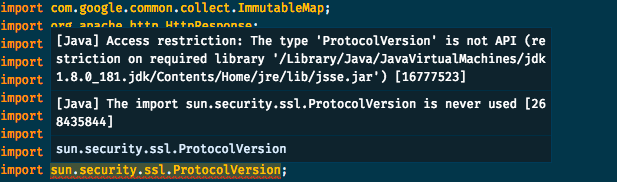
I have to point that I'm not using the JVM in the error description. Here's my workspace's settings:
{
   "java.home": "/Users/augusto.dias/.sdkman/candidates/java/8.0.181-oracle",
   "java.jdt.ls.vmargs": "-javaagent:/Users/augusto.dias/my-project/.vscode/lombok.jar -Xbootclasspath/a:/Users/augusto.dias/my-project/.vscode/lombok.jar"
}
- Wrong exception handling
I have a RetryTemplate class from spring and I'm calling execute as the following example:
retryTemplate.execute(getCallback(),getRecovery());

private RetryCallback<Void, IOException> getCallback() {
    return context -> {
        if (context.getLastThrowable() instanceof IOException) {
                    IOException e = (IOException) context.getLastThrowable();
    // do some other things
                    throw e;
        }
        return null;
    };
}

private RecoveryCallback getRecovery() {
    return context -> {
        Throwable lastThrowable = context.getLastThrowable();
    // do some other things
        throw lastThrowable instanceof Exception ? (Exception) lastThrowable : new Exception(lastThrowable);
    }
}
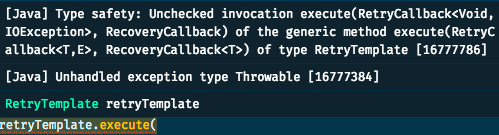
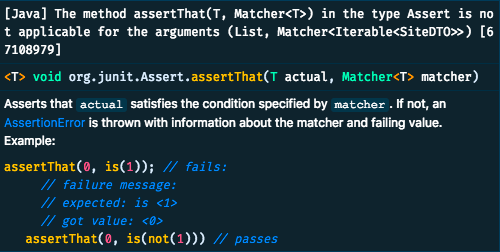
- And finally: false error in method signature
    assertThat((List) ((Envelope) responseEntity.getBody()).getData(), hasItems(siteDTO));
    assertThat((List) ((Envelope) responseEntity.getBody()).getData(), hasSize(1));
Environment
- Operating System: macOS Mojave
- JDK version: 1.8
- Visual Studio Code version: 1.29.1
- Java extension version: 0.34.0
コントリビューションガイド
はじめの一歩
- issue を最後まで読み、次にプロジェクトのコントリビューションガイドを読みます。
- 着手することを issue にコメントします — 二人が同じ作業をするのを防げます。
- リポジトリをフォークし、ブランチを切って変更します。
- issue 番号を参照したプルリクエストを送ります。
調査の方向性
まず、提供された Java スニペットで、ワークスペース設定、JDK 1.8、VS Code 1.29.1、Java extension 0.34.0 を使用して、報告された 3 つの診断を再現します。language server の結果を IntelliJ および Gradle と比較し、それぞれの誤ったエラーの原因が同じかどうかを切り分けます。完了条件は、影響を受ける例で誤った診断が発生しなくなり、報告されたケースに対するリグレッションテストのカバレッジがあることです。
索引モデルが issue の本文から書いたものです。
評価
- 技術スタック
- java, vscode
- 領域
- devtools
- issue の種類
- バグ
- 難易度
- 4/5
- 見積もり時間
- 3〜5日
- 活発さ
- 停滞
- 明瞭さ
- 説明が足りない
- 初心者へのやさしさ
- 25/100