redhat-developer / redhat-developer/vscode-java
Wrong reported errors by compiler
Nessuno ha ancora preso questa issue.
- Lingua principale
- TypeScript
- Stelle
- 2.3k
- Fork
- 546
- Merge medio
- 20h 1m
- PR unite (30g)
- 11
Descrizione
I have some pieces of code that compiles fine in IntelliJ and Gradle but VSCode reports them as errors.
Examples:
-
Error in import
import sun.security.ssl.ProtocolVersion;
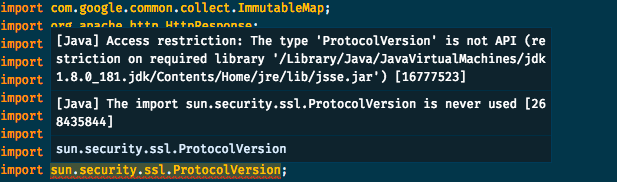
I have to point that I'm not using the JVM in the error description. Here's my workspace's settings:
{
   "java.home": "/Users/augusto.dias/.sdkman/candidates/java/8.0.181-oracle",
   "java.jdt.ls.vmargs": "-javaagent:/Users/augusto.dias/my-project/.vscode/lombok.jar -Xbootclasspath/a:/Users/augusto.dias/my-project/.vscode/lombok.jar"
}
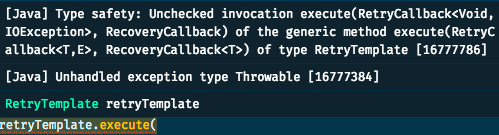
- Wrong exception handling
I have a RetryTemplate class from spring and I'm calling execute as the following example:
retryTemplate.execute(getCallback(),getRecovery());

private RetryCallback<Void, IOException> getCallback() {
    return context -> {
        if (context.getLastThrowable() instanceof IOException) {
                    IOException e = (IOException) context.getLastThrowable();
    // do some other things
                    throw e;
        }
        return null;
    };
}

private RecoveryCallback getRecovery() {
    return context -> {
        Throwable lastThrowable = context.getLastThrowable();
    // do some other things
        throw lastThrowable instanceof Exception ? (Exception) lastThrowable : new Exception(lastThrowable);
    }
}
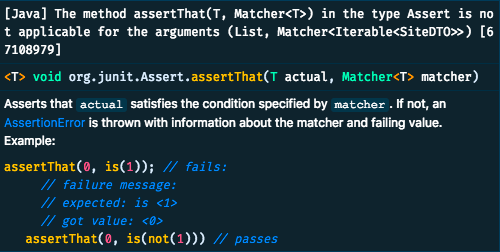
- And finally: false error in method signature
    assertThat((List) ((Envelope) responseEntity.getBody()).getData(), hasItems(siteDTO));
    assertThat((List) ((Envelope) responseEntity.getBody()).getData(), hasSize(1));
Environment
- Operating System: macOS Mojave
- JDK version: 1.8
- Visual Studio Code version: 1.29.1
- Java extension version: 0.34.0
Guida per i contributori
Apri la guida per i contributori
Come iniziare
- Leggi tutta la issue e poi la guida ai contributi del progetto.
- Commenta sulla issue per dire che te ne occupi tu — evita che due persone facciano lo stesso lavoro.
- Fai un fork del repository e lavora su un branch.
- Apri una pull request che faccia riferimento al numero della issue.
Direzione di ricerca
Inizia riproducendo le tre diagnosi segnalate nei frammenti Java forniti usando le impostazioni dell'area di lavoro, JDK 1.8, VS Code 1.29.1 e Java extension 0.34.0. Confronta i risultati del language server con IntelliJ e Gradle, quindi determina se ogni errore falso ha la stessa causa. Il lavoro è completato quando gli esempi interessati non producono più diagnosi errate e sono presenti test di regressione per i casi segnalati.
Scritto dal modello di indicizzazione a partire dal testo della issue.
Valutazione
- Stack tecnologico
- java, vscode
- Ambito
- devtools
- Tipo di issue
- Bug
- Difficoltà
- 4/5
- Tempo stimato
- 3-5 giorni
- Stato di attività
- Ferma
- Chiarezza
- Da chiarire
- Idoneità per principianti
- 25/100