redhat-developer / redhat-developer/vscode-java
A single file ever opened with compilation error will influence the workspace
オープン
まだ誰も着手していません。
bug
compile
- 主要言語
- TypeScript
- スター
- 2.3k
- フォーク
- 546
- 平均マージ
- 20時間 1分
- マージ済み PR(30日)
- 11
説明
Cannot get rid of a single file ever opened
steps to repro:
- Open
1.helloworldproject in vscode at https://github.com/vscjavaci/java-debug-ci/tree/master/testcase/1.helloworld - Create a Single.java outside the 1.helloworld folder
public class Single {
    public static void main(String[] args) throws IOException  {

        System.out.println("Program Arguments:");
        for (String arg : args) {
            System.out.println("\t" + arg);
        }
        String foo = (String) System.getProperties().get("foo");
        System.out.println("\tValue:" + foo);
    }
}
- Open the
Single.javaand F5 and then CLOSE theSingle.java - Trigger the
force java compilationand choose "full"
expected: you will pass the compilation
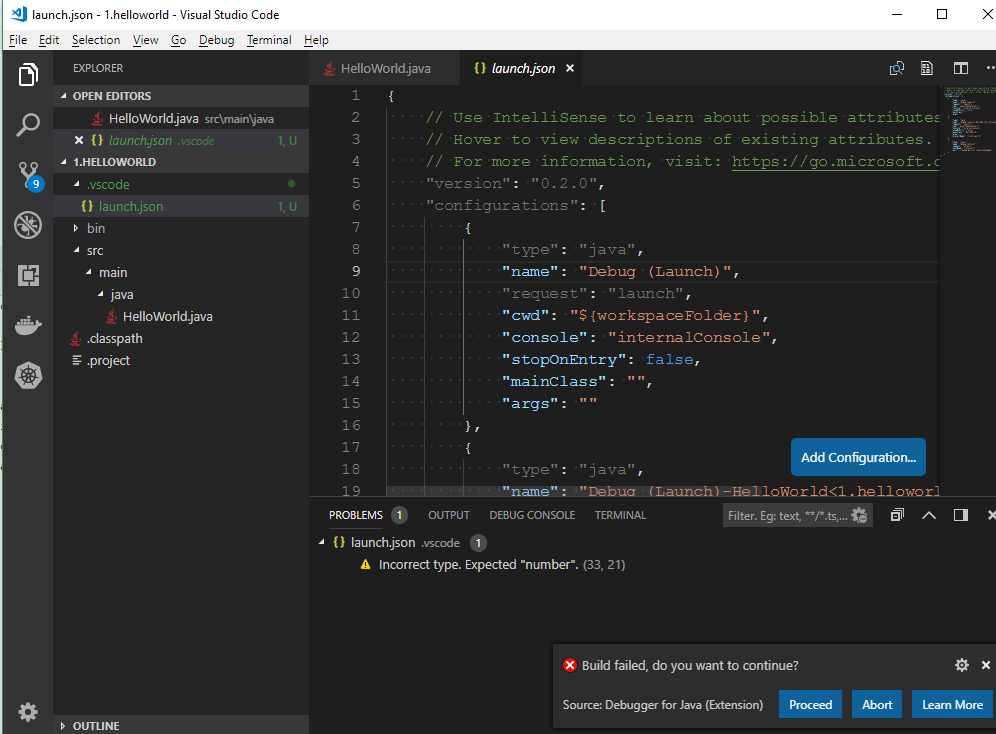
actual: you will receive the build error notificaiton
コントリビューションガイド
はじめの一歩
- issue を最後まで読み、次にプロジェクトのコントリビューションガイドを読みます。
- 着手することを issue にコメントします — 二人が同じ作業をするのを防げます。
- リポジトリをフォークし、ブランチを切って変更します。
- issue 番号を参照したプルリクエストを送ります。
調査の方向性
レポートにリンクされている 1.helloworld プロジェクトを使って問題を再現します。Single.java を作成して開き、F5 で実行し、閉じた後、force java compilation を “full” で実行します。閉じたファイルがワークスペースのコンパイル状態に残る仕組みを追跡します。完了条件は、閉じたファイルのエラーなしで完全コンパイルが成功することです。
索引モデルが issue の本文から書いたものです。
評価
- 技術スタック
- java, typescript, vscode
- 領域
- tooling
- issue の種類
- バグ
- 難易度
- 4/5
- 見積もり時間
- 3〜5日
- 活発さ
- 停滞
- 明瞭さ
- おおむね明確
- 初心者へのやさしさ
- 38/100