redhat-developer / redhat-developer/vscode-java
Fails to find definition from a package
まだ誰も着手していません。
- 主要言語
- TypeScript
- スター
- 2.3k
- フォーク
- 546
- 平均マージ
- 20時間 1分
- マージ済み PR(30日)
- 11
説明
Type: Bug
Press SHIFT+CTRL+P -> 'Go to symbols in workspace', search for ArrayList in the utils package. Press enter to view the definition.
From the class definition move the cursom to "List" and then press 12 (Go to definition). I get and error saying the definition is not found, but it exist if I just search for it.
These seem to be a bug in the indexing of the definition.
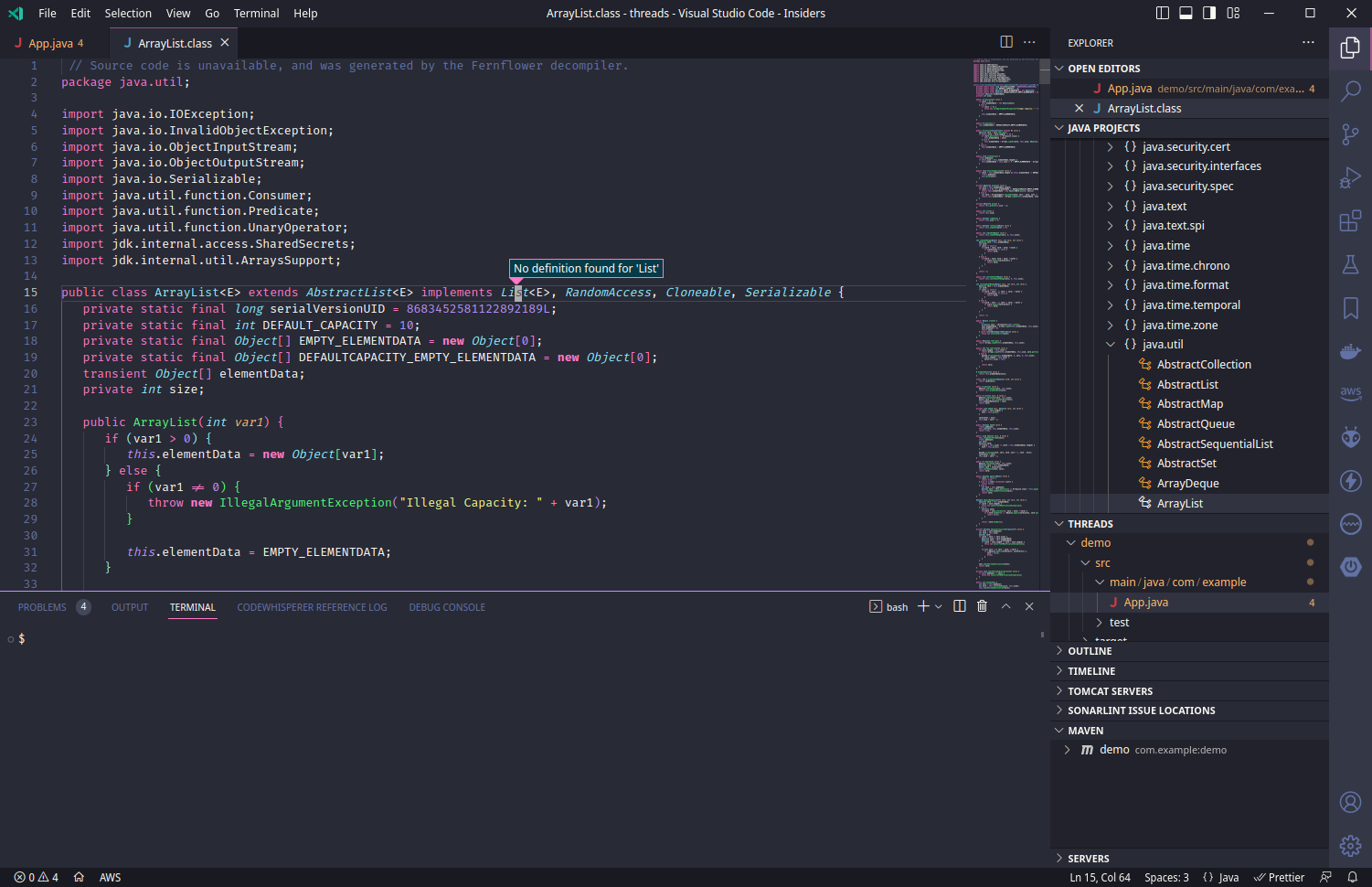
Extension version: 1.13.0
VS Code version: Code - Insiders 1.75.0-insider (11238faea62d570d77afe6edfe05c8b732c44a2b, 2022-12-13T05:22:26.937Z)
OS version: Linux x64 6.1.3-1-default
Modes:
Sandboxed: Yes
System Info
| Item | Value |
|---|---|
| CPUs | AMD Ryzen 9 5900X 12-Core Processor (24 x 3999) |
| GPU Status | 2d_canvas: enabled canvas_oop_rasterization: disabled_off direct_rendering_display_compositor: disabled_off_ok gpu_compositing: enabled multiple_raster_threads: enabled_on opengl: enabled_on rasterization: enabled raw_draw: disabled_off_ok skia_renderer: enabled_on video_decode: disabled_software video_encode: disabled_software vulkan: disabled_off webgl: enabled webgl2: enabled webgpu: disabled_off |
| Load (avg) | 6, 5, 4 |
| Memory (System) | 62.72GB (45.77GB free) |
| Process Argv | /home/yadav/dev/docs/guides --crash-reporter-id 210d9130-10f4-4cf9-ad76-187d60112fd6 |
| Screen Reader | no |
| VM | 0% |
| DESKTOP_SESSION | /usr/share/xsessions/plasma5 |
| XDG_CURRENT_DESKTOP | KDE |
| XDG_SESSION_DESKTOP | KDE |
| XDG_SESSION_TYPE | x11 |
A/B Experiments
vsliv695:30137379
vsins829:30139715
vsliv368:30146709
vsreu685:30147344
python383:30185418
vspor879:30202332
vspor708:30202333
vspor363:30204092
vslsvsres303:30308271
pythonvspyl392:30422396
pythontb:30258533
vsc_aa:30263845
pythonptprofiler:30281269
vshan820:30294714
pythondataviewer:30285072
vscod805cf:30301675
bridge0708:30335490
bridge0723:30353136
cmake_vspar411:30581797
vsaa593cf:30376535
pythonvs932:30404738
cppdebug:30492333
vsclangdf:30492506
c4g48928:30535728
dsvsc012cf:30540253
pynewext54:30618038
pylantcb52:30590116
pyindex848:30611229
nodejswelcome1:30587009
pyind779:30611226
pythonsymbol12:30622696
fim-prod:30623723
コントリビューションガイド
はじめの一歩
- issue を最後まで読み、次にプロジェクトのコントリビューションガイドを読みます。
- 着手することを issue にコメントします — 二人が同じ作業をするのを防げます。
- リポジトリをフォークし、ブランチを切って変更します。
- issue 番号を参照したプルリクエストを送ります。
調査の方向性
VS Code で Java ワークスペースを開き、ArrayList を検索して、List に対して Go to Definition を使用して失敗を再現します。まず、拡張機能の定義のインデックス作成と検索の動作を調査します。ワークスペースのシンボル検索ではすでに見つかるにもかかわらず、コマンドで List を解決できれば完了です。
索引モデルが issue の本文から書いたものです。
評価
- 技術スタック
- java, vscode
- 領域
- devtools, search
- issue の種類
- バグ
- 難易度
- 4/5
- 見積もり時間
- 3〜5日
- 活発さ
- 停滞
- 明瞭さ
- おおむね明確
- 初心者へのやさしさ
- 35/100