redhat-developer / redhat-developer/vscode-java
hot code replace set to auto causes endless "appyling code changes" notifications
Nessuno ha ancora preso questa issue.
- Lingua principale
- TypeScript
- Stelle
- 2.3k
- Fork
- 546
- Merge medio
- 20h 1m
- PR unite (30g)
- 11
Descrizione
Usually I use the "hode code replace" feature set to auto, so whenever I save the code is automatically injected into the running process. Since a few days this is not working as expected any more.
As soon as I save, the functionality kicks in and the java LSP process goes crazy. It goes up to 200-300% CPU and never comes back.
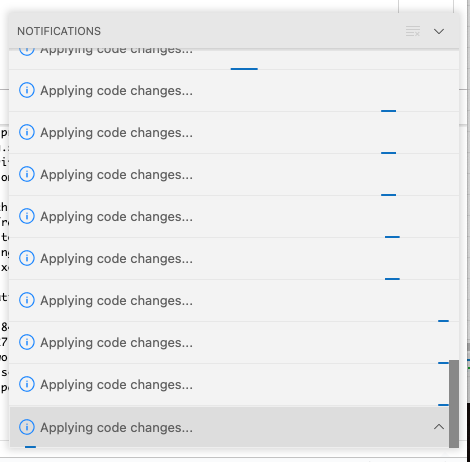
The problem seems to be that the "Applying code changes ..." functionality is repeatedly started over and over again, but seems to never stop.
It does not recover on its own, I have to restart vscode.
Environment
- Operating System: macOS 11.6.2 (20G314)
- JDK version:openjdk 17.0.1 2021-10-19
- Visual Studio Code version: 1.65.1
- Java extension version: v0.22.0
Steps To Reproduce
- Set "Hot code replace" to
auto - Halt on breakpoint
- Change code and save a few times in a row
After a few times it looks like this:
The log contains proprietary code, so I cannot easily share it here. But it seems fine, no repeating (error) messages of any kind. Just the change detection seems to kick in repeatedly and invoke the "hot code replace" every time (which never returns).
Current Result
"Applying code changes" goes crazy.
Expected Result
Apply codes changes. Java LSP process should permanently consume 200-300% CPU after it.
Additional Informations
If I use the manual "hot code replace" (the lightning symbol), I can't reproduce the issue.
Guida per i contributori
Apri la guida per i contributori
Come iniziare
- Leggi tutta la issue e poi la guida ai contributi del progetto.
- Commenta sulla issue per dire che te ne occupi tu — evita che due persone facciano lo stesso lavoro.
- Fai un fork del repository e lavora su un branch.
- Apri una pull request che faccia riferimento al numero della issue.
Direzione di ricerca
Inizia riproducendo il problema con automatic hot code replace, un punto di interruzione e diversi salvataggi, quindi esamina i punti di ingresso di Java LSP hot-code-replace e del rilevamento delle modifiche. Confronta questo comportamento con il flusso manuale di lightning-button. Il lavoro è completato quando salvataggi ripetuti applicano le modifiche una sola volta, senza notifiche infinite né un utilizzo sostenuto della CPU del 200–300%.
Scritto dal modello di indicizzazione a partire dal testo della issue.
Valutazione
- Stack tecnologico
- java, typescript, vscode
- Ambito
- developer-experience, tooling
- Tipo di issue
- Bug
- Difficoltà
- 4/5
- Tempo stimato
- 3-5 giorni
- Stato di attività
- Ferma
- Chiarezza
- Abbastanza chiara
- Idoneità per principianti
- 35/100